Fabric API Needed by RealClockHUD realclock-1.1.0+26.1.x+26.2.jar
requiredMatching file found Matched file: 0.155.3+26.1.2
CurseForge · Minecraft mod
A simple client-side Fabric mod that shows the current time in-game. Fully configurable, works on any server.
Quick answer
RealClockHUD realclock-1.1.0+26.1.x+26.2.jar targets 26.1, 26.1.1, 26.1.2 with Fabric. The project page does not say whether this file belongs on the client, dedicated server, or both. All 1 required mods have matching files.
Where it goes
The project page does not say whether this file belongs on the client, dedicated server, or both.
The source does not explicitly classify this release as client-only or server-only.
realclock-1.1.0+26.1.x+26.2.jar on 26.1.2. Every mod below is checked against that same setup.
Install Fabric API first. We found matching files for this game-version and loader setup.
We only count dependency files that match this setup. A file for another loader does not fill the gap.
Before you install it
Built for RealClockHUD realclock-1.1.0+26.1.x+26.2.jar on 26.1.2. Pick another file and the loader, install side or required mods may change.
Use realclock-1.1.0+26.1.x+26.2.jar. It targets 26.1, 26.1.1, 26.1.2 with Fabric; another release may have different loader, side or dependency requirements.
Install Fabric API first. We found matching files for this game-version and loader setup.
The project page does not say whether this file belongs on the client, dedicated server, or both.
Use the “Get this file” button beside realclock-1.1.0+26.1.x+26.2.jar. It opens that exact file at the source.
About this project
Displays the real-life system time as a HUD overlay in Minecraft.
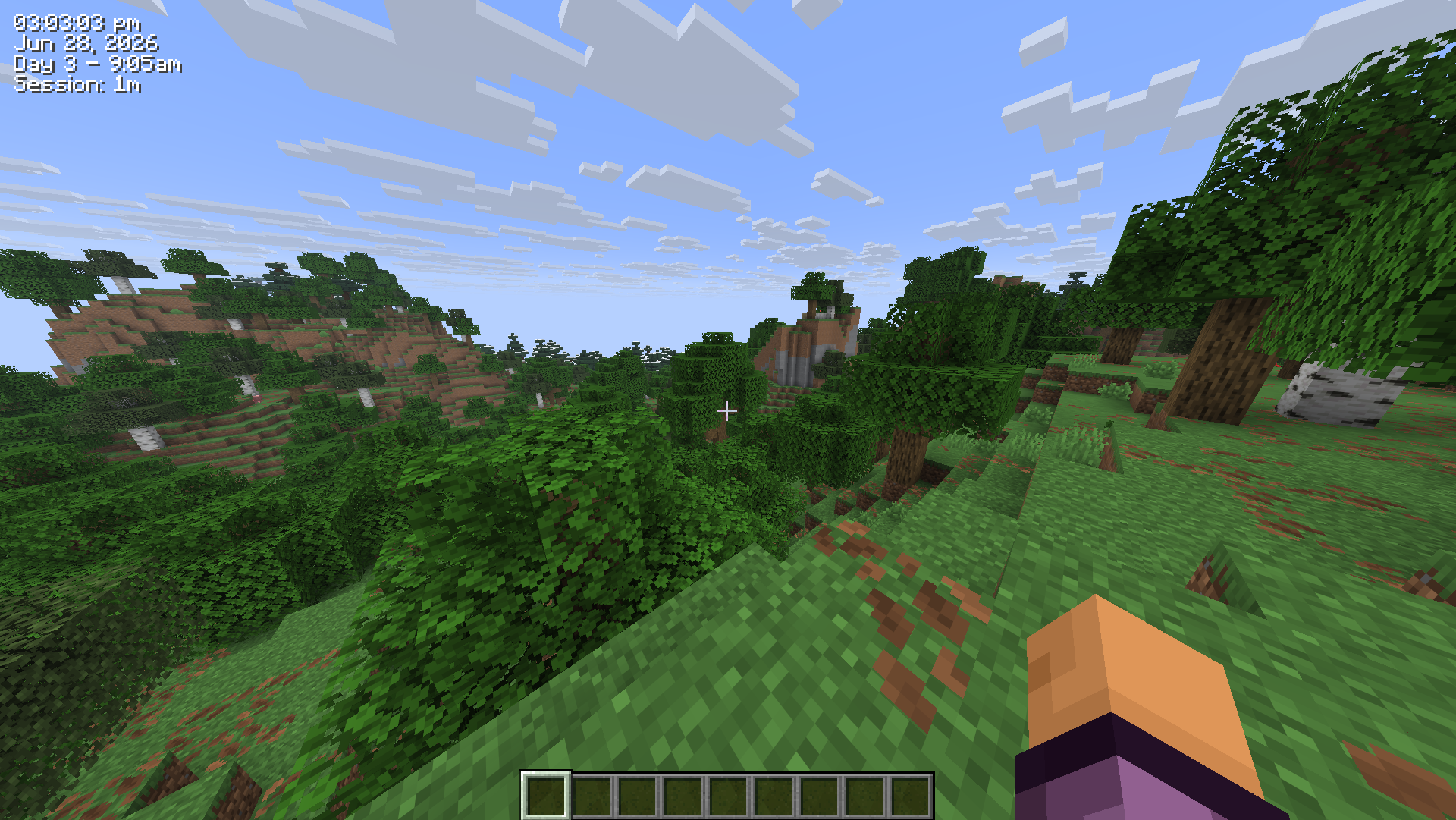
Note: This mod is client-side only and works on any server including vanilla. No server-side installation required.
Jun 28, 2026)Day 42 - 6:30am)Session: 1h 23m)K, rebindable in Controls)/realclock commands for all settingsAll settings are stored in .minecraft/config/realclock.json and can be edited manually. The config is self-healing - any invalid values will be reset to defaults automatically on next launch.
You can also change any setting using the /realclock command - no need to edit the config file directly. Changes take effect immediately and are saved automatically.
The clock can also be toggled with the K keybind (rebindable in Options > Controls).
| Setting | Command | Default | Description |
|---|---|---|---|
24h |
/realclock 24h true |
false |
Use 24hr time format instead of 12hr |
background |
/realclock background true |
true |
Show a dark box behind the clock |
color |
/realclock color #FF0000 |
#FFFFFF |
Text color as a hex value |
corner |
/realclock corner top-left |
top-right |
Clock position - top-left, top-right, bottom-left, bottom-right |
date |
/realclock date true |
false |
Show the real-life date below the clock |
gametime |
/realclock gametime true |
false |
Show the in-game day and time of day |
offsetx |
/realclock offsetx 8 |
4 |
Horizontal nudge in pixels from the corner |
offsety |
/realclock offsety 8 |
4 |
Vertical nudge in pixels from the corner |
scale |
/realclock scale 1.5 |
1.0 |
Text scale - 1.0 is normal, 2.0 is double size |
seconds |
/realclock seconds true |
false |
Show seconds alongside the time |
sessiontimer |
/realclock sessiontimer true |
false |
Show how long you've been in the current session |
shadow |
/realclock shadow true |
true |
Render a drop shadow behind the text |
toggle |
/realclock toggle |
true |
Whether the clock is currently visible |
Config file is created automatically at .minecraft/config/realclock.json on first launch.
{
  "visible": true,
  "corner": "TOP_RIGHT",
  "use24Hour": false,
  "showSeconds": false,
  "color": 16777215,
  "scale": 1.0,
  "showDate": false,
  "showGameTime": false,
  "showSessionTimer": false,
  "showBackground": true,
  "textShadow": true,
  "offsetX": 4,
  "offsetY": 4
}
color is stored as a decimal integer. 16777215 = #FFFFFF (white).
Project description from CurseForge.
Pick your setup
Choose the version and loader you play, then open the matching release.
Check the dependencies, then try the file in a copied instance before changing a world you care about.
Recent files
28 Jun 2026
5 Jun 2026
4 Jun 2026
Looking for an older file? The official CurseForge project page is in Resources.
 mod
Well-rounded client-side optimization mod. Extremely compatible Vulkan backend for 1.21.11-26.1.2. By Polyfrost, best with OneClient.
 mod
A client-side mod that renders inventory & container screens as a 3D plane.
 mod
Listen together in Minecraft. Play your music through speakers and boomboxes, in sync for every player.