Minecraft version
Back to mods 
CurseForge · Minecraft mod
LogarithmicSpiralBiome
generates Overworld biomes in a logarithmic spiral pattern
Choose a version Pick your version below, then grab the matching file.
Quick answer
Which LogarithmicSpiralBiome release should I use?
Latest stable file logarithmicspiralbiome-neoforge-26.1-1.1.1.jar
Game version 26.1
Loader NeoForge
logarithmicspiralbiome-neoforge-26.1-1.1.1.jar targets 26.1 with NeoForge. The project page does not say whether this file belongs on the client, dedicated server, or both. No extra mods listed for this file.
Where it goes
Is LogarithmicSpiralBiome required on the client, server, or both?
The project page does not say whether this file belongs on the client, dedicated server, or both.
Client Source doesn’t say
Dedicated server Source doesn’t say
Loader for this release NeoForge
Required install it here Optional supported, not mandatory Not supported do not install here Source doesn’t say do not assume
The source does not explicitly classify this release as client-only or server-only.
What else does logarithmicspiralbiome-neoforge-26.1-1.1.1.jar need?
logarithmicspiralbiome-neoforge-26.1-1.1.1.jar. Change the file and its required mods may change too.
This file does not list any required mods. Do not add a library just because a different file uses it.
This file does not list any required or optional mods.
Before you install it
Add LogarithmicSpiralBiome without breaking your instance.
Built for logarithmicspiralbiome-neoforge-26.1-1.1.1.jar. Pick another file and the loader, install side or required mods may change.
- 01
Stick to this file
Use logarithmicspiralbiome-neoforge-26.1-1.1.1.jar. It targets 26.1 with NeoForge; another release may have different loader, side or dependency requirements.
- 02
Bring the mods it needs
This file does not list any required mods. Do not add a library just because a different file uses it.
- 03
Put it on the correct side
The project page does not say whether this file belongs on the client, dedicated server, or both.
- 04
Pick the file you checked
Use the “Get this file” button beside logarithmicspiralbiome-neoforge-26.1-1.1.1.jar. It opens that exact file at the source.
About this project
What does LogarithmicSpiralBiome add?
Logarithmic Spiral Biome
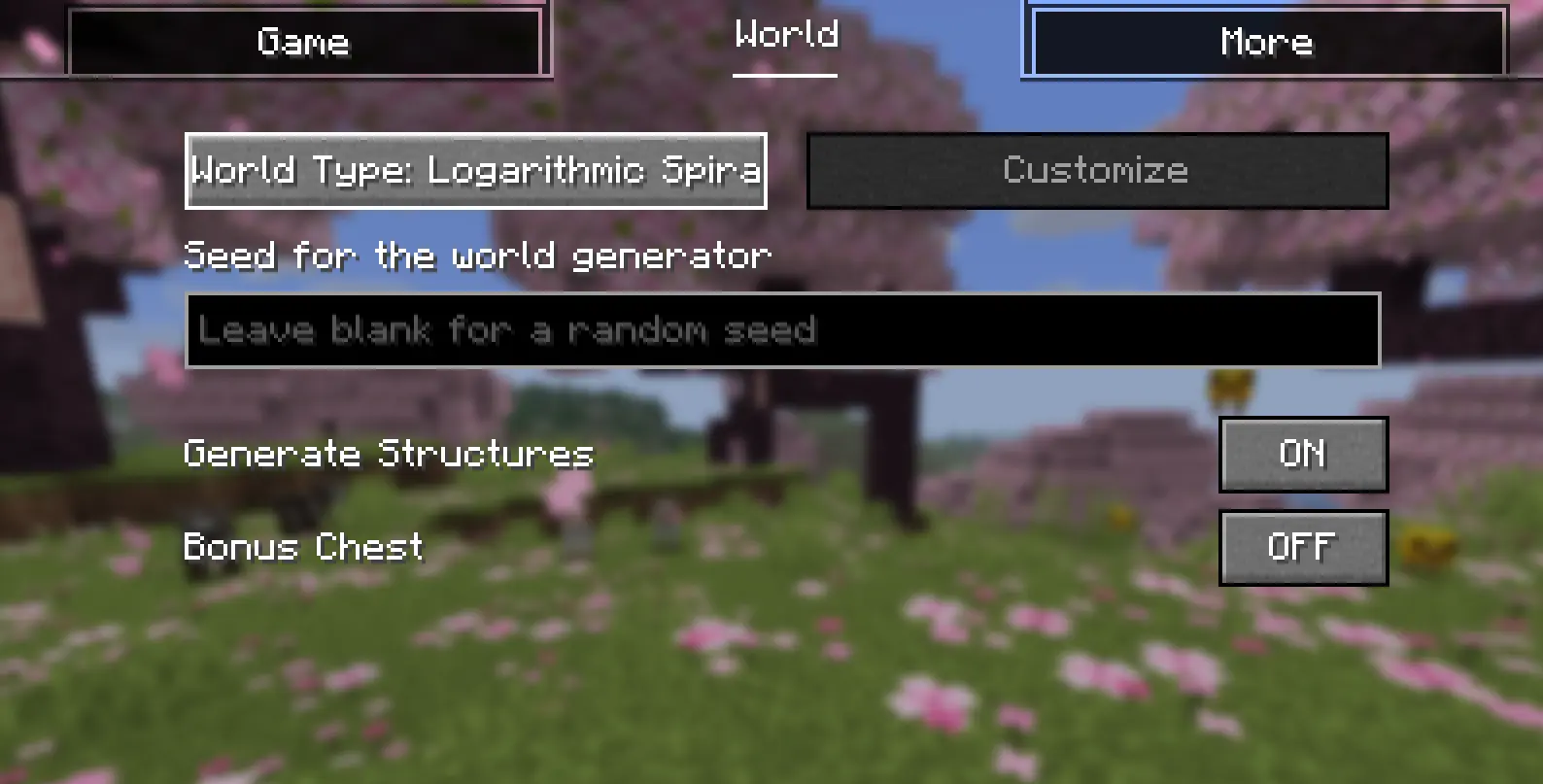
A Minecraft mod for Fabric and NeoForge that generates Overworld and Nether biomes in a mathematical logarithmic spiral pattern.
Overview
Unlike standard Minecraft world generation which relies on random multi-noise blobs, Logarithmic Spiral Biome distributes biomes along continuous logarithmic spiral arms ($r = a \cdot e^{b\theta}$) emanating outward from the world origin point (X=0, Z=0).
Each biome occupies a curving radial sector that expands progressively as you travel farther from spawn, creating a structured, navigable, and aesthetically striking world.
Features
Core World Generation
- Logarithmic Spiral Preset: Select the
Logarithmic Spiralworld type when creating a new world. - Deterministic Biome Distribution: Biomes are mapped to spiral sectors centered at coordinates
0, 0.
Added in v1.1.1
- Spawn Elevation Slider:
- Eliminates water submergence around the spawn point by raising terrain above sea level (Y=64–67).
- Configurable in the customization screen and config:
OFFor radius from10mto300m(step: 10m). - Fully optimized for fast, safe chunk generation.
- Nether Terrain Style Option:
- Choose between two generation styles for the Nether:
- Overworld-like (Gentle): Generates gentle, traversable rolling surface hills while preserving the bedrock roof ceiling.
- Vanilla: Standard cavernous maze generation.
- Multiloader Streamlining: Focused support on Fabric and NeoForge.
Added in v1.1.0
- The Nether Dimension Support:
- Nether biomes generate in a logarithmic spiral layout.
- Independent toggles for enabling/disabling Overworld and Nether spiral generation.
- In-Game Customization Screen:
- Accessible via the Customize button on the world creation screen.
- Real-Time 2D Map Preview: Interactive color-coded preview of the spiral biome layout with chunk grid overlay.
- Preset Styles: Choose from tuned presets (
Standard,Large,Dense,Tight,Custom). - Fine-Tuning Sliders: Adjust scale (initial radius) and growth rate (arm expansion speed).
- Boundary Divider Blocks & Wall Height:
- Optional physical boundary walls mark borders between adjacent spiral arms.
- Searchable block picker for choosing any block as dividers.
- Adjustable wall height from flat floor paving (0) up to 5-block tall walls.
- Biome Mod Compatibility:
- Compatible with major world generation and biome mods (Terralith, Incendium, Biomes O' Plenty, etc.).
Server Configuration
To use this world preset on a dedicated server, configure server.properties:
level-name=world
level-seed=
level-type=logarithmicspiralbiome:logarithmic_spiral
Config File (config/logarithmicspiralbiome.json)
{
  "enable_overworld": true,
  "enable_nether": true,
  "divider_blocks": false,
  "wall_height": 0,
  "overworld_divider_block": "minecraft:stone",
  "nether_divider_block": "minecraft:blackstone",
  "style": "standard",
  "scale": 3.0,
  "growth": 0.32,
  "spawn_elevate_radius": 100.0,
  "nether_terrain_style": "gentle"
}
Supported Versions
- Minecraft: 26.3
- Mod Loaders: Fabric, NeoForge
License
This project is licensed under the MIT License.
Project description from CurseForge.
Pick your setup
LogarithmicSpiralBiome by Minecraft version and loader
Choose the version and loader you play, then open the matching release.
Minecraft version
26.2
2 loader buildsMinecraft version
26.1.2
2 loader buildsMinecraft version
26.1
2 loader buildsMinecraft version
1.21.11
3 loader buildsMinecraft version
1.21.4
3 loader buildsMinecraft version
1.21.1
3 loader buildsMinecraft version
1.20.6
3 loader buildsMinecraft version
1.20.4
2 loader buildsMinecraft version
1.20.1
2 loader buildsCheck the dependencies, then try the file in a copied instance before changing a world you care about.
Recent files
LogarithmicSpiralBiome versions and loaders
logarithmicspiralbiome-neoforge-26.1-1.1.1.jar
24 Oct 2026
Client Source doesn’t say Server Source doesn’t say Dependencies No extras listed Listed on Release listing
Check the 26.1 · NeoForge setup NeoForge26.1 release
logarithmicspiralbiome-fabric-26.1-1.1.1.jar
24 Oct 2026
Client Source doesn’t say Server Source doesn’t say Dependencies 1 required · 1 unchecked Listed on Release listing
Check the 26.1 · Fabric setup Fabric26.1 release
logarithmicspiralbiome-neoforge-26.1.2-1.1.1.jar
24 Oct 2026
Client Source doesn’t say Server Source doesn’t say Dependencies No extras listed Listed on Release listing
Check the 26.1.2 · NeoForge setup NeoForge26.1.2 release
logarithmicspiralbiome-fabric-26.1.2-1.1.1.jar
24 Oct 2026
Client Source doesn’t say Server Source doesn’t say Dependencies 1 required · 1 unchecked Listed on Release listing
Check the 26.1.2 · Fabric setup Fabric26.1.2 release
logarithmicspiralbiome-fabric-26.2-1.1.1.jar
24 Oct 2026
Client Source doesn’t say Server Source doesn’t say Dependencies 1 required · 1 unchecked Listed on Release listing
Check the 26.2 · Fabric setup Fabric26.2 release
logarithmicspiralbiome-neoforge-26.2-1.1.1.jar
24 Oct 2026
Client Source doesn’t say Server Source doesn’t say Dependencies No extras listed Listed on Release listing
Check the 26.2 · NeoForge setup NeoForge26.2 release
logarithmicspiralbiome-neoforge-26.3-1.1.1.jar
24 Oct 2026
Client Source doesn’t say Server Source doesn’t say Dependencies No extras listed Listed on Release listing
Check the 26.3 · NeoForge setup NeoForge26.3 release
logarithmicspiralbiome-fabric-26.3-1.1.1.jar
24 Oct 2026
Client Source doesn’t say Server Source doesn’t say Dependencies 1 required · 1 unchecked Listed on Release listing
Check the 26.3 · Fabric setup Fabric26.3 release
logarithmicspiralbiome-neoforge-26.3-1.1.0.jar
23 Oct 2026
Client Source doesn’t say Server Source doesn’t say Dependencies No extras listed Listed on Release listing
Check the 26.3 · NeoForge setup NeoForge26.3 release
logarithmicspiralbiome-fabric-26.3-1.1.0.jar
23 Oct 2026
Client Source doesn’t say Server Source doesn’t say Dependencies 1 required · 1 unchecked Listed on Release listing
Check the 26.3 · Fabric setup Fabric26.3 release
logarithmicspiralbiome-neoforge-26.1.2-1.0.1.jar
18 Jun 2026
Client Source doesn’t say Server Source doesn’t say Dependencies No extras listed Listed on Release listing
Check the 26.1.2 · NeoForge setup NeoForge26.1.2 release
logarithmicspiralbiome-fabric-26.1.2-1.0.1.jar
18 Jun 2026
Client Source doesn’t say Server Source doesn’t say Dependencies No extras listed Listed on Release listing
Check the 26.1.2 · Fabric setup Fabric26.1.2 release
Looking for an older file? The official CurseForge project page is in Resources.
 mod
mod CurseForge · Minecraft
The Frozen Dominion
A soulslike citadel in the snow: five stages of halls, nine minibosses of the king's court, and Velkhar, the Hollow Sovereign, in four phases.
 mod
mod CurseForge · Minecraft
Fantastic-Fish-Reborn
The classic Fantastic Fish mod reborn — supported for both 1.12.2 and 1.20.1!
 mod
mod CurseForge · Minecraft
SlabsUpdate
Finally, halfspace placement in Minecraft! Place Slabs, Blocks, Fluids, Objects of any kind ontop of each other in any constellation you like. Be flabbergasted of the wonderful world of Minecraft in a double rendered worldgen full of details.