Minecraft version
Back to mods 
CurseForge · Minecraft mod
TabTPS
Minecraft server mod/plugin to show TPS, MSPT, and other information in the tab menu, boss bar, and action bar.
Choose a version Pick your version below, then grab the matching file.
Quick answer
Which TabTPS release matches 1.18?
Best match for your filters tabtps-fabric-mc1.18-1.3.11.jar
Game version 1.18
Loader Fabric
tabtps-fabric-mc1.18-1.3.11.jar targets 1.18 with Fabric. The project page does not say whether this file belongs on the client, dedicated server, or both. No extra mods listed for this file.
Where it goes
Is TabTPS required on the client, server, or both?
The project page does not say whether this file belongs on the client, dedicated server, or both.
Client Source doesn’t say
Dedicated server Source doesn’t say
Loader for this release Fabric
Required install it here Optional supported, not mandatory Not supported do not install here Source doesn’t say do not assume
The source does not explicitly classify this release as client-only or server-only.
What else does tabtps-fabric-mc1.18-1.3.11.jar need?
tabtps-fabric-mc1.18-1.3.11.jar on 1.18. Every mod below is checked against that same setup.
This file does not list any required mods. Do not add a library just because a different file uses it.
This file does not list any required or optional mods.
Before you install it
Add TabTPS without breaking your instance.
Built for tabtps-fabric-mc1.18-1.3.11.jar on 1.18. Pick another file and the loader, install side or required mods may change.
- 01
Stick to this file
Use tabtps-fabric-mc1.18-1.3.11.jar. It targets 1.18 with Fabric; another release may have different loader, side or dependency requirements.
- 02
Bring the mods it needs
This file does not list any required mods. Do not add a library just because a different file uses it.
- 03
Put it on the correct side
The project page does not say whether this file belongs on the client, dedicated server, or both.
- 04
Pick the file you checked
Use the “Get this file” button beside tabtps-fabric-mc1.18-1.3.11.jar. It opens that exact file at the source.
About this project
What does TabTPS add?
Features
Live information displays
Configure what information will be shown using display configs (
/plugins/TabTPS/display-configs/)- Each display config has a permission associated, and players with that permission will use that display config.
- The default display config uses the permission
tabtps.defaultdisplay, and allows for using all three display types. - Only one display config can be assigned to each player, even if they have permission for multiple. Set priorities for different display configs in the main config (
plugins/TabTPS/main.conf)
- The default display config uses the permission
- Each display config has a permission associated, and players with that permission will use that display config.
Configure colors for displays using theme configs (
/plugins/TabTPS/themes/)
Tab menu
- Command:
/tabtps toggle tab 
Action bar
- Command:
/tabtps toggle actionbar 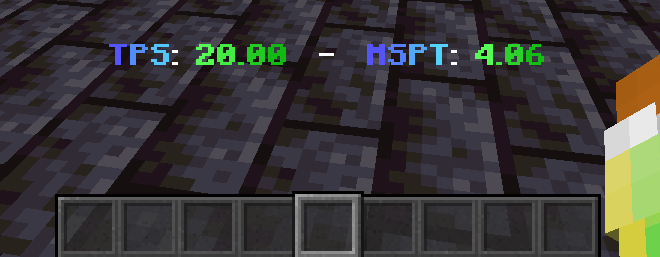
Boss bar
- Command:
/tabtps toggle bossbar 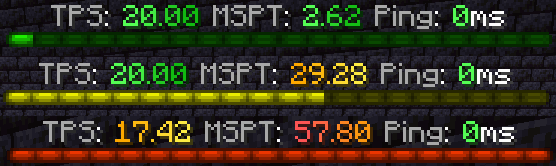
Commands
Improved TPS command
- Command:
/tickinfoor/mspt - Permission required:
tabtps.tps 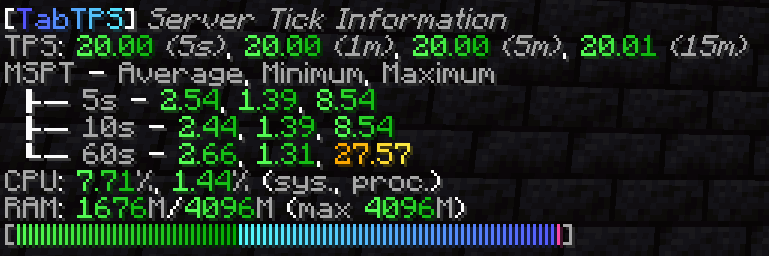
Memory command
- Command:
/memory,/mem, or/ram - View information about the current memory pools of the server jvm.
- Note: the output and usefulness of this command varies depending on the type of garbage collection used, garbage collection settings, and many other factors.
- Permission required:
tabtps.tps 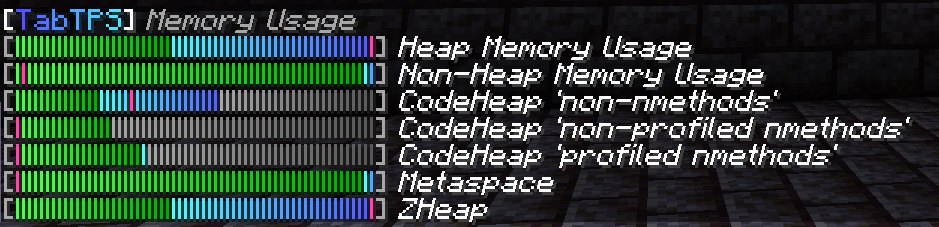
Ping command
- Commands:
/ping,/ping [username], or/pingall - View the ping of yourself, or another user.
/pingallwill show a summary of all connected player's pings. - Permissions:
tabtps.pingto view your own ping,tabtps.ping.othersto view other users ping and the ping summary. 

Reload command
- Command:
/tabtps reload - Permission required:
tabtps.reload
Project description from CurseForge.
Pick your setup
TabTPS by Minecraft version and loader
Choose the version and loader you play, then open the matching release.
Minecraft version
1.21.11
2 loader buildsMinecraft version
1.21.10
2 loader buildsMinecraft version
1.21.8
2 loader buildsMinecraft version
1.21.5
2 loader buildsMinecraft version
1.21.4
2 loader buildsMinecraft version
1.21.1
2 loader buildsMinecraft version
1.20.6
1 loader buildMinecraft version
1.20.4
1 loader buildMinecraft version
1.20.2
1 loader buildMinecraft version
1.20.1
1 loader buildMinecraft version
1.19.4
1 loader buildShowing the newest 12 of 20 game versions. Older files are in the list below.
Check the dependencies, then try the file in a copied instance before changing a world you care about.
Recent files
TabTPS versions and loaders
tabtps-fabric-mc1.18-1.3.11.jar
7 Jun 2026
Client Source doesn’t say Server Source doesn’t say Dependencies No extras listed Listed on Release listing
Check the 1.18 · Fabric setup Fabric1.18 release
Looking for an older file? The official CurseForge project page is in Resources.
 mod
mod CurseForge + Modrinth · Minecraft
Reflex AntiLag
Eliminates render queue latency using NVIDIA Reflex architecture. Works on ANY GPU!
 mod
mod CurseForge + Modrinth · Minecraft
GugleCarpetAddition
Gugle's Carpet Addition
 mod
mod CurseForge + Modrinth · Minecraft
Customizable Brightness - Fullbright & Gamma Control
Press B to cycle brightness from 0% to 1000%+. Fullbright with custom levels, remembered between sessions. Fabric 1.14.4 – 26.3.