Minecraft version
Back to mods 
CurseForge · Minecraft mod
Admin Command Tool
Easily Apply in-game commands and set custom commands with hotkeys.
Choose a version Pick your version below, then grab the matching file.
Quick answer
Which Admin Command Tool release matches 26.1.1 Fabric?
Best match for your filters admincommandtool-2.0.1-26.1.jar
Game version 26.1, 26.1.1, 26.1.2
Loader Fabric
Admin Command Tool admincommandtool-2.0.1-26.1.jar targets 26.1, 26.1.1, 26.1.2 with Fabric. The project page does not say whether this file belongs on the client, dedicated server, or both. No extra mods listed for this file.
Where it goes
Is Admin Command Tool required on the client, server, or both?
The project page does not say whether this file belongs on the client, dedicated server, or both.
Client Source doesn’t say
Dedicated server Source doesn’t say
Loader for this release Fabric
Required install it here Optional supported, not mandatory Not supported do not install here Source doesn’t say do not assume
The source does not explicitly classify this release as client-only or server-only.
What else does Admin Command Tool admincommandtool-2.0.1-26.1.jar need?
admincommandtool-2.0.1-26.1.jar on 26.1.1 Fabric. Every mod below is checked against that same setup.
This file does not list any required mods. Do not add a library just because a different file uses it.
This file does not list any required or optional mods.
Before you install it
Add Admin Command Tool without breaking your instance.
Built for Admin Command Tool admincommandtool-2.0.1-26.1.jar on 26.1.1 Fabric. Pick another file and the loader, install side or required mods may change.
- 01
Stick to this file
Use admincommandtool-2.0.1-26.1.jar. It targets 26.1, 26.1.1, 26.1.2 with Fabric; another release may have different loader, side or dependency requirements.
- 02
Bring the mods it needs
This file does not list any required mods. Do not add a library just because a different file uses it.
- 03
Put it on the correct side
The project page does not say whether this file belongs on the client, dedicated server, or both.
- 04
Pick the file you checked
Use the “Get this file” button beside admincommandtool-2.0.1-26.1.jar. It opens that exact file at the source.
About this project
What does Admin Command Tool add?
An in-game GUI tool for server admins and operators. Press the hotkey G to open a menu where you can:
Report Bugs Here : https://discord.gg/qc4TrREeMf
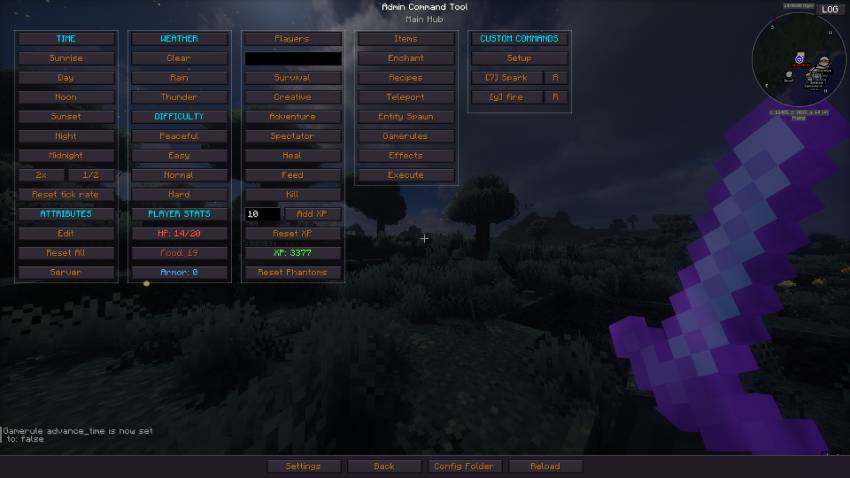
-Teleport players to any coordinate or to other players.
Locate biomes and Structures by ID.
Give custom items with dynamic stack size, fill inventory, or clear it.
Spawn any entity with custom count and NBT data.
Apply status effects with configurable duration and amplifier.
Toggle game rules and change their numeric values.
Enchant items with any enchantment at any level & add custom Attributes.
Give or remove recipes from players.
Kill hostile, peaceful, or specific mobs and clear ground items.
Manage time, weather, difficulty, gamemode, and tick rate.
Manage player health, hunger, and XP levels on any player.
- Create custom command presets with auto-repeat and configurable execution count and Assign hotkeys.
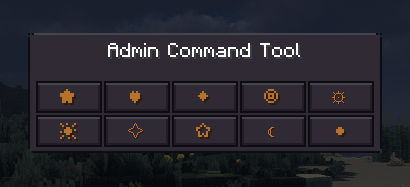
A Mini Mode that can be toggled with a Hotkey.
Player stats display showing HP, food, XP, armor.
And many more.
No need to memorize slash commands. Just makes managing your Minecraft world a little bit easier.
Project description from CurseForge.
Pick your setup
Admin Command Tool by Minecraft version and loader
Choose the version and loader you play, then open the matching release.
Minecraft version
26.2
1 loader buildMinecraft version
26.1.2
1 loader buildMinecraft version
26.1.1
1 loader buildMinecraft version
26.1
1 loader buildMinecraft version
1.21.11
1 loader buildCheck the dependencies, then try the file in a copied instance before changing a world you care about.
Recent files
Admin Command Tool versions and loaders
admincommandtool-2.0.1-26.1.jar
13 Nov 2026
Client Source doesn’t say Server Source doesn’t say Dependencies No extras listed Listed on Release listing
Check the 26.1.1 · Fabric setup Fabric26.126.1.126.1.2 release
admincommandtool-1.1-26.1.jar
7 Sept 2026
Client Source doesn’t say Server Source doesn’t say Dependencies No extras listed Listed on Release listing
Check the 26.1.1 · Fabric setup Fabric26.126.1.126.1.2 release
admincommandtool-1.0.9-26.1.jar
6 Aug 2026
Client Source doesn’t say Server Source doesn’t say Dependencies No extras listed Listed on Release listing
Check the 26.1.1 · Fabric setup Fabric26.126.1.126.1.2 release
admincommandtool-1.0.8-26.1.jar
29 Jul 2026
Client Source doesn’t say Server Source doesn’t say Dependencies No extras listed Listed on Release listing
Check the 26.1.1 · Fabric setup Fabric26.126.1.126.1.2 release
admincommandtool-1.0.7-26.1.jar
19 Jul 2026
Client Source doesn’t say Server Source doesn’t say Dependencies No extras listed Listed on Release listing
Check the 26.1.1 · Fabric setup Fabric26.126.1.126.1.2 release
admincommandtool-1.0.6-26.1.jar
13 Jul 2026
Client Source doesn’t say Server Source doesn’t say Dependencies No extras listed Listed on Release listing
Check the 26.1.1 · Fabric setup Fabric26.126.1.126.1.2 release
Looking for an older file? The official CurseForge project page is in Resources.
 mod
CurseForge + Modrinth · Minecraft
Reconnectible Chains
A multiloader fork of Connectible Chains: Connect your fences/walls with a decorative chain!
 mod
CurseForge + Modrinth · Minecraft
danse - serverside gestures / emotes
Server-side player gestures using a resourcepack. Dynamic player textures! No client-side mods required!
 mod
CurseForge + Modrinth · Minecraft
DamageTint
Changes the color of entities that are hurt and conditionally on certain events. By Polyfrost, best with OneClient.