Mod Menu Needed by Combat Hitboxes 1.0.11
requiredMatching file found Matched file: v20.0.3 for 26.2
CurseForge · Minecraft mod
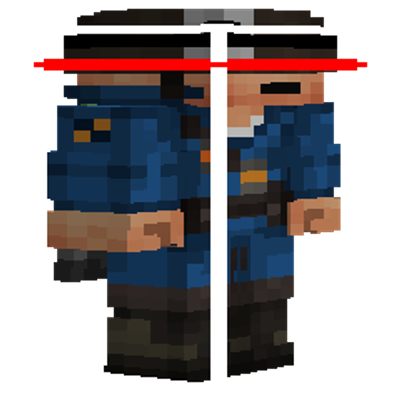
A mod that changes hitbox color when the entity is targeted and allows configuration of line widths as well as the color of different hitbox components
Quick answer
Combat Hitboxes 1.0.11 targets 26.1, 26.1.1, 26.1.2 with Fabric. The project page does not say whether this file belongs on the client, dedicated server, or both. All 7 required mods have matching files.
Where it goes
The project page does not say whether this file belongs on the client, dedicated server, or both.
The source does not explicitly classify this release as client-only or server-only.
Combat Hitboxes 1.0.11. Change the file and its required mods may change too.
Install Mod Menu, Fabric API, Cloth Config API (Fabric/Forge/NeoForge), Cloth Config API and 3 more first. We found matching files for this game-version and loader setup. 2 come through another mod in the chain.
2 extra mods were pulled in by other dependencies. Indented rows show who needs each one. We only count dependency files that match this setup. A file for another loader does not fill the gap.
Before you install it
Built for Combat Hitboxes 1.0.11. Pick another file and the loader, install side or required mods may change.
Use Combat Hitboxes 1.0.11. It targets 26.1, 26.1.1, 26.1.2 with Fabric; another release may have different loader, side or dependency requirements.
Install Mod Menu, Fabric API, Cloth Config API (Fabric/Forge/NeoForge), Cloth Config API and 3 more first. We found matching files for this game-version and loader setup. 2 come through another mod in the chain.
The project page does not say whether this file belongs on the client, dedicated server, or both.
Use the “Get this file” button beside Combat Hitboxes 1.0.11. It opens that exact file at the source.
About this project
This purely visual mod adds settings for the debug hitbox line width (vanilla's size is usually too thin for my liking), color for each component, and a toggle for each component.
Tired of squinting at the tiny attack indicator to see if you're within reach? With combat hitboxes, the entire hitbox will change color (by default, to red) to indicate your targeted enemy.
(Previews are in the gallery, and don't forget to check out Tektonikal)
This mod requires Fabric api, and Cloth config + Mod menu for configuration.
Project description from CurseForge.
Pick your setup
Choose the version and loader you play, then open the matching release.
Showing the newest 12 of 26 game versions. Older files are in the list below.
Check the dependencies, then try the file in a copied instance before changing a world you care about.
Recent files
combat-hitbox-1.0.11.jar
13 Jun 2026
combat-hitbox-1.0.10.jar
13 Jun 2026
combat-hitbox-1.0.9.jar
11 Jun 2026
combat-hitbox-1.0.8.jar
11 Jun 2026
combat-hitbox-1.0.7.jar
11 Jun 2026
combat-hitbox-1.0.6.jar
11 Jun 2026
combat-hitbox-1.0.5.jar
11 Jun 2026
combat-hitbox-1.0.4.jar
11 Jun 2026
combat-hitbox-1.0.3.jar
11 Jun 2026
combat-hitbox-1.0.2.jar
11 Jun 2026
combat-hitbox-1.0.1.jar
11 Jun 2026
combat-hitbox-1.0.0.jar
11 Jun 2026
Looking for an older file? The official CurseForge project page is in Resources.
 mod
This mod disables item drop scatter by centering items on the block grid.
 mod
Wheel tracks are the trails stories leave behind; the rift is the gap between trails — and that thin gap is the bond that ties every story back together.
 mod
Make falling in Minecraft realistic!