Minecraft version
Back to mods 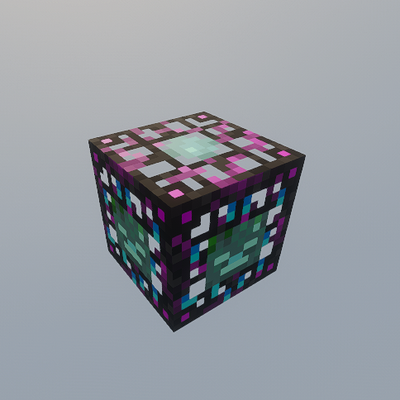
CurseForge · Minecraft mod
Expanded Spawner
Adds a new upgreadable spawner
Choose a version Pick your version below, then grab the matching file.
Quick answer
Which Expanded Spawner release matches 1.21.8 NeoForge?
Best match for your filters expandedspawner-1.1.10-neoforge-26.1.2.jar
Game version 1.21.8, 26.1.2
Loader NeoForge
Expanded Spawner expandedspawner-1.1.10-neoforge-26.1.2.jar targets 1.21.8, 26.1.2 with NeoForge. The project page does not say whether this file belongs on the client, dedicated server, or both. No extra mods listed for this file.
Where it goes
Is Expanded Spawner required on the client, server, or both?
The project page does not say whether this file belongs on the client, dedicated server, or both.
Client Source doesn’t say
Dedicated server Source doesn’t say
Loader for this release NeoForge
Required install it here Optional supported, not mandatory Not supported do not install here Source doesn’t say do not assume
The source does not explicitly classify this release as client-only or server-only.
What else does Expanded Spawner expandedspawner-1.1.10-neoforge-26.1.2.jar need?
expandedspawner-1.1.10-neoforge-26.1.2.jar on 1.21.8 NeoForge. Every mod below is checked against that same setup.
This file does not list any required mods. Do not add a library just because a different file uses it.
This file does not list any required or optional mods.
Before you install it
Add Expanded Spawner without breaking your instance.
Built for Expanded Spawner expandedspawner-1.1.10-neoforge-26.1.2.jar on 1.21.8 NeoForge. Pick another file and the loader, install side or required mods may change.
- 01
Stick to this file
Use expandedspawner-1.1.10-neoforge-26.1.2.jar. It targets 1.21.8, 26.1.2 with NeoForge; another release may have different loader, side or dependency requirements.
- 02
Bring the mods it needs
This file does not list any required mods. Do not add a library just because a different file uses it.
- 03
Put it on the correct side
The project page does not say whether this file belongs on the client, dedicated server, or both.
- 04
Pick the file you checked
Use the “Get this file” button beside expandedspawner-1.1.10-neoforge-26.1.2.jar. It opens that exact file at the source.
About this project
What does Expanded Spawner add?
Expanded Spawner
Take mob farming to the next level with Expanded Spawner!
This mod adds customizable spawners that allow you to choose which mob should be spawned directly through an easy-to-use GUI. No commands required.
Features
Corrupted Spawner
A configurable spawner that can be switched between multiple mob types:
- Zombie
- Skeleton
- Spider
- Creeper
- Slime
- Drowned
- Hoglin
- Shulker
- Phantom
- Villager
- Cow
- Sheep
- Chicken
- Iron Golem
- Evoker
- Zombified Piglin
The spawner can also be turned on or off whenever needed.
Upgraded Corrupted Spawner
An advanced version of the Corrupted Spawner with additional mob options, including:
- Allay
- Blaze
and all mobs available in the standard Corrupted Spawner.
Remote Control System
Manage your upgreaded spawners from a distance using the Transmitter.
Perfect For
- Mob farms
- Resource generation
- Adventure maps
- Skyblock packs
- Technical Minecraft gameplay
- Custom survival experiences
NeoForge
This mod is built for NeoForge 26.1.2.
Create powerful automated farms and customize your mob spawning experience like never before!
Project description from CurseForge.
Pick your setup
Expanded Spawner by Minecraft version and loader
Choose the version and loader you play, then open the matching release.
Minecraft version
1.21.8
1 loader buildCheck the dependencies, then try the file in a copied instance before changing a world you care about.
Recent files
Expanded Spawner versions and loaders
expandedspawner-1.1.10-neoforge-26.1.2.jar
18 Jul 2026
Client Source doesn’t say Server Source doesn’t say Dependencies No extras listed Listed on Release listing
Check the 1.21.8 · NeoForge setup 1.21.8NeoForge26.1.2 release
expandedspawner-1.1.10-neoforge-1.21.8.jar
14 Jul 2026
Client Source doesn’t say Server Source doesn’t say Dependencies No extras listed Listed on Release listing
Check the 1.21.8 · NeoForge setup 1.21.8NeoForge release
expandedspawner-1.1.9-neoforge-1.21.8.jar
13 Jul 2026
Client Source doesn’t say Server Source doesn’t say Dependencies No extras listed Listed on Release listing
Check the 1.21.8 · NeoForge setup 1.21.8NeoForge release
expandedspawner-1.1.8-neoforge-1.21.8.jar
1 Jul 2026
Client Source doesn’t say Server Source doesn’t say Dependencies No extras listed Listed on Release listing
Check the 1.21.8 · NeoForge setup 1.21.8NeoForge release
expandedspawner-1.1.6-neoforge-1.21.8.jar
29 Jun 2026
Client Source doesn’t say Server Source doesn’t say Dependencies No extras listed Listed on Release listing
Check the 1.21.8 · NeoForge setup 1.21.8NeoForge release
expandedspawner-1.1.5-neoforge-1.21.8.jar
28 Jun 2026
Client Source doesn’t say Server Source doesn’t say Dependencies No extras listed Listed on Release listing
Check the 1.21.8 · NeoForge setup 1.21.8NeoForge release
sulbound-1.1.4-neoforge-1.21.8.jar
25 Jun 2026
Client Source doesn’t say Server Source doesn’t say Dependencies No extras listed Listed on Release listing
Check the 1.21.8 · NeoForge setup 1.21.8NeoForge release
Expanded_Spawner-1.1.3-neoforge-1.21.8.jar
expanded_spawner-1.1.2-neoforge-1.21.8.jar
17 Jun 2026
Client Source doesn’t say Server Source doesn’t say Dependencies No extras listed Listed on Release listing
Check the 1.21.8 · NeoForge setup 1.21.8NeoForge release
Expanded Spawner(+GUI)-1.1.2-neoforge-1.21.8.jar
sulbound-1.1.2-neoforge-1.21.8.jar
14 Jun 2026
Client Source doesn’t say Server Source doesn’t say Dependencies No extras listed Listed on Release listing
Check the 1.21.8 · NeoForge setup 1.21.8NeoForge release
Looking for an older file? The official CurseForge project page is in Resources.
 mod
CurseForge · Minecraft
Survival Instinct Skills
Open the skill tree tab by pressing the K key to unlock skills that empower the player.
 mod
CurseForge · Minecraft
Mob Senses: Mobs Hear Sound, Guns, Light & Voice Chat
Mobs hear steps, blocks, TaCZ gunshots (with suppressors!) & Simple Voice Chat through walls, see torchlight and smell blood trails. Zombie awareness, stealth & horror survival for Forge, NeoForge, Fabric & Paper.
 mod
CurseForge + Modrinth · Minecraft
Cinch's Villager Statues
Simply adds ancient statues of villagers to almost all biomes in the overworld.