Minecraft version
Back to mods 
CurseForge · Minecraft mod
physics effects
completely transforms Minecraft's static world into a dynamic, highly interactive, and visually stunning playground and more.
Choose a version Pick your version below, then grab the matching file.
Quick answer
Which physics effects release matches 26.1.2?
Best match for your filters physics effects neoforge 1.0.0.jar
Game version 26.1, 26.1.1, 26.1.2
Loader NeoForge
physics effects neoforge 1.0.0.jar targets 26.1, 26.1.1, 26.1.2 with NeoForge. The project page does not say whether this file belongs on the client, dedicated server, or both. No extra mods listed for this file.
Where it goes
Is physics effects required on the client, server, or both?
The project page does not say whether this file belongs on the client, dedicated server, or both.
Client Source doesn’t say
Dedicated server Source doesn’t say
Loader for this release NeoForge
Required install it here Optional supported, not mandatory Not supported do not install here Source doesn’t say do not assume
The source does not explicitly classify this release as client-only or server-only.
What else does physics effects neoforge 1.0.0.jar need?
physics effects neoforge 1.0.0.jar on 26.1.2. Every mod below is checked against that same setup.
This file does not list any required mods. Do not add a library just because a different file uses it.
This file does not list any required or optional mods.
Before you install it
Add physics effects without breaking your instance.
Built for physics effects neoforge 1.0.0.jar on 26.1.2. Pick another file and the loader, install side or required mods may change.
- 01
Stick to this file
Use physics effects neoforge 1.0.0.jar. It targets 26.1, 26.1.1, 26.1.2 with NeoForge; another release may have different loader, side or dependency requirements.
- 02
Bring the mods it needs
This file does not list any required mods. Do not add a library just because a different file uses it.
- 03
Put it on the correct side
The project page does not say whether this file belongs on the client, dedicated server, or both.
- 04
Pick the file you checked
Use the “Get this file” button beside physics effects neoforge 1.0.0.jar. It opens that exact file at the source.
About this project
What does physics effects add?

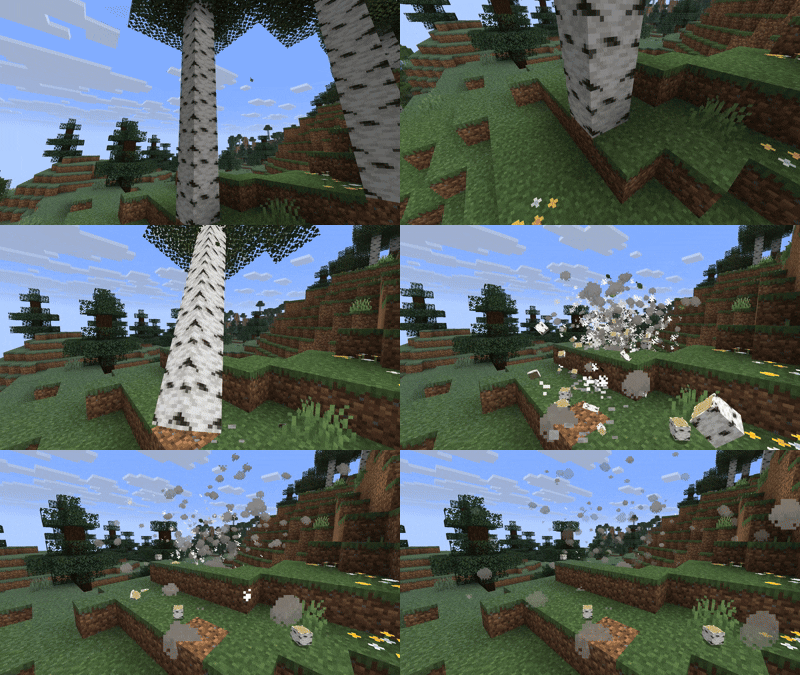
Core Concept & Mod Mechanics
The core concept of this mod is "to bring visual life and physics-based interactions to Minecraft's static world with minimal performance (FPS) overhead."
Instead of adding a heavy, complex rigid-body physics engine (which would calculate collision geometry for every single piece of debris and destroy game performance), the mod achieves realistic results through clever visual tricks and lightweight mathematical simulations.
The Mod Concept
The Concept: Adds realistic visual physics to Minecraft (falling trees, block debris, grass bending, item flinging, and water ripples) while keeping your performance (FPS) completely smooth.
How it Works:
No Heavy Engines: It does not use a resource-heavy physics engine that lags your game. Visual Illusion: When a block breaks, it is replaced instantly by lightweight 3D displays (BlockDisplay) that fall, bounce, tumble, and fade away. Smart Grass Swaying: Plants bend smoothly when you touch them by transforming their model vertices directly inside the graphics card. Visual-Only: All debris and bending effects are purely cosmetic; they won't block your movement or trap you.
Project description from CurseForge.
Pick your setup
physics effects by Minecraft version and loader
Choose the version and loader you play, then open the matching release.
Minecraft version
26.1.1
3 loader buildsMinecraft version
26.1
3 loader buildsCheck the dependencies, then try the file in a copied instance before changing a world you care about.
Recent files
physics effects versions and loaders
physics effects neoforge 1.0.0.jar
11 Jun 2026
Client Source doesn’t say Server Source doesn’t say Dependencies No extras listed Listed on Release listing
Check the 26.1.2 · NeoForge setup NeoForge26.126.1.126.1.2 release
physics effects forge 1.0.0.jar
11 Jun 2026
Client Source doesn’t say Server Source doesn’t say Dependencies No extras listed Listed on Release listing
Check the 26.1.2 · Forge setup Forge26.126.1.126.1.2 release
physics effects fabric 1.0.0.jar
11 Jun 2026
Client Source doesn’t say Server Source doesn’t say Dependencies No extras listed Listed on Release listing
Check the 26.1.2 · Fabric setup Fabric26.126.1.126.1.2 release
physics effects neoforge 1.0.0.jar
11 Jun 2026
Client Source doesn’t say Server Source doesn’t say Dependencies No extras listed Listed on Release listing
Check the 26.1.2 · NeoForge setup NeoForge26.1.2 release
physics effects forge 1.0.0.jar
11 Jun 2026
Client Source doesn’t say Server Source doesn’t say Dependencies No extras listed Listed on Release listing
Check the 26.1.2 · Forge setup Forge26.1.2 release
physics effects fabric 1.0.0.jar
11 Jun 2026
Client Source doesn’t say Server Source doesn’t say Dependencies No extras listed Listed on Release listing
Check the 26.1.2 · Fabric setup Fabric26.1.2 release
Looking for an older file? The official CurseForge project page is in Resources.
 mod
CurseForge + Modrinth · Minecraft
RP Renames
View all Resource Pack Renames in a new anvil GUI catalog!
 mod
CurseForge · Minecraft
Minecraft Borderless Window
Borderless fullscreen with a 3-mode system and configurable F11, plus a growing set of video and quality-of-life options Minecraft doesn't expose. Every setting defaults to vanilla. Client-side, no dependencies, optional Sodium integration.
 mod
CurseForge · Minecraft
AE2 Objects
Introduces high-density Deep Storage Cells with no type limits. A continuation and derivative work based on AE2 Things.