Minecraft version
Back to mods 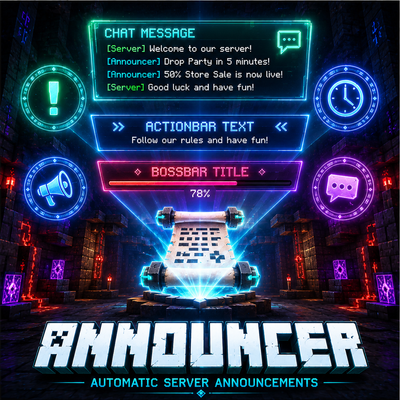
CurseForge · Minecraft mod
Announcer - Automatic Server Announcements
Automated chat, actionbar and bossbar announcements for Minecraft servers. JSON configurable, color support, ordered or random rotation, and fully server-side with no client installation required.
Choose a version Pick your version below, then grab the matching file.
Quick answer
Which Announcer - Automatic Server Announcements release should I use?
Latest stable file announcer-neoforge-1.21.1.jar
Game version 1.21.1
Loader NeoForge
Announcer - Automatic Server Announcements announcer-neoforge-1.21.1.jar targets 1.21.1 with NeoForge. The project page does not say whether this file belongs on the client, dedicated server, or both. No extra mods listed for this file.
Where it goes
Is Announcer - Automatic Server Announcements required on the client, server, or both?
The project page does not say whether this file belongs on the client, dedicated server, or both.
Client Source doesn’t say
Dedicated server Source doesn’t say
Loader for this release NeoForge
Required install it here Optional supported, not mandatory Not supported do not install here Source doesn’t say do not assume
The source does not explicitly classify this release as client-only or server-only.
What else does Announcer - Automatic Server Announcements announcer-neoforge-1.21.1.jar need?
announcer-neoforge-1.21.1.jar. Change the file and its required mods may change too.
This file does not list any required mods. Do not add a library just because a different file uses it.
This file does not list any required or optional mods.
Before you install it
Add Announcer - Automatic Server Announcements without breaking your instance.
Built for Announcer - Automatic Server Announcements announcer-neoforge-1.21.1.jar. Pick another file and the loader, install side or required mods may change.
- 01
Stick to this file
Use announcer-neoforge-1.21.1.jar. It targets 1.21.1 with NeoForge; another release may have different loader, side or dependency requirements.
- 02
Bring the mods it needs
This file does not list any required mods. Do not add a library just because a different file uses it.
- 03
Put it on the correct side
The project page does not say whether this file belongs on the client, dedicated server, or both.
- 04
Pick the file you checked
Use the “Get this file” button beside announcer-neoforge-1.21.1.jar. It opens that exact file at the source.
About this project
What does Announcer - Automatic Server Announcements add?
Announcer
Automatic Chat, ActionBar and BossBar Announcements for Minecraft Servers
Announcer is a lightweight, server-side mod designed to automatically broadcast scheduled messages to players in a clean and highly configurable way.
It allows server administrators to keep players informed at all times with rotating announcements displayed in chat, action bar, or boss bars — all fully controlled via a simple JSON configuration file.
Perfect for server rules, Discord promotion, events, rewards, tips, and system notifications.
✨ Features
💬 Chat Announcements
Send full messages or multi-line announcements directly in chat.
Use cases:
- Server rules
- Discord links
- Event announcements
- Gameplay tips
- Welcome messages
Supports Minecraft color codes using & formatting.
⚡ ActionBar Announcements
Display lightweight notifications above the hotbar without interrupting gameplay.
Perfect for:
- Reminders
- Event timers
- Short alerts
- Reward notifications
👑 BossBar Announcements
Highly visible top-screen announcements using Minecraft boss bars.
Features:
- Custom title
- Custom color
- Configurable duration
- Temporary display system
Ideal for:
- Server events
- Maintenance alerts
- PvP warnings
- Important system messages
🎨 Color Support
Full support for Minecraft formatting codes using &.
Example:
&a - Green | &b - Blue | &c - Red | &e - Yellow
Project description from CurseForge.
Pick your setup
Announcer - Automatic Server Announcements by Minecraft version and loader
Choose the version and loader you play, then open the matching release.
Minecraft version
1.20.1
3 loader buildsCheck the dependencies, then try the file in a copied instance before changing a world you care about.
Recent files
Announcer - Automatic Server Announcements versions and loaders
announcer-neoforge-1.21.1.jar
15 Sept 2026
Client Source doesn’t say Server Source doesn’t say Dependencies No extras listed Listed on Release listing
Check the 1.21.1 · NeoForge setup 1.21.1NeoForge release
announcer-neoforge-1.20.1.jar
15 Sept 2026
Client Source doesn’t say Server Source doesn’t say Dependencies No extras listed Listed on Release listing
Check the 1.20.1 · NeoForge setup 1.20.1NeoForge release
announcer-forge-1.20.1.jar
15 Sept 2026
Client Source doesn’t say Server Source doesn’t say Dependencies No extras listed Listed on Release listing
Check the 1.20.1 · Forge setup 1.20.1Forge release
announcer-fabric-1.20.1.jar
15 Sept 2026
Client Source doesn’t say Server Source doesn’t say Dependencies No extras listed Listed on Release listing
Check the 1.20.1 · Fabric setup Fabric1.20.1 release
Looking for an older file? The official CurseForge project page is in Resources.