Minecraft version
Back to mods 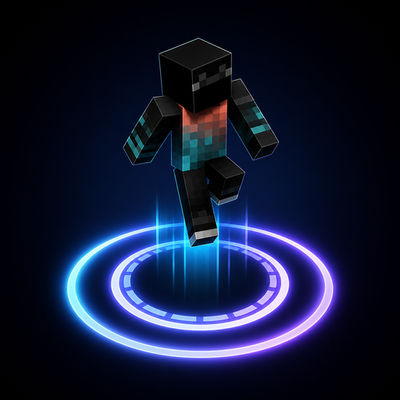
CurseForge · Minecraft mod
Jump Circle
Turn every jump into a spectacle with stunning customizable effects and smooth, FPS-friendly performance.
Choose a version Pick your version below, then grab the matching file.
Quick answer
Which Jump Circle release should I use?
Latest stable file JumpCircle-Fabric-26.1-26.2.jar
Game version 26.1, 26.1.1, 26.1.2
Loader Fabric
Jump Circle JumpCircle-Fabric-26.1-26.2.jar targets 26.1, 26.1.1, 26.1.2 with Fabric. The project page does not say whether this file belongs on the client, dedicated server, or both. No extra mods listed for this file.
Where it goes
Is Jump Circle required on the client, server, or both?
The project page does not say whether this file belongs on the client, dedicated server, or both.
Client Source doesn’t say
Dedicated server Source doesn’t say
Loader for this release Fabric
Required install it here Optional supported, not mandatory Not supported do not install here Source doesn’t say do not assume
The source does not explicitly classify this release as client-only or server-only.
What else does Jump Circle JumpCircle-Fabric-26.1-26.2.jar need?
JumpCircle-Fabric-26.1-26.2.jar. Change the file and its required mods may change too.
This file does not list any required mods. Do not add a library just because a different file uses it.
This file does not list any required or optional mods.
Before you install it
Add Jump Circle without breaking your instance.
Built for Jump Circle JumpCircle-Fabric-26.1-26.2.jar. Pick another file and the loader, install side or required mods may change.
- 01
Stick to this file
Use JumpCircle-Fabric-26.1-26.2.jar. It targets 26.1, 26.1.1, 26.1.2 with Fabric; another release may have different loader, side or dependency requirements.
- 02
Bring the mods it needs
This file does not list any required mods. Do not add a library just because a different file uses it.
- 03
Put it on the correct side
The project page does not say whether this file belongs on the client, dedicated server, or both.
- 04
Pick the file you checked
Use the “Get this file” button beside JumpCircle-Fabric-26.1-26.2.jar. It opens that exact file at the source.
About this project
What does Jump Circle add?
Jump Circle
**Turn every jump into a polished visual effect.**
**Jump Circle** is a lightweight cosmetic mod that creates animated rings and themed energy effects beneath your feet whenever you jump. Choose between six circle types, eight completely different particle styles, and sixteen color schemes to match your character, resource pack, PvP setup, or cinematic build.
The effect appears at the exact takeoff position, expands smoothly, and dissolves while remaining fixed in the world. It is rendered with custom geometry instead of ordinary vanilla particle clouds, giving every style a recognizable shape—from ice crystals and magical runes to branching lightning and orbiting stars.
Jump Circle is client-side only, works on multiplayer servers without server installation, and stays inactive when there is nothing to render. It changes no gameplay mechanics—it simply makes movement feel more responsive, stylish, and personal.
Why Jump Circle?
Makes jumping feel more responsive and visually satisfying
Six circle types that can be freely combined with eight particle styles
Every particle style has its own geometry and animation
Sixteen built-in two-color schemes
No gameplay advantage or server-side changes
Smooth partial-tick animation
Minecraft-style settings screen with live preview
Rebindable settings key
Mod Menu integration on Fabric
Eleven included UI languages
Optimized for high-FPS client setups
Two Independent Effect Layers
Jump Circle keeps the base circle and thematic particles separate:
**Circle Type** selects the ring shape and animation.
**Particle Style** selects the custom geometry that rises from and moves around it.
Particle geometry works with every circle type. Choose **Energy Effects** when you want only the selected particle style with no ordinary ring underneath.
You can mix them freely—for example, Shockwave with Fire, Gradient with Enchant, or Layered Rings with Galaxy.
Circle Types
**Classic Rings** — a clean expanding ring with geometric markers
**Layered Rings** — coordinated inner and outer circles
**Shockwaves** — an energy band opening outward from the center
**Gradients** — layered two-color geometry
**RGB Effects** — a continuously animated rainbow ring
**Energy Effects** — the selected particle style without a generic base ring
Eight Particle Styles
Every style uses its own geometry, motion, silhouette, and sparks:
**Ice** — crystals, ice shards, snowflakes, and frozen sparks
**Fire** — rising flames, embers, and hot energy bursts
**Nature** — growing stems, leaves, and geometric petals
**Soul** — ghostly figures, spiraling wisps, and soul trails
**Enchant** — orbiting runes, occult symbols, and magical sparks
**Wither** — dark spikes, skulls, ash, and heavy debris
**Lightning** — branching bolts and sharp electric arcs
**Galaxy** — spiral arms, orbiting stars, ribbons, and comets
Colors and Settings
Choose from sixteen compact two-color schemes:
**Lime, Emerald, Aqua, Sky, Blue, Purple, Magenta, Pink, Red, Orange, Gold, White, Ice, Fire, Soul, and Galaxy.**
Color schemes affect the base circle. Particle styles retain their thematic colors so every style stays recognizable.
The settings screen includes:
Enabled state, circle type, particles, particle style, easing, and lifetime
Radius, thickness, opacity, and segment count
Color scheme with live preview
Render distance, ground offset, maximum effects, and RGB speed
Settings are saved to:
config/jumpcircle.json
Performance
Jump Circle performs no world scanning and renders nothing while no effects are active. Its render path uses object pooling, distance culling, distance-based detail, cached spark data, reused render objects, and precomputed trigonometry.
The optimized geometry path preserves the same vertex count while reducing CPU geometry-generation time by roughly 15–23% in the included microbenchmark.
Supported Fabric Versions
| Minecraft | Download |
| --- | --- |
| 1.21–1.21.8 | JumpCircle-Fabric-1.21-1.21.8.jar |
| 1.21.9 | JumpCircle-Fabric-1.21.9.jar |
| 1.21.10–1.21.11 | JumpCircle-Fabric-1.21.10-1.21.11.jar |
| 26.1, 26.1.2, 26.2 | JumpCircle-Fabric-26.1-26.2.jar |
Minecraft 1.21–1.21.11 requires Java 21. Minecraft 26.1–26.2 requires Java 25.
Fabric requires Fabric API. Mod Menu is optional.
Supported Forge Versions
Verified Forge builds are available for Minecraft:
1.21, 1.21.1, 1.21.8, 1.21.9, and 1.21.10.
Installation
Install Fabric Loader with Fabric API, or install Forge, for your exact Minecraft version.
Download the matching Jump Circle JAR.
Place it in your Minecraft
modsfolder.Launch the game and open Jump Circle using its registered keybind.
The mod is client-side only and is not required on servers.
Compatibility
Jump Circle is designed to coexist with common client optimization mods. The Fabric 1.21.11 build has been launch-tested with Sodium and Iris.
Mods that replace large parts of world rendering may require individual testing.
Included Languages
English, German, Spanish, French, Japanese, Polish, Portuguese (Brazil), Russian, Turkish, Ukrainian, and Chinese (Simplified).
License
MIT
Project description from CurseForge.
Pick your setup
Jump Circle by Minecraft version and loader
Choose the version and loader you play, then open the matching release.
Minecraft version
26.1.2
1 loader buildMinecraft version
26.1.1
1 loader buildMinecraft version
26.1
1 loader buildMinecraft version
1.21.11
1 loader buildMinecraft version
1.21.10
1 loader buildMinecraft version
1.21.9
1 loader buildMinecraft version
1.21.8
1 loader buildMinecraft version
1.21.7
1 loader buildMinecraft version
1.21.6
1 loader buildMinecraft version
1.21.5
1 loader buildMinecraft version
1.21.4
1 loader buildShowing the newest 12 of 16 game versions. Older files are in the list below.
Check the dependencies, then try the file in a copied instance before changing a world you care about.
Recent files
Jump Circle versions and loaders
JumpCircle-Fabric-26.1-26.2.jar
27 Jul 2026
Client Source doesn’t say Server Source doesn’t say Dependencies No extras listed Listed on Release listing
Check the 26.2 · Fabric setup Fabric26.126.1.126.1.2 release
JumpCircle-Fabric-1.21.10-1.21.11.jar
27 Jul 2026
Client Source doesn’t say Server Source doesn’t say Dependencies No extras listed Listed on Release listing
Check the 1.21.11 · Fabric setup Fabric1.21.101.21.11 release
JumpCircle-Fabric-1.21.9.jar
27 Jul 2026
Client Source doesn’t say Server Source doesn’t say Dependencies No extras listed Listed on Release listing
Check the 1.21.9 · Fabric setup Fabric1.21.9 release
JumpCircle-Fabric-1.21-1.21.8.jar
27 Jul 2026
Client Source doesn’t say Server Source doesn’t say Dependencies No extras listed Listed on Release listing
Check the 1.21.8 · Fabric setup 1.21Fabric1.21.81.21.5 release
JumpCircle-26.2.jar
23 Jul 2026
Client Source doesn’t say Server Source doesn’t say Dependencies No extras listed Listed on Release listing
Check the 26.2 · Fabric setup Fabric26.2 release
JumpCircle-26.1.2.jar
23 Jul 2026
Client Source doesn’t say Server Source doesn’t say Dependencies No extras listed Listed on Release listing
Check the 26.1.2 · Fabric setup Fabric26.1.2 release
JumpCircle-26.1.jar
23 Jul 2026
Client Source doesn’t say Server Source doesn’t say Dependencies No extras listed Listed on Release listing
Check the 26.1 · Fabric setup Fabric26.1 release
JumpCircle-1.21.11.jar
23 Jul 2026
Client Source doesn’t say Server Source doesn’t say Dependencies No extras listed Listed on Release listing
Check the 1.21.11 · Fabric setup Fabric1.21.11 release
JumpCircle-1.21.10.jar
23 Jul 2026
Client Source doesn’t say Server Source doesn’t say Dependencies No extras listed Listed on Release listing
Check the 1.21.10 · Fabric setup Fabric1.21.10 release
JumpCircle-1.21.9.jar
23 Jul 2026
Client Source doesn’t say Server Source doesn’t say Dependencies No extras listed Listed on Release listing
Check the 1.21.9 · Fabric setup Fabric1.21.9 release
JumpCircle-1.21.8.jar
23 Jul 2026
Client Source doesn’t say Server Source doesn’t say Dependencies No extras listed Listed on Release listing
Check the 1.21.8 · Fabric setup Fabric1.21.8 release
JumpCircle-1.21.7.jar
23 Jul 2026
Client Source doesn’t say Server Source doesn’t say Dependencies No extras listed Listed on Release listing
Check the 1.21.7 · Fabric setup Fabric1.21.7 release
Looking for an older file? The official CurseForge project page is in Resources.
 mod
CurseForge · Minecraft
Mo' Bends [MODERN PORT]
A port of the Mo' Bends mod to modern Minecraft.
 mod
CurseForge · Minecraft
Holoscreens
Sci-fi screens and holographic panels that show your own text and live values from any block.
 mod
CurseForge · Minecraft
Sky’s Terrain Smoother - Biomes O' Plenty Add-On
Extends Sky’s Terrain Smoother to Biomes O’ Plenty, with matching grass and soil slabs, steps and corners for smoother hillsides and cave floors.