Minecraft version
Back to mods 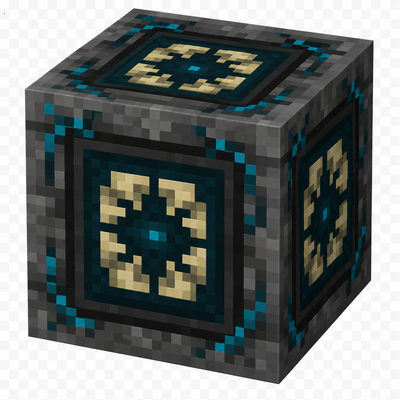
CurseForge · Minecraft mod
Nexus Gate
Nexus Gate is a late-game storage block that links shared channel inventories across any distance and dimension. Nexus Gate is heavily inspired by the mod Tesseract, with a more vanilla-friendly touch.
Choose a version Pick your version below, then grab the matching file.
Quick answer
Which Nexus Gate release should I use?
Latest stable file nexus_gate-0.4.0.jar
Game version 26.1.2
Loader NeoForge
Nexus Gate nexus_gate-0.4.0.jar targets 26.1.2 with NeoForge. The project page does not say whether this file belongs on the client, dedicated server, or both. No extra mods listed for this file.
Where it goes
Is Nexus Gate required on the client, server, or both?
The project page does not say whether this file belongs on the client, dedicated server, or both.
Client Source doesn’t say
Dedicated server Source doesn’t say
Loader for this release NeoForge
Required install it here Optional supported, not mandatory Not supported do not install here Source doesn’t say do not assume
The source does not explicitly classify this release as client-only or server-only.
What else does Nexus Gate nexus_gate-0.4.0.jar need?
nexus_gate-0.4.0.jar. Change the file and its required mods may change too.
This file does not list any required mods. Do not add a library just because a different file uses it.
This file does not list any required or optional mods.
Before you install it
Add Nexus Gate without breaking your instance.
Built for Nexus Gate nexus_gate-0.4.0.jar. Pick another file and the loader, install side or required mods may change.
- 01
Stick to this file
Use nexus_gate-0.4.0.jar. It targets 26.1.2 with NeoForge; another release may have different loader, side or dependency requirements.
- 02
Bring the mods it needs
This file does not list any required mods. Do not add a library just because a different file uses it.
- 03
Put it on the correct side
The project page does not say whether this file belongs on the client, dedicated server, or both.
- 04
Pick the file you checked
Use the “Get this file” button beside nexus_gate-0.4.0.jar. It opens that exact file at the source.
About this project
What does Nexus Gate add?
Nexus Gate
Nexus Gate is a late-game item transport mod that connects inventories across any distance and dimension.
How It Works
Every Nexus Gate is assigned to a named channel. Gates using the same channel share one persistent 27-slot inventory.
Items cannot be accessed directly through a GUI. Instead, use hoppers or compatible item automation systems to insert and extract items from any side.
Channels
Rename a Nexus Gate in an anvil before placing it. Its custom name becomes the channel name.
You can also rename a name tag and use it on an existing Nexus Gate to change its channel.
Unnamed gates use the shared channel:
default
Channel names must match exactly. All channels are public, so anyone using the same name can connect to the same inventory.
Main Features
- Shared 27-slot inventory per channel
- Unlimited public channels
- Works across dimensions and unlimited distances
- Compatible with vanilla hoppers
- Item access from all six sides
- No pipes, cables, energy, or dependencies
- Stored items remain in the channel when gates are broken
- No chunk loading required for stored inventories
- Custom 3D model and pulsing Sculk-inspired core
Important
Nexus Gate does not move items automatically and has no accessible inventory screen. Attach hoppers, chests, barrels, or compatible automation blocks to use the shared storage.
It transports items only.
Project description from CurseForge.
Pick your setup
Nexus Gate by Minecraft version and loader
Choose the version and loader you play, then open the matching release.
Check the dependencies, then try the file in a copied instance before changing a world you care about.
Recent files
Nexus Gate versions and loaders
nexus_gate-0.4.0.jar
16 Jun 2026
Client Source doesn’t say Server Source doesn’t say Dependencies No extras listed Listed on Release listing
Check the 26.1.2 · NeoForge setup NeoForge26.1.2 release
Looking for an older file? The official CurseForge project page is in Resources.