Minecraft version
Back to mods 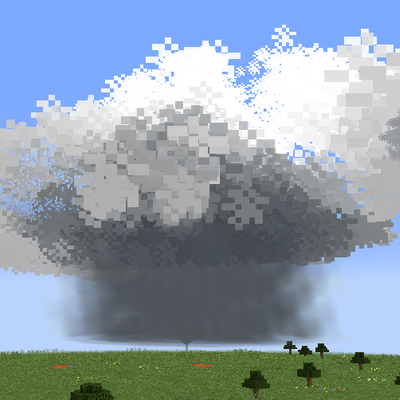
CurseForge · Minecraft mod
Climate - Clouds, Storms & Technology
A mod that adds many unique cloud types, tornadoes, squall lines, and cyclones, rendered via GPU Instancing, as well as weather-tracking items/blocks.
Choose a version Pick your version below, then grab the matching file.
Quick answer
Which Climate - Clouds, Storms & Technology release should I use?
Latest stable file climate-0.9-1.20.1.jar
Game version 1.20.1
Loader Forge
Climate - Clouds, Storms & Technology climate-0.9-1.20.1.jar targets 1.20.1 with Forge. The project page does not say whether this file belongs on the client, dedicated server, or both. No extra mods listed for this file.
Where it goes
Is Climate - Clouds, Storms & Technology required on the client, server, or both?
The project page does not say whether this file belongs on the client, dedicated server, or both.
Client Source doesn’t say
Dedicated server Source doesn’t say
Loader for this release Forge
Required install it here Optional supported, not mandatory Not supported do not install here Source doesn’t say do not assume
The source does not explicitly classify this release as client-only or server-only.
What else does Climate - Clouds, Storms & Technology climate-0.9-1.20.1.jar need?
climate-0.9-1.20.1.jar. Change the file and its required mods may change too.
This file does not list any required mods. Do not add a library just because a different file uses it.
This file does not list any required or optional mods.
Before you install it
Add Climate - Clouds, Storms & Technology without breaking your instance.
Built for Climate - Clouds, Storms & Technology climate-0.9-1.20.1.jar. Pick another file and the loader, install side or required mods may change.
- 01
Stick to this file
Use climate-0.9-1.20.1.jar. It targets 1.20.1 with Forge; another release may have different loader, side or dependency requirements.
- 02
Bring the mods it needs
This file does not list any required mods. Do not add a library just because a different file uses it.
- 03
Put it on the correct side
The project page does not say whether this file belongs on the client, dedicated server, or both.
- 04
Pick the file you checked
Use the “Get this file” button beside climate-0.9-1.20.1.jar. It opens that exact file at the source.
About this project
What does Climate - Clouds, Storms & Technology add?
About the mod
Climate brings a complete meteorological overhaul to Minecraft, transforming the sky from a repetitive background into a living, breathing fluid dynamic simulation. From peaceful fair-weather skies to violent, destructive squall lines, this mod seamlessly blends scientific accuracy with interactive survival gameplay.
Whether you are a casual builder tracking cloud fronts or a dedicated storm chaser running a doppler network, this mod changes how you look at the horizon forever.
The skybox features a highly realistic, tiered cloud structure spanning low, middle, and high altitudes. Every cloud type behaves exactly like its real-world counterpart, shifting dynamically based on humidity, temperature, and atmospheric CAPE.
Different types of instruments used to measure/predict weather include: Disdrometer, Hygrometer, Doppler Radar, Barometer, Anemometer, RadarScope, EAS system, and Weather CAPE measurers (weather station). Many new features such as Rain Gauges, Wind vanes, and diesel generators have been added. The doppler radar guide book of how to set up can be found within the crestive mode tab. It is also recommended that the radar be placed in open, flat terrain instead of steep, mountains , or forest terrain.
Supercells have different types, including Low Precipitation, Classic, and High precipitation.
High-Altitude Clouds (Ice Crystals): Wispy Cirrus strands stretched by upper-level winds, flat Cirrostratus sheets, and rippled Altocumulus patches.
Mid-Level Layers: Structured Stratocumulus and dark, blanket-like Nimbostratus decks that bring steady, overcast rainfall.
Low-Level Convection: Fluffy Cumulus humilis (fair-weather clouds) that can grow into Cumulus mediocris and eventually explode into towering, multi-layered Cumulonimbus storm fronts.

Most weather mods cause massive lag because they force your computer to load every single cloud particle one by one. This slows down your processor and tanks your game's frame rate.
Instead of slowing down your game, Climate uses a smart coding trick called GPU Instancing. This offloads all the heavy lifting from your game's main processor straight to your graphics card. Your computer can now draw entire, massive storm systems all at once in the blink of an eye.
- Massive FPS Boost: Watch thousands of beautiful, realistic clouds roll by with almost zero impact on your performance.
- Lag-Free Storms: Stand right inside a towering supercell or watch a tornado spin without your screen turning into a slideshow.
- Low-End PC Friendly: You do not need an expensive gaming computer to experience realistic, weather.*Please note that there may be some client issues when spawning the tornadoes in multiplayer
The mod also features different tornado types, such as rope tornadoes and multivortex tornadoes.
Disclaimer: While the mod does run fast, spawning too many storms and/or tornadoes can cause noticeable frame drops.
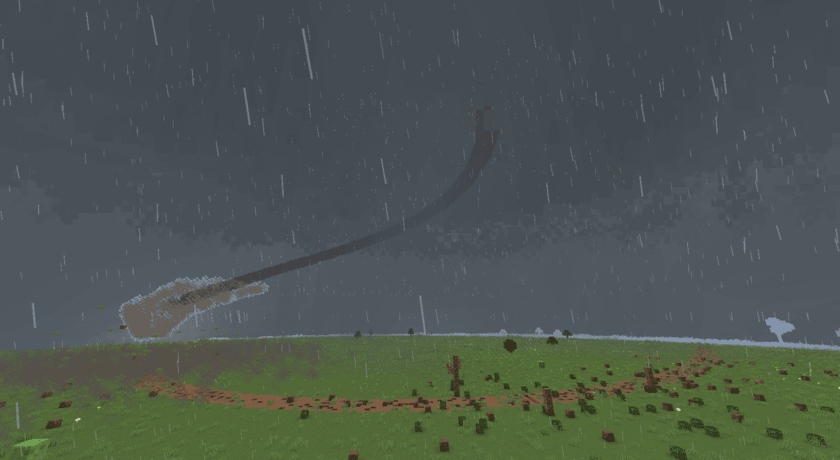
If you are wondering how to get rid of all storms, just type the command: /climate set moisture 0
Project description from CurseForge.
Pick your setup
Climate - Clouds, Storms & Technology by Minecraft version and loader
Choose the version and loader you play, then open the matching release.
Check the dependencies, then try the file in a copied instance before changing a world you care about.
Recent files
Climate - Clouds, Storms & Technology versions and loaders
climate-0.9-1.20.1.jar
8 Aug 2026
Client Source doesn’t say Server Source doesn’t say Dependencies No extras listed Listed on Release listing
Check the 1.20.1 · Forge setup 1.20.1Forge release
climate-0.8-1.20.1.jar
30 Jul 2026
Client Source doesn’t say Server Source doesn’t say Dependencies No extras listed Listed on Release listing
Check the 1.20.1 · Forge setup 1.20.1Forge release
climate-0.7-1.20.1.jar
24 Jul 2026
Client Source doesn’t say Server Source doesn’t say Dependencies No extras listed Listed on Release listing
Check the 1.20.1 · Forge setup 1.20.1Forge release
climate-0.6-1.20.1.jar
21 Jul 2026
Client Source doesn’t say Server Source doesn’t say Dependencies No extras listed Listed on Release listing
Check the 1.20.1 · Forge setup 1.20.1Forge beta
climate-0.5-beta-1.20.1.jar
8 Jul 2026
Client Source doesn’t say Server Source doesn’t say Dependencies No extras listed Listed on Release listing
Check the 1.20.1 · Forge setup 1.20.1Forge beta
Looking for an older file? The official CurseForge project page is in Resources.
 mod
mod CurseForge + Modrinth · Minecraft
RS Integration
A major core optimization release featuring improved recursive crafting scheduling, recipe-index warm-up, safer transaction settlement, rewritten pinyin search, and optional Project MMO salvage integration.
 mod
mod CurseForge · Minecraft
Villageria
Villagers who actually work. 8 professions defend, rebuild, light, farm, explore, heal and manage villages. Includes 4 new buildings, 4 Iron Golem types, a shared economy and a working police pistol.
 mod
mod CurseForge · Minecraft
ColoFixes
A small colleciton of client side fixes for Pixelmon, intended for the Colomon Modpack