Minecraft version
Back to mods 
CurseForge · Minecraft mod
Osmium Optimization
Osmium is a Forge mod designed for optimization and performance
Choose a version Pick your version below, then grab the matching file.
Quick answer
Which Osmium Optimization release matches 1.20?
Best match for your filters Osmium 1.0.2
Game version 1.20
Loader Forge
Osmium Optimization Osmium 1.0.2 targets 1.20 with Forge. The project page does not say whether this file belongs on the client, dedicated server, or both. No extra mods listed for this file.
Where it goes
Is Osmium Optimization required on the client, server, or both?
The project page does not say whether this file belongs on the client, dedicated server, or both.
Client Source doesn’t say
Dedicated server Source doesn’t say
Loader for this release Forge
Required install it here Optional supported, not mandatory Not supported do not install here Source doesn’t say do not assume
The source does not explicitly classify this release as client-only or server-only.
What else does Osmium Optimization Osmium 1.0.2 need?
Osmium 1.0.2 on 1.20. Every mod below is checked against that same setup.
This file does not list any required mods. Do not add a library just because a different file uses it.
This file does not list any required or optional mods.
Before you install it
Add Osmium Optimization without breaking your instance.
Built for Osmium Optimization Osmium 1.0.2 on 1.20. Pick another file and the loader, install side or required mods may change.
- 01
Stick to this file
Use Osmium 1.0.2. It targets 1.20 with Forge; another release may have different loader, side or dependency requirements.
- 02
Bring the mods it needs
This file does not list any required mods. Do not add a library just because a different file uses it.
- 03
Put it on the correct side
The project page does not say whether this file belongs on the client, dedicated server, or both.
- 04
Pick the file you checked
Use the “Get this file” button beside Osmium 1.0.2. It opens that exact file at the source.
About this project
What does Osmium Optimization add?
Information [17/06/26] - Osmium Version 1.0.0 has finally finished development, varying in supported versions of Minecraft. Designed for Forge users on extremely low-end devices, ones that can't push 100 Frames. Heavily inpired by the Fabric mod 'Sodium'.
Osmium v1.0.0 was single handedly developed by x64 and may have issues, please report them in the discord.
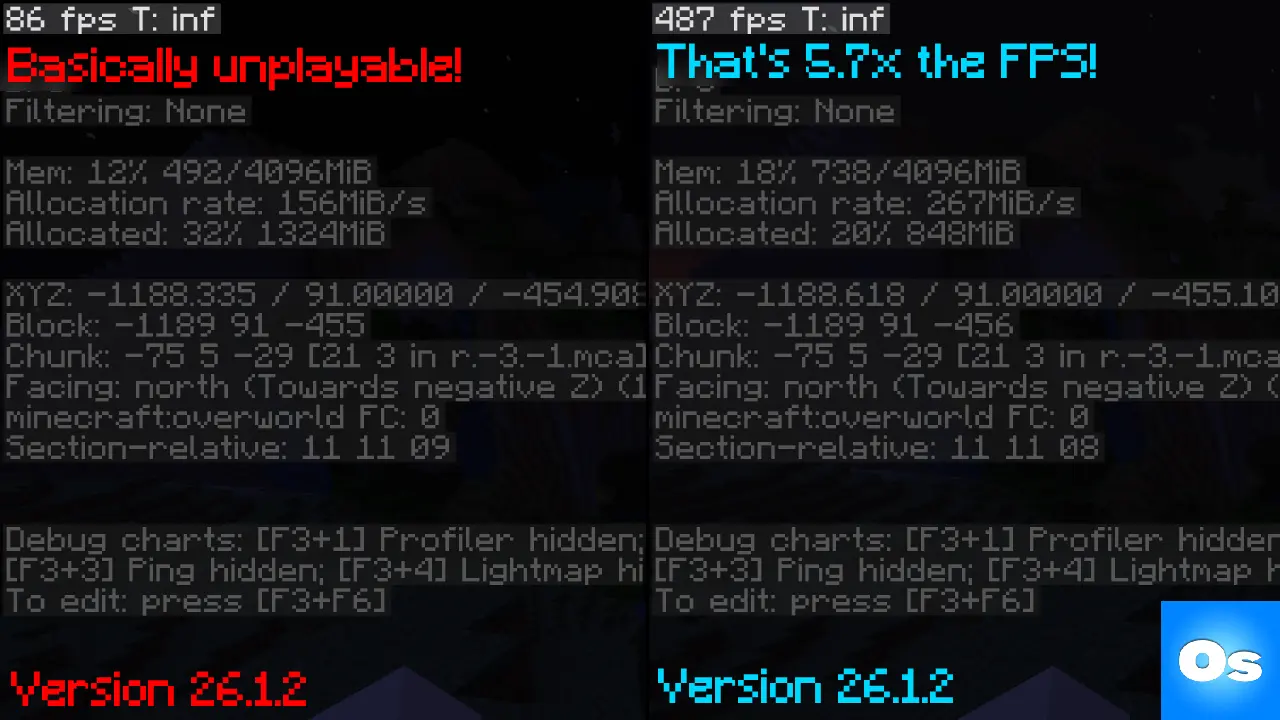 As shown above, low-end devices (even with Vulkan!) may struggle to reun minecraft of default settings. (even when optimized) Leaving them with around ~80 FPS.
Whereas Osmium provides the optimal Minecraft experience at around ~480 FPS Avg. That's 5.663x the FPS base Minecraft performed at with the exact same settings!
🛠️ Installation Guide
Osmium is only available for Forge, as I barley noticed any optimization mods for it. Just find the 'mods' folder that your launcher provides you with, then drag & drop Osmium's .Jar file into it.
How do i know if it's installed? - By going into Settings, you should see a whole new layout. That's how you know.
How do i get more FPS? - You can enable our experimental feature 'Cull entities behind blocks' in Osmium's Culling tab. This will increase your FPS by around 100 by preventing non-visible entities from being rendered.
❓ What does Osmium target?
- Block, Item & Entity rendering/culling
- World generation
- Noise Generation
- Math optimization
- Lighting rewrite
- Networking performance
- Pinging
- Packets & NBTs
- Chunk generation, loading & pre-generation
- DSA
- Memory Usage & Leakage
- & More!
🎨 Capes Customization
Osmium also comes in with a built in custom cape changer & uploader! With 3 preset Osmium capes (Normal blue, Vantablack, Red) you can also upload your own capes. Anyone using the Osmium mod can see your cape, vise versa. This is optional and can be disabled in settings.
If the backend is custom, couldn't someone spoof and change my cape? - No. When changing a cape, your client provides crutial data provided by Microsoft including your account's private keys. They are then compared backend along with UUID to confirm authenticity (this data is NOT saved). The only data that's publicly visible is: Your UUID, and Cape (base64 or preset cape)
🤔 How do i know Osmium performs well for my hardware?
You can compare your hardware to the hardware used for Osmium's testing & Development.
Device [1/2]
- Intel Core i5-6400 @ 2.70GHZ
- 16GB Ram DDR4 (4GB Allocated)
- NVIDIA GeForce GTX 1650
- [~480 FPS Default Settings]
Device [2/2]
- Intel Core i9-14900KF @ 5GHZ
- 32GB Ram DDR5 (4GB Allocated)
- NVIDIA RTX 4080 Super
- [~2,200 FPS 4K, Max render distance ETC]
Osmium is not for redistribution or modification. Requests can be done via the Discord.
Project description from CurseForge.
Pick your setup
Osmium Optimization by Minecraft version and loader
Choose the version and loader you play, then open the matching release.
Minecraft version
26.1.2
1 loader buildMinecraft version
26.1.1
1 loader buildMinecraft version
26.1
1 loader buildMinecraft version
1.21.11
1 loader buildMinecraft version
1.21.10
1 loader buildMinecraft version
1.21.8
1 loader buildMinecraft version
1.21.5
1 loader buildMinecraft version
1.21.4
1 loader buildMinecraft version
1.21.3
1 loader buildMinecraft version
1.21.1
1 loader buildMinecraft version
1.20.6
1 loader buildShowing the newest 12 of 16 game versions. Older files are in the list below.
Check the dependencies, then try the file in a copied instance before changing a world you care about.
Recent files
Osmium Optimization versions and loaders
Osmium 1.0.2
osmium-1.0.2-mc1.20.jar
18 Jun 2026
Client Source doesn’t say Server Source doesn’t say Dependencies No extras listed Listed on Release listing
Check the 1.20 · Forge setup Forge1.20 release
Looking for an older file? The official CurseForge project page is in Resources.
 mod
CurseForge · Minecraft
BetterEnd
This mod adds content to the End (biomes, mobs, blocks, etc.)
 mod
CurseForge · Minecraft
BetterNether
Improvements for the Nether (plants, biomes, structures, worldgen)
 mod
CurseForge · Minecraft
Wunderreich
🤑 Influence trades - 🧱sand/dirt/glass Slabs - 🎁linked chest inventory- 🛠️place random block