Minecraft version
Back to mods 
CurseForge · Minecraft mod
Simple Locks
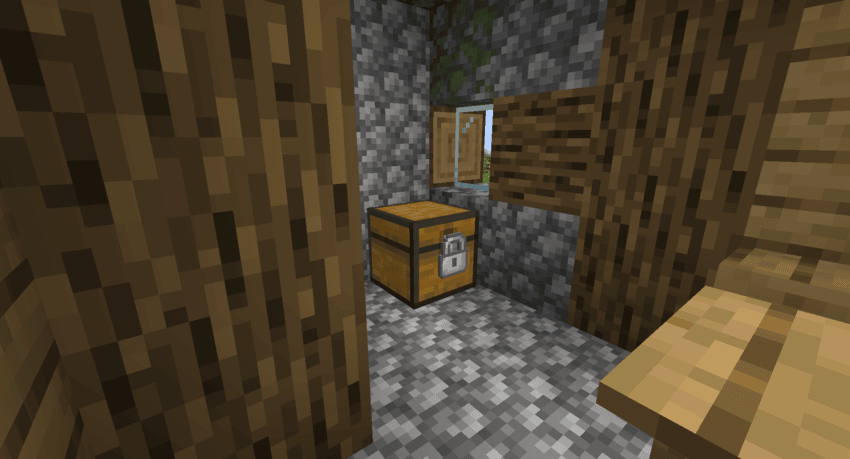
Simple Locks is a simple mod that adds locks, keys, and lockpick.
Choose a version Pick your version below, then grab the matching file.
Quick answer
Which Simple Locks release matches 1.19.2 Forge?
Best match for your filters Simple Locks 1.0.0 for Forge 1.19.2
Game version 1.19.2
Loader Forge
Simple Locks 1.0.0 for Forge 1.19.2 targets 1.19.2 with Forge. The project page does not say whether this file belongs on the client, dedicated server, or both. No extra mods listed for this file.
Where it goes
Is Simple Locks required on the client, server, or both?
The project page does not say whether this file belongs on the client, dedicated server, or both.
Client Source doesn’t say
Dedicated server Source doesn’t say
Loader for this release Forge
Required install it here Optional supported, not mandatory Not supported do not install here Source doesn’t say do not assume
The source does not explicitly classify this release as client-only or server-only.
What else does Simple Locks 1.0.0 for Forge 1.19.2 need?
Simple Locks 1.0.0 for Forge 1.19.2 on 1.19.2 Forge. Every mod below is checked against that same setup.
This file does not list any required mods. Do not add a library just because a different file uses it.
This file does not list any required or optional mods.
Before you install it
Add Simple Locks without breaking your instance.
Built for Simple Locks 1.0.0 for Forge 1.19.2 on 1.19.2 Forge. Pick another file and the loader, install side or required mods may change.
- 01
Stick to this file
Use Simple Locks 1.0.0 for Forge 1.19.2. It targets 1.19.2 with Forge; another release may have different loader, side or dependency requirements.
- 02
Bring the mods it needs
This file does not list any required mods. Do not add a library just because a different file uses it.
- 03
Put it on the correct side
The project page does not say whether this file belongs on the client, dedicated server, or both.
- 04
Pick the file you checked
Use the “Get this file” button beside Simple Locks 1.0.0 for Forge 1.19.2. It opens that exact file at the source.
About this project
What does Simple Locks add?
Simple Locks
Simple Locks is a simple mod that adds locks, keys, and lockpick.
Lockpicking Mechanics
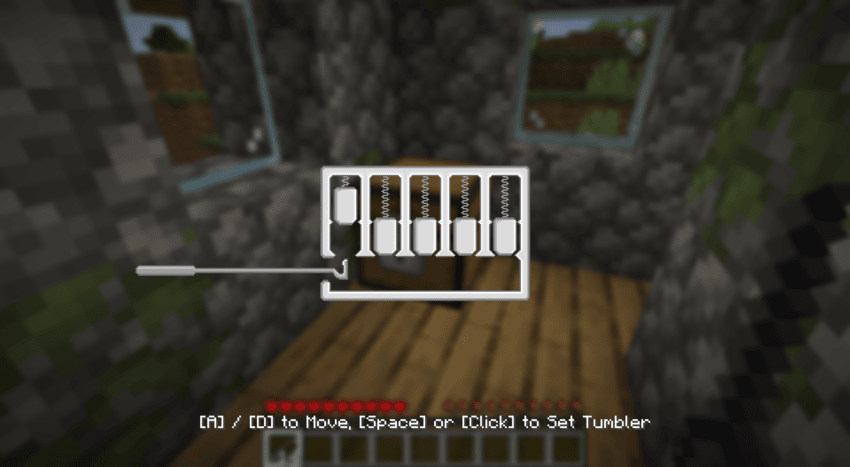
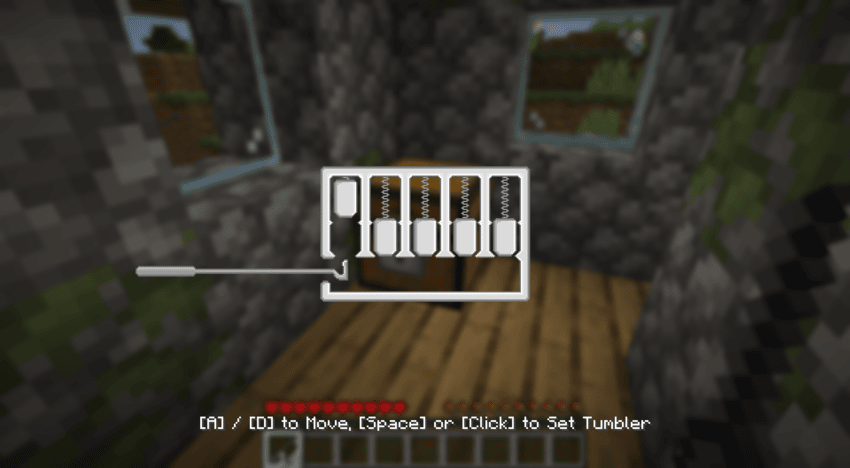
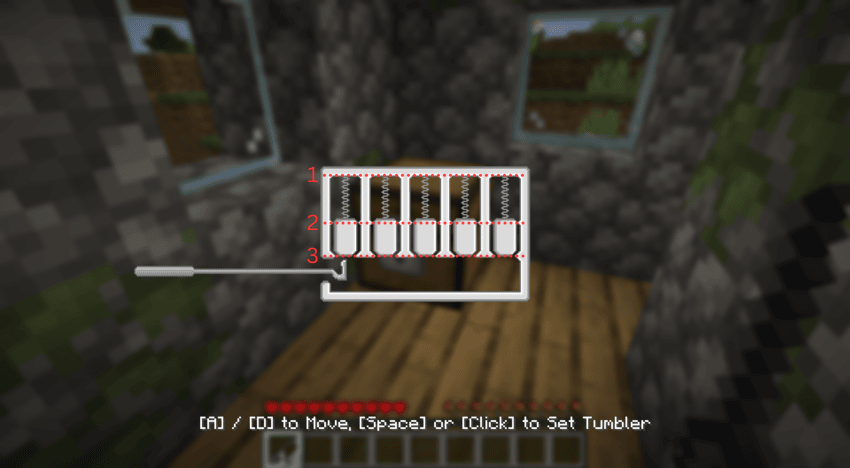
The lockpicking mechanic requires players to use a lockpick to push the pins up and set them into place. The sequence of these pins is completely random. Some pins will not settle at the top on the first try and will begin to fall back down at varying speeds—sometimes slowly, sometimes quickly. For these descending pins, you must press Space or Click before the pin drops below the "2nd zone," as shown in the image below. If you make a mistake and all the pins drop, the pin sequence itself does not change, but which pins fail to settle on the first try will be randomized again. However, if your lockpick breaks, the entire sequence of the pins will be reset and completely randomized.
Commands
/simple_locks lockpick [enable/disable]
Enables or disables lockpicks. Enabled by default.
/simple_locks lockpickBreakChance <lock> <0 - 100 | default>
Sets the lockpick breakage chance for a specific lock. Accepts values from 0 to 100, or 'default'. The 'default' option applies the base value of that lock. Valid locks: ironLock, goldLock, diamondLock, netheriteLock Example : /simple_locks lockpickBreakChance ironLock 50
/simple_locks multiLock [enable/disable]
Enables or disables the ability to lock and unlock multiple locks with a single key (a key can only unlock the locks it has locked). When disabled, one key is bound to a single lock. Enabled by default.
/simple_locks keyReset [eneble/disable]
Enables or disables the ability to clear a used key. When enabled, placing a key with a lock ID into any crafting grid will return a blank key of the same material with no ID. Enabled by default.
/simple_locks unlock
Unlocks the locked block the player is currently looking at without requiring a key.
Configurations
This mod generates a simple_locks.json file inside the Minecraft config folder. You can make any vanilla Minecraft block—or blocks from other mods—lockable by adding their specific identifiers to this file.
Example:
{
"lockable_blocks": [
"minecraft:tnt",
"minecraft:furnace"
]
}
With the configuration above, you can now place locks on TNT and furnaces. You are not limited to vanilla Minecraft blocks; you can add block identifiers from other mods into this JSON file to make them lockable as well.
When a lock is placed on a block and is in the locked state, the block gains the following properties until it is unlocked with the correct key:
- It cannot be broken.
- Items cannot be inserted into or extracted from it (e.g., via hoppers).
- It becomes completely immune to redstone signals.
- It cannot be moved by pistons.
Note: Adding certain complex or incompatible blocks to this list may cause the game to crash. Proceed with caution when adding modded blocks.
``
``
Project description from CurseForge.
Pick your setup
Simple Locks by Minecraft version and loader
Choose the version and loader you play, then open the matching release.
Minecraft version
26.1.2
2 loader buildsMinecraft version
26.1.1
2 loader buildsMinecraft version
26.1
2 loader buildsMinecraft version
1.21.11
2 loader buildsMinecraft version
1.21.1
2 loader buildsMinecraft version
1.20.4
2 loader buildsMinecraft version
1.20.1
2 loader buildsMinecraft version
1.20
2 loader buildsMinecraft version
1.19.4
2 loader buildsMinecraft version
1.19.2
2 loader buildsMinecraft version
1.18.2
2 loader buildsCheck the dependencies, then try the file in a copied instance before changing a world you care about.
Recent files
Simple Locks versions and loaders
Simple Locks 1.0.0 for Forge 1.19.2
simplelocks-forge-1.0.0-mc1.19.2.jar
4 Jul 2026
Client Source doesn’t say Server Source doesn’t say Dependencies No extras listed Listed on Release listing
Check the 1.19.2 · Forge setup Forge1.19.2 release
Looking for an older file? The official CurseForge project page is in Resources.
 mod
Modrinth · Minecraft
IronTanks Community Edition
Iron Tanks Community Edition expanding Buildcraft Community Edition tanks similarly to the way IronChests expanded vanilla chests.
 mod
Modrinth · Minecraft
NuclearCraft Neoteric
This is a re-creation of old but gold NuclearCraft on a modern MC version
 mod
CurseForge + Modrinth · Minecraft
Energized Power
A technology NeoForge/Fabric mod with many machines.