Minecraft version
Back to mods 
CurseForge · Minecraft mod
MB Build Tools
Imagine.. trowels, chisels, void cleanup, conveyors, fans, machines, portable XP, and a respawn anchor that doesn’t care what dimension you’re in.
Choose a version Pick your version below, then grab the matching file.
Quick answer
Which MB Build Tools release should I use?
Latest stable file mb-build-tools-1.0.1.jar
Game version 1.20.1
Loader Fabric
MB Build Tools mb-build-tools-1.0.1.jar targets 1.20.1 with Fabric. The project page does not say whether this file belongs on the client, dedicated server, or both. No extra mods listed for this file.
Where it goes
Is MB Build Tools required on the client, server, or both?
The project page does not say whether this file belongs on the client, dedicated server, or both.
Client Source doesn’t say
Dedicated server Source doesn’t say
Loader for this release Fabric
Required install it here Optional supported, not mandatory Not supported do not install here Source doesn’t say do not assume
The source does not explicitly classify this release as client-only or server-only.
What else does MB Build Tools mb-build-tools-1.0.1.jar need?
mb-build-tools-1.0.1.jar. Change the file and its required mods may change too.
This file does not list any required mods. Do not add a library just because a different file uses it.
This file does not list any required or optional mods.
Before you install it
Add MB Build Tools without breaking your instance.
Built for MB Build Tools mb-build-tools-1.0.1.jar. Pick another file and the loader, install side or required mods may change.
- 01
Stick to this file
Use mb-build-tools-1.0.1.jar. It targets 1.20.1 with Fabric; another release may have different loader, side or dependency requirements.
- 02
Bring the mods it needs
This file does not list any required mods. Do not add a library just because a different file uses it.
- 03
Put it on the correct side
The project page does not say whether this file belongs on the client, dedicated server, or both.
- 04
Pick the file you checked
Use the “Get this file” button beside mb-build-tools-1.0.1.jar. It opens that exact file at the source.
About this project
What does MB Build Tools add?
MB Build Tools..
A set of clever gadgets for building, terraforming, and managing your world.
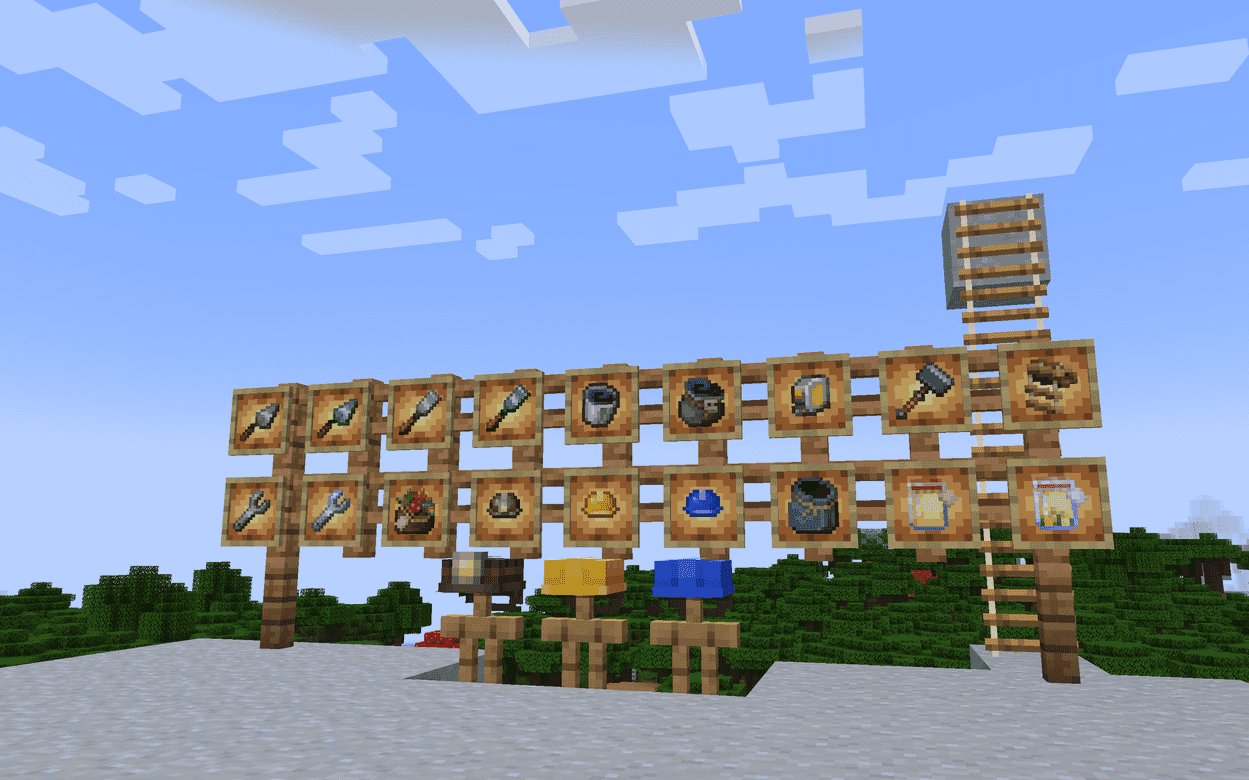
A collection of builder-focused tools — trowels, chisels, void storage, tape measure, hammer, wrench, and more.————————————————————THE JOB SITE KIT• Trowel — Slap down a random block from your hotbar. Decorative walls have never been so delightfully chaotic. • Chisel — Replace a block in-world with something from your hotbar. Legal placements only. The universe has rules; we just negotiate them. • Hammer — A 3×3 of honest demolition. Point. Swing. Regret nothing. • Block Wrench — Rotate, reorient, and (with State Tuner) cycle block states like you own the place. Because you do. • Tape Measure — Mark two corners. Get your dimensions. Pretend you planned this. • Grass Starter — Dirt to grass. Stone to nylium. Nature, but on a schedule.————————————————————CLEANUP CREW• Void Bucket — Water, lava, powder snow: gone. No souvenir fluids. Just absence. • Void Bundle — Stuff goes in. Stuff ceases to exist. (There’s a brief window for “wait—no—bring that back.”) • Item Magnet — Right-click to toggle. Nearby drops decide your inventory is home.————————————————————VERTICAL AMBITION• Rope Ladder — Deploy a hanging climbable column and commit to the bit. • Firm Ladder — Same idea as a ladder, but you climb it like you’ve had coffee.————————————————————SAFETY FIRST (REACH SECOND)• Hardhat — Extra block reach, plus a personal grudge against falling gravel that tries to end you. • Foreman Hardhat — More reach. More authority. Same energy. • Mining Helmet — Hardhat protections with a light that follows your head into the dark.————————————————————LIGHT INDUSTRY• Conveyor Belt — Move entities along. Signal strength sets the pace. • Fan — Push mobs (and friends) up to five blocks. Fall damage while lifting? Handled. You’re welcome. • Breaker — Feed it a tool. Pulse redstone. It finishes the block in front like a dispenser with a work ethic. • Placer — The Breaker’s optimistic twin. Blocks go in. Blocks go out. Civilization continues.————————————————————FIELD CURIOSITIES• Mob Bag — Catch a living creature. Carry it. Release it later. Dispensers approved. Ethics optional. • Flask o’ Enchanting — Bottle your XP (up to 100 levels). Cork it. Throw it. Watch the orbs remember who paid for them. • Corrupted Respawn Anchor — Charge it. Sneak-set spawn. Home is no longer a dimensionally exclusive club. Achievement: Anywhere’s Fine. • Corrupted Crying Obsidian — Born of tragedy on crying obsidian. Drips red. Looks haunted. Crafts into worse ideas.————————————————————ENCHANTMENT• State Tuner — For the Block Wrench. Stop rotating in circles and start cycling the properties that actually matter.
Installation
Install Forge or Fabric.
Drop the
.jarfile into your.minecraft/modsfolder.Launch and play!
Modpacks & Feedback
- Modpacks: 100% allowed! Drop a comment if you use it—we’d love to play your pack.
- Ideas? This mod is brand new. Share your feature suggestions below to help shape the next update!
Project description from CurseForge.
Pick your setup
MB Build Tools by Minecraft version and loader
Choose the version and loader you play, then open the matching release.
Check the dependencies, then try the file in a copied instance before changing a world you care about.
Recent files
MB Build Tools versions and loaders
mb-build-tools-1.0.1.jar
mb-build-tools-1.0.0.jar
9 Aug 2026
Client Source doesn’t say Server Source doesn’t say Dependencies No extras listed Listed on Release listing
Check the 1.20.1 · Fabric setup Fabric1.20.1 release
mb-build-tools-1.0.0.jar
22 Jul 2026
Client Source doesn’t say Server Source doesn’t say Dependencies No extras listed Listed on Release listing
Check the 1.20.1 · Fabric setup Fabric1.20.1 release
Looking for an older file? The official CurseForge project page is in Resources.
 mod
mod CurseForge + Modrinth · Minecraft
AntOS Computer | Quests + Guidebook
An immersive and fully functioning computer that provides an anternative to the stale and overused quest book and guide book
 mod
mod CurseForge · Minecraft
Cursed Fate: Technique Selection
Technique Selection mod for cursed fate, allows the player to choose through 60 cursed techniques
 mod
mod CurseForge · Minecraft
Tensura RPG System
An RPG progression addon for Tensura: Reincarnated with skill shops, attributes, racial evolution, mob progression, and a customizable player interface.