Minecraft version
Back to mods 
CurseForge · Minecraft mod
SpellActionbar
A 3-slot scroll action bar extendable with equipped books for Iron’s Spells ‘n Spellbooks. Equip scrolls, cast with hotkeys, and see spell icons, cooldowns, mana, and keybinds on a HUD above your hotbar. Scrolls are never consumed.
Choose a version Pick your version below, then grab the matching file.
Quick answer
Which SpellActionbar release should I use?
Latest stable file spell_actionbar-1.1.7-neoforge-1.21.1.jar
Game version 1.21.1
Loader NeoForge
SpellActionbar spell_actionbar-1.1.7-neoforge-1.21.1.jar targets 1.21.1 with NeoForge. The project page does not say whether this file belongs on the client, dedicated server, or both. No extra mods listed for this file.
Where it goes
Is SpellActionbar required on the client, server, or both?
The project page does not say whether this file belongs on the client, dedicated server, or both.
Client Source doesn’t say
Dedicated server Source doesn’t say
Loader for this release NeoForge
Required install it here Optional supported, not mandatory Not supported do not install here Source doesn’t say do not assume
The source does not explicitly classify this release as client-only or server-only.
What else does SpellActionbar spell_actionbar-1.1.7-neoforge-1.21.1.jar need?
spell_actionbar-1.1.7-neoforge-1.21.1.jar. Change the file and its required mods may change too.
This file does not list any required mods. Do not add a library just because a different file uses it.
This file does not list any required or optional mods.
Before you install it
Add SpellActionbar without breaking your instance.
Built for SpellActionbar spell_actionbar-1.1.7-neoforge-1.21.1.jar. Pick another file and the loader, install side or required mods may change.
- 01
Stick to this file
Use spell_actionbar-1.1.7-neoforge-1.21.1.jar. It targets 1.21.1 with NeoForge; another release may have different loader, side or dependency requirements.
- 02
Bring the mods it needs
This file does not list any required mods. Do not add a library just because a different file uses it.
- 03
Put it on the correct side
The project page does not say whether this file belongs on the client, dedicated server, or both.
- 04
Pick the file you checked
Use the “Get this file” button beside spell_actionbar-1.1.7-neoforge-1.21.1.jar. It opens that exact file at the source.
About this project
What does SpellActionbar add?
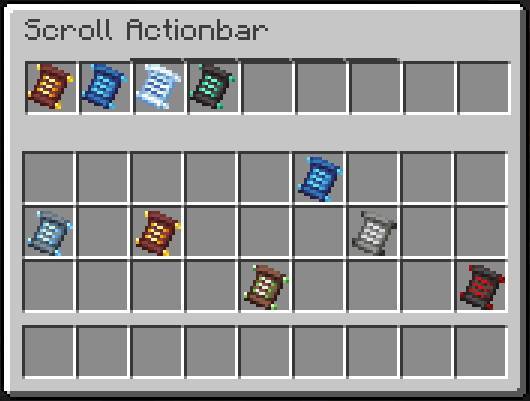
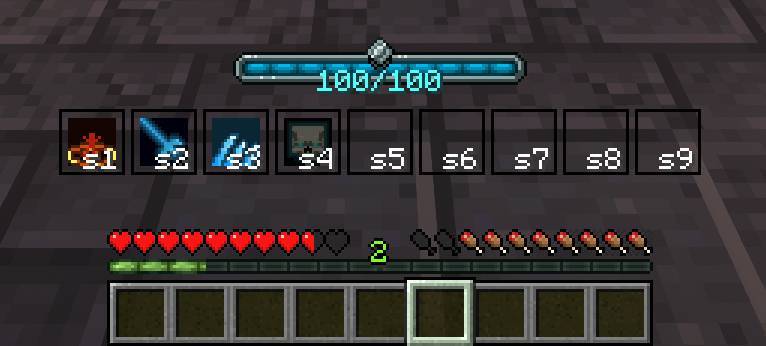
Spell Actionbar adds a dedicated spell bar for Iron's Spells 'n Spellbooks. Equip scrolls, cast with Iron's quick-cast keys, and see icons, cooldowns, mana, and keybind labels above your hotbar.
How it works
- Open the equip screen with the Spell Actionbar key (default
`) - Place Iron's scrolls into free actionbar slots
- Cast with Iron's quick-cast keybinds — the HUD shows the bound key on each slot
- Scrolls are not consumed when casting from the bar
Spellbooks & slot count
- With no Curios spellbook equipped, the bar has 3 slots
- An equipped spellbook sets the bar size to that book's max spell capacity
- Packed book spells lock into the leading slots — they cast from the book and cannot be moved in the equip screen
- Remaining slots are yours for player scrolls
- If the book shrinks or locks over a scroll slot, those scrolls are returned to your inventory (dropped if full)
HUD
- Spell icons, cooldown overlays, and affordability tinting
- Compact keybind labels (e.g.
Q,s1,cR) - Mana bar styled for this actionbar
- Iron's native spell bar and mana overlay are hidden so they don't stack
For pack makers & addons
- Other mods can open a custom equip UI via
SpellActionbarMenuOpeners - Cast gating helpers (
ActionbarCastGate) for addons such as Specs: Iron's Spells 'n Spellbooks Addon - HUD offset preview/persist APIs for companion HUD editors
Project description from CurseForge.
Pick your setup
SpellActionbar by Minecraft version and loader
Choose the version and loader you play, then open the matching release.
Minecraft version
1.20.1
1 loader buildCheck the dependencies, then try the file in a copied instance before changing a world you care about.
Recent files
SpellActionbar versions and loaders
spell_actionbar-1.1.7-neoforge-1.21.1.jar
26 Sept 2026
Client Source doesn’t say Server Source doesn’t say Dependencies No extras listed Listed on Release listing
Check the 1.21.1 · NeoForge setup 1.21.1NeoForge release
spell_actionbar-1.1.7-forge-1.20.1.jar
25 Sept 2026
Client Source doesn’t say Server Source doesn’t say Dependencies No extras listed Listed on Release listing
Check the 1.20.1 · Forge setup 1.20.1Forge release
spell_actionbar-1.1.6-forge-1.20.1.jar
22 Sept 2026
Client Source doesn’t say Server Source doesn’t say Dependencies No extras listed Listed on Release listing
Check the 1.20.1 · Forge setup 1.20.1Forge release
spell_actionbar-1.1.6-neoforge-1.21.1.jar
22 Sept 2026
Client Source doesn’t say Server Source doesn’t say Dependencies No extras listed Listed on Release listing
Check the 1.21.1 · NeoForge setup 1.21.1NeoForge release
spell_actionbar-1.1.5.jar
19 Sept 2026
Client Source doesn’t say Server Source doesn’t say Dependencies No extras listed Listed on Release listing
Check the 1.20.1 · Forge setup 1.20.1Forge release
spell_actionbar-1.1.5.jar
17 Sept 2026
Client Source doesn’t say Server Source doesn’t say Dependencies No extras listed Listed on Release listing
Check the 1.21.1 · NeoForge setup 1.21.1NeoForge release
spell_actionbar-1.1.4.jar
8 Aug 2026
Client Source doesn’t say Server Source doesn’t say Dependencies No extras listed Listed on Release listing
Check the 1.21.1 · NeoForge setup 1.21.1NeoForge release
spell_actionbar-1.1.3.jar
3 Aug 2026
Client Source doesn’t say Server Source doesn’t say Dependencies No extras listed Listed on Release listing
Check the 1.21.1 · NeoForge setup 1.21.1NeoForge release
spell_actionbar-1.1.2.jar
29 Jul 2026
Client Source doesn’t say Server Source doesn’t say Dependencies No extras listed Listed on Release listing
Check the 1.21.1 · NeoForge setup 1.21.1NeoForge release
spell_actionbar-1.1.1.jar
29 Jul 2026
Client Source doesn’t say Server Source doesn’t say Dependencies No extras listed Listed on Release listing
Check the 1.21.1 · NeoForge setup 1.21.1NeoForge release
spell_actionbar-1.1.0.jar
29 Jul 2026
Client Source doesn’t say Server Source doesn’t say Dependencies No extras listed Listed on Release listing
Check the 1.21.1 · NeoForge setup 1.21.1NeoForge release
spell_actionbar-1.0.3.jar
25 Jul 2026
Client Source doesn’t say Server Source doesn’t say Dependencies No extras listed Listed on Release listing
Check the 1.21.1 · NeoForge setup 1.21.1NeoForge release
Looking for an older file? The official CurseForge project page is in Resources.