GeckoLib Needed by Fowevah Tools fowevahtools-2.0.4.jar
requiredMatching file found Matched file: NeoForge 5.5.2
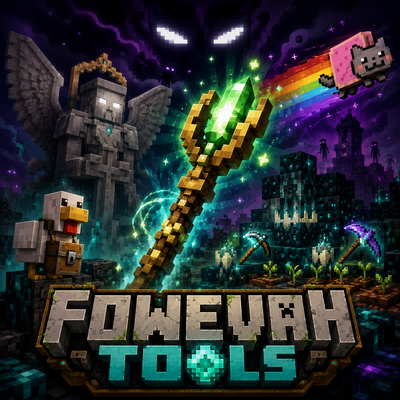
CurseForge · Minecraft mod
Adds fun, chaotic, and unusual features, including custom tools, companions, magical farming, base guardians, and playable antagonist mechanics, with bigger hunt and taming systems planned for the future. Suggestions are always welcome!
Quick answer
Fowevah Tools fowevahtools-2.0.4.jar targets 26.1.2 with NeoForge. The project page does not say whether this file belongs on the client, dedicated server, or both. All 1 required mods have matching files.
Where it goes
The project page does not say whether this file belongs on the client, dedicated server, or both.
The source does not explicitly classify this release as client-only or server-only.
fowevahtools-2.0.4.jar on 26.1.2. Every mod below is checked against that same setup.
Install GeckoLib first. We found matching files for this game-version and loader setup.
We only count dependency files that match this setup. A file for another loader does not fill the gap.
Before you install it
Built for Fowevah Tools fowevahtools-2.0.4.jar on 26.1.2. Pick another file and the loader, install side or required mods may change.
Use fowevahtools-2.0.4.jar. It targets 26.1.2 with NeoForge; another release may have different loader, side or dependency requirements.
Install GeckoLib first. We found matching files for this game-version and loader setup.
The project page does not say whether this file belongs on the client, dedicated server, or both.
Use the “Get this file” button beside fowevahtools-2.0.4.jar. It opens that exact file at the source.
About this project
Fowevah Tools is a Forge/NeoForge mod made mainly for my friends and my Minecraft server, but it is also for anyone who enjoys strange, magical, chaotic, and memorable tools in survival.
Instead of only adding normal weapons or simple utility items, this mod focuses on custom features with unique behavior: companion items, chaotic weapons, magical farming tools, shrine-based powers, base guardians, playable antagonist mechanics, and multiplayer-focused systems that create funny, scary, useful, or unexpected moments.
Current features include the Chicken Staff, a personal chicken companion with storage; the Nyan Cat Gun, a loud rainbow projectile weapon; the Sculkbound Harvester, a magical crop harvesting tool; the Stone Angel Guardian, a summonable base protector; and the Herobrine Playable Antagonist system, which lets a chosen player become a controlled horror role on the server.
Future updates are planned to expand Fowevah Tools with larger survival systems, especially monster hunting and taming. Players will eventually be able to hunt powerful creatures, weaken them, tame them, protect them, command them, ride them, and use their special abilities.
Fowevah Tools is meant to grow with the server and with player suggestions. If you have a cool, funny, chaotic, magical, scary, useful, or unusual idea, feel free to suggest it.
Some powerful items in Fowevah Tools are obtained through special shrine structures instead of normal crafting. Shrines are built in the world using specific blocks, then activated with the correct item.
Players can only be worthy of one major shrine weapon/power at a time. If a player is already worthy of Herobrine, Frostmourne, or the Devil Spear, they cannot claim another worthy relic until their current one is removed.
Shrines must also be built with real survival blocks. If a shrine is built using illegal blocks from the Admin Creative Key menu, the shrine will reject the activation.
Build a 3x3 base like this:
Sea Lantern | Prismarine | Sea LanternPrismarine | Gold Block | PrismarineSea Lantern | Prismarine | Sea Lantern
Then place:
Dark Prismarine
on top of the center Gold Block.
To activate the shrine, right-click the Dark Prismarine with a Water Bucket.
If accepted, the shrine fills with water, lightning strikes, and the Devil Spear appears above the shrine.
Build a 3x3 base like this:
Bone Block | Soul Sand | Bone BlockSoul Sand | Blue Ice | Soul SandBone Block | Soul Sand | Bone Block
Then place:
Soul Soil
on top of the center Blue Ice.
To activate the shrine, right-click the Soul Soil with Flint and Steel.
If accepted, soul fire appears, lightning strikes, and Frostmourne appears above the shrine.
Build a 3x3 base made entirely of:
Gold Blocks
Then place:
Netherrack
on top of the center Gold Block.
Around the Netherrack, place torches on the four straight sides:
Empty | Torch | EmptyTorch | Netherrack | TorchEmpty | Torch | Empty
The torches can be normal Torches, Soul Torches, or Redstone Torches.
To activate the shrine, right-click the Netherrack with Flint and Steel.
If accepted, fire appears, lightning strikes, and the Herobrine relic appears above the shrine. This allows a chosen player to become the Herobrine playable antagonist, as long as there is not already another active Herobrine vessel.
Project description from CurseForge.
Pick your setup
Choose the version and loader you play, then open the matching release.
Check the dependencies, then try the file in a copied instance before changing a world you care about.
Recent files
7 Jul 2026
6 Jul 2026
5 Jul 2026
4 Jul 2026
fowevahtools-2.1.0-26.1.2.jar
3 Jul 2026
Looking for an older file? The official CurseForge project page is in Resources.
 mod
Don’t mess with the server Play Minecraft with your friends in 2 clicks via P2P
 mod
Manual crafting tools for Create — press, grind, mix, and more by hand.
 mod
Transform vanilla mounts into fully customized combat companions with alloy armor, modular plugins, and unique skills.