Minecraft version
Back to mods 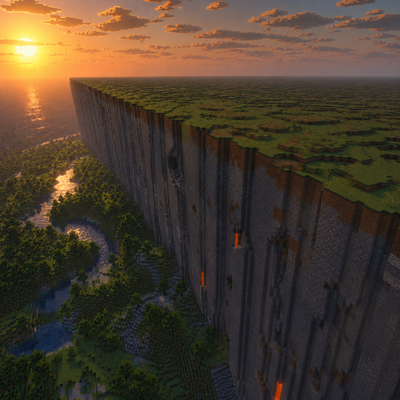
CurseForge · Minecraft mod
Farlands Reforged
Restores classic Far Lands-style terrain by preserving full Perlin-noise coordinate precision. Fabric & NeoForge.
Choose a version Pick your version below, then grab the matching file.
Quick answer
Which Farlands Reforged release should I use?
Latest stable file Farlands Reforged 0.3.1 (Fabric MC 26.3)
Game version 26.3
Loader Fabric
Farlands Reforged 0.3.1 (Fabric MC 26.3) targets 26.3 with Fabric. The project page does not say whether this file belongs on the client, dedicated server, or both. No extra mods listed for this file.
Where it goes
Is Farlands Reforged required on the client, server, or both?
The project page does not say whether this file belongs on the client, dedicated server, or both.
Client Source doesn’t say
Dedicated server Source doesn’t say
Loader for this release Fabric
Required install it here Optional supported, not mandatory Not supported do not install here Source doesn’t say do not assume
The source does not explicitly classify this release as client-only or server-only.
What else does Farlands Reforged 0.3.1 (Fabric MC 26.3) need?
Farlands Reforged 0.3.1 (Fabric MC 26.3). Change the file and its required mods may change too.
This file does not list any required mods. Do not add a library just because a different file uses it.
This file does not list any required or optional mods.
Before you install it
Add Farlands Reforged without breaking your instance.
Built for Farlands Reforged 0.3.1 (Fabric MC 26.3). Pick another file and the loader, install side or required mods may change.
- 01
Stick to this file
Use Farlands Reforged 0.3.1 (Fabric MC 26.3). It targets 26.3 with Fabric; another release may have different loader, side or dependency requirements.
- 02
Bring the mods it needs
This file does not list any required mods. Do not add a library just because a different file uses it.
- 03
Put it on the correct side
The project page does not say whether this file belongs on the client, dedicated server, or both.
- 04
Pick the file you checked
Use the “Get this file” button beside Farlands Reforged 0.3.1 (Fabric MC 26.3). It opens that exact file at the source.
About this project
What does Farlands Reforged add?
Farlands Reforged
Remember the Far Lands? Walk about 12.5 million blocks from spawn in an old Beta world and the terrain just fell apart. Stone walls as tall as the world, huge floating sheets stacked on top of each other, dark tunnels that went on forever. Beta 1.8 fixed it, and they've been gone ever since.
This mod puts them back. It isn't a "glitchy terrain" imitation. It uses the same overflowing noise Beta used, at the same coordinates, with the same grassy ledges and flooded caves.
There are no new blocks and you don't need a resource pack. The rest of your world generates like normal, and you won't notice anything until you get really, really far out.
What's in it
- The Edge Far Lands along X and Z, and the Corner Far Lands where they meet, starting at ±12,550,821. Keep going to ±25,101,648 and everything breaks a second time.
- Grass and trees on top, grass and dirt on every ledge, and water filling everything up to sea level, just like Beta.
- Mountains and caves stay normal until you reach the right distance. Nothing starts glitching early.
- Modern noodle caves don't cut through the Far Lands, so the walls stay solid. Regular caves are still there.
- Arriving doesn't freeze your server. All that water doesn't turn into a flood of block updates.
/farlandstells you where the Far Lands start and how far away you are. Operators also get/farlands set <threshold>and/farlands reset.- A hidden advancement, "…where am I?", for making it out there.
- Config options to turn off the terrain or the advancement.
Getting there
You could walk. It's only 12.5 million blocks. Or make a new world and run:
/tp @s 12550821 120 0
Then try the other axis, the negative side, and a corner:
/tp @s 0 120 12550821
/tp @s -12550821 120 0
/tp @s 12550821 120 12550821
Only chunks that haven't been generated yet turn into Far Lands. Places you've already explored won't change.
How it works
In Beta, the terrain noise multiplied your block coordinate by 171.103. Somewhere past 12.5 million blocks that number got too big for an integer, the math broke, and out came the Far Lands. Modern Minecraft still has that exact noise. It just wraps the coordinates so they never get that big.
Removing the wrap sounds like it should be enough, but it isn't. On its own, modern world generation treats the broken values as "deep underground", and you get a solid block of stone from bedrock to the build limit. So the mod also changes how terrain density is handled, how grass and dirt get placed, and how water fills in, and it keeps noodle caves out of the Far Lands. That's what makes it look like Beta again.
Versions
| Minecraft | Fabric | NeoForge | Forge |
|---|---|---|---|
| 26.3 | ✅ | ||
| 26.2 | ✅ | ✅ | ✅ |
| 26.1.2 | ✅ | ✅ | ✅ |
| 26.1.1 | ✅ | ✅ | ✅ |
| 26.1 | ✅ | ✅ | ✅ |
You'll need Java 25. On Fabric, Fabric Loader is all you need. No Fabric API.
Config
Fabric and NeoForge: config/farlandsreforged-common.toml Forge: config/farlandsreforged.properties
enableFarlandsTerrain = true
enableWhereAmIAdvancement = true
farlandsStartCoordinate = 12550821
farlandsStartCoordinate only moves the /farlands readout and the advancement. The terrain always breaks at the real spot, same as in Beta.
Credits
Big thanks to AdyTech99, whose MIT-licensed Farlands Reborn had the original idea of undoing the noise wrap.
MIT licensed. Made by Shigeo. The source is on GitHub.
Project description from CurseForge.
Pick your setup
Farlands Reforged by Minecraft version and loader
Choose the version and loader you play, then open the matching release.
Minecraft version
26.2
3 loader buildsMinecraft version
26.1.2
3 loader buildsMinecraft version
26.1.1
3 loader buildsMinecraft version
26.1
3 loader buildsCheck the dependencies, then try the file in a copied instance before changing a world you care about.
Recent files
Farlands Reforged versions and loaders
Farlands Reforged 0.3.1 (NeoForge MC 26.3)
farlandsreforged-0.3.1+mc26.3-neoforge.jar
17 Sept 2026
Client Source doesn’t say Server Source doesn’t say Dependencies No extras listed Listed on Release listing
Check the 26.3 · NeoForge setup NeoForge26.3 beta
Farlands Reforged 0.3.1 (Fabric MC 26.3)
farlandsreforged-0.3.1+mc26.3-fabric.jar
15 Sept 2026
Client Source doesn’t say Server Source doesn’t say Dependencies No extras listed Listed on Release listing
Check the 26.3 · Fabric setup Fabric26.3 release
Farlands Reforged 0.3.1 (Forge 26.1)
farlandsreforged-0.3.1+mc26.1-forge.jar
15 Sept 2026
Client Source doesn’t say Server Source doesn’t say Dependencies No extras listed Listed on Release listing
Check the 26.1 · Forge setup Forge26.1 release
Farlands Reforged 0.3.1 (NeoForge 26.1)
farlandsreforged-0.3.1+mc26.1-neoforge.jar
15 Sept 2026
Client Source doesn’t say Server Source doesn’t say Dependencies No extras listed Listed on Release listing
Check the 26.1 · NeoForge setup NeoForge26.1 release
Farlands Reforged 0.3.1 (Fabric 26.1)
farlandsreforged-0.3.1+mc26.1-fabric.jar
15 Sept 2026
Client Source doesn’t say Server Source doesn’t say Dependencies No extras listed Listed on Release listing
Check the 26.1 · Fabric setup Fabric26.1 release
Farlands Reforged 0.3.1 (Forge 26.1.1)
farlandsreforged-0.3.1+mc26.1.1-forge.jar
15 Sept 2026
Client Source doesn’t say Server Source doesn’t say Dependencies No extras listed Listed on Release listing
Check the 26.1.1 · Forge setup Forge26.1.1 release
Farlands Reforged 0.3.1 (NeoForge 26.1.1)
farlandsreforged-0.3.1+mc26.1.1-neoforge.jar
15 Sept 2026
Client Source doesn’t say Server Source doesn’t say Dependencies No extras listed Listed on Release listing
Check the 26.1.1 · NeoForge setup NeoForge26.1.1 release
Farlands Reforged 0.3.1 (Fabric 26.1.1)
farlandsreforged-0.3.1+mc26.1.1-fabric.jar
15 Sept 2026
Client Source doesn’t say Server Source doesn’t say Dependencies No extras listed Listed on Release listing
Check the 26.1.1 · Fabric setup Fabric26.1.1 release
Farlands Reforged 0.3.1 (Forge 26.1.2)
farlandsreforged-0.3.1+mc26.1.2-forge.jar
15 Sept 2026
Client Source doesn’t say Server Source doesn’t say Dependencies No extras listed Listed on Release listing
Check the 26.1.2 · Forge setup Forge26.1.2 release
Farlands Reforged 0.3.1 (NeoForge 26.1.2)
farlandsreforged-0.3.1+mc26.1.2-neoforge.jar
15 Sept 2026
Client Source doesn’t say Server Source doesn’t say Dependencies No extras listed Listed on Release listing
Check the 26.1.2 · NeoForge setup NeoForge26.1.2 release
Farlands Reforged 0.3.1 (Fabric 26.1.2)
farlandsreforged-0.3.1+mc26.1.2-fabric.jar
15 Sept 2026
Client Source doesn’t say Server Source doesn’t say Dependencies No extras listed Listed on Release listing
Check the 26.1.2 · Fabric setup Fabric26.1.2 release
Farlands Reforged 0.3.1 (Forge 26.2)
farlandsreforged-0.3.1+mc26.2-forge.jar
15 Sept 2026
Client Source doesn’t say Server Source doesn’t say Dependencies No extras listed Listed on Release listing
Check the 26.2 · Forge setup Forge26.2 release
Looking for an older file? The official CurseForge project page is in Resources.
 mod
mod CurseForge · Minecraft
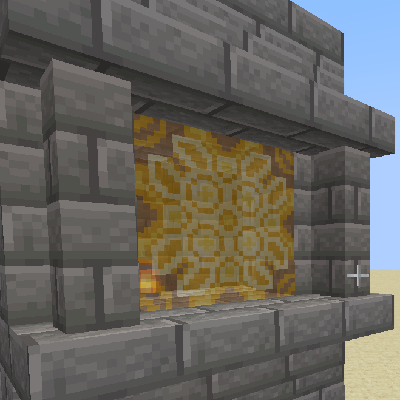
Glazed Terracotta Stained Glass
A light mod that adds terracotta-patterned stained glass without replacing vanilla colored glass.
 mod
mod CurseForge · Minecraft
Woven In Time
Woven in Time adds 14 historical tapestries inspired by centuries of art, warfare, royalty and folklore.
 mod
mod CurseForge + Modrinth · Minecraft
MineTuner HUD
Highly customizable performance HUD for Minecraft.