Minecraft version
Back to mods 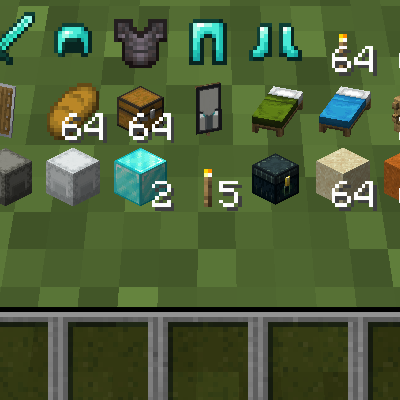
CurseForge · Minecraft mod
InvHUD
See your whole inventory at a glance — no more opening your bag mid-fight.
Choose a version Pick your version below, then grab the matching file.
Quick answer
Which InvHUD release should I use?
Latest stable file InventoryHUD-neoforge-26.1.jar
Game version 26.1, 26.1.1, 26.1.2
Loader NeoForge
InvHUD InventoryHUD-neoforge-26.1.jar targets 26.1, 26.1.1, 26.1.2 with NeoForge. The project page does not say whether this file belongs on the client, dedicated server, or both. No extra mods listed for this file.
Where it goes
Is InvHUD required on the client, server, or both?
The project page does not say whether this file belongs on the client, dedicated server, or both.
Client Source doesn’t say
Dedicated server Source doesn’t say
Loader for this release NeoForge
Required install it here Optional supported, not mandatory Not supported do not install here Source doesn’t say do not assume
The source does not explicitly classify this release as client-only or server-only.
What else does InvHUD InventoryHUD-neoforge-26.1.jar need?
InventoryHUD-neoforge-26.1.jar. Change the file and its required mods may change too.
This file does not list any required mods. Do not add a library just because a different file uses it.
This file does not list any required or optional mods.
Before you install it
Add InvHUD without breaking your instance.
Built for InvHUD InventoryHUD-neoforge-26.1.jar. Pick another file and the loader, install side or required mods may change.
- 01
Stick to this file
Use InventoryHUD-neoforge-26.1.jar. It targets 26.1, 26.1.1, 26.1.2 with NeoForge; another release may have different loader, side or dependency requirements.
- 02
Bring the mods it needs
This file does not list any required mods. Do not add a library just because a different file uses it.
- 03
Put it on the correct side
The project page does not say whether this file belongs on the client, dedicated server, or both.
- 04
Pick the file you checked
Use the “Get this file” button beside InventoryHUD-neoforge-26.1.jar. It opens that exact file at the source.
About this project
What does InvHUD add?
🎒 InventoryHUD
See your whole inventory at a glance — no more opening your bag mid-fight.
InventoryHUD shows your main inventory (the 27 backpack slots) as a clean, always-on overlay, so you can keep an eye on your items, food and blocks without ever pressing E. Lightweight, fully configurable, and completely client-side.
✨ Features
- 🎒 Live inventory overlay — your 3 main inventory rows rendered right on the HUD, with stack counts
- 🖱️ Drag to move — place it anywhere on screen
- 🔍 Resize freely — scroll or use buttons (25% – 300%)
- 👁️ Instant toggle — show/hide with a single key
- 💬 Renders behind chat — your chat and hotbar stay fully readable
- 💾 Settings are saved — position, size and on/off persist across restarts
- 🌐 English & Japanese built in
- 🪶 Client-side only — works on vanilla servers, Realms and multiplayer; nothing to install server-side
⌨️ Controls
Rebindable in Options → Controls → "InventoryHUD".
| Key | Action |
|---|---|
| K | Open the InventoryHUD settings screen |
| N | Toggle the HUD on / off |
⚙️ Configuration
Press K to open settings, where you can:
- Toggle the display ON / OFF
- Change the size (− / +)
- Drag the inventory grid to reposition it
- Scroll over it to resize
- Reset the position to default
📦 Requirements
- Fabric builds require Fabric API.
- Forge / NeoForge builds have no dependencies.
⚠️ Download the file that matches both your Minecraft version and your mod loader.
🧩 Supported versions
- Fabric: 1.20.1 / 1.20.2 / 1.20.4 / 1.20.6 / 1.21.1 / 1.21.3 / 1.21.4 / 1.21.5 / 1.21.8 / 1.21.10 / 1.21.11
- Forge: 1.20.1 / 1.20.2 / 1.20.4 / 1.20.6
- NeoForge: 1.21.1 / 1.21.3 / 1.21.4 / 1.21.5 / 1.21.8 / 1.21.10 / 1.21.11 / 26.1
❤️ Support
If you enjoy InventoryHUD, you can support development on Ko-fi — thank you!
Project description from CurseForge.
Pick your setup
InvHUD by Minecraft version and loader
Choose the version and loader you play, then open the matching release.
Minecraft version
26.1.1
1 loader buildMinecraft version
26.1
1 loader buildMinecraft version
1.21.11-snapshot
2 loader buildsMinecraft version
1.21.11
2 loader buildsMinecraft version
1.21.10
2 loader buildsMinecraft version
1.21.8
2 loader buildsMinecraft version
1.21.5-Snapshot
2 loader buildsMinecraft version
1.21.5
2 loader buildsMinecraft version
1.21.4-Snapshot
2 loader buildsMinecraft version
1.21.4
2 loader buildsMinecraft version
1.21.3
2 loader buildsShowing the newest 12 of 21 game versions. Older files are in the list below.
Check the dependencies, then try the file in a copied instance before changing a world you care about.
Recent files
InvHUD versions and loaders
InventoryHUD-neoforge-26.1.jar
24 Jun 2026
Client Source doesn’t say Server Source doesn’t say Dependencies No extras listed Listed on Release listing
Check the 26.1.2 · NeoForge setup NeoForge26.126.1.126.1.2 release
InventoryHUD-neoforge-1.21.11.jar
24 Jun 2026
Client Source doesn’t say Server Source doesn’t say Dependencies No extras listed Listed on Release listing
Check the 1.21.11-snapshot · NeoForge setup NeoForge1.21.11-snapshot1.21.11 release
InventoryHUD-neoforge-1.21.10.jar
24 Jun 2026
Client Source doesn’t say Server Source doesn’t say Dependencies No extras listed Listed on Release listing
Check the 1.21.10 · NeoForge setup NeoForge1.21.10 release
InventoryHUD-neoforge-1.21.8.jar
24 Jun 2026
Client Source doesn’t say Server Source doesn’t say Dependencies No extras listed Listed on Release listing
Check the 1.21.8 · NeoForge setup 1.21.8NeoForge release
InventoryHUD-neoforge-1.21.5.jar
24 Jun 2026
Client Source doesn’t say Server Source doesn’t say Dependencies No extras listed Listed on Release listing
Check the 1.21.5-Snapshot · NeoForge setup 1.21.51.21.5-SnapshotNeoForge release
InventoryHUD-neoforge-1.21.4.jar
24 Jun 2026
Client Source doesn’t say Server Source doesn’t say Dependencies No extras listed Listed on Release listing
Check the 1.21.4-Snapshot · NeoForge setup 1.21.4NeoForge1.21.4-Snapshot release
InventoryHUD-neoforge-1.21.3.jar
24 Jun 2026
Client Source doesn’t say Server Source doesn’t say Dependencies No extras listed Listed on Release listing
Check the 1.21.3 · NeoForge setup 1.21.3NeoForge release
InventoryHUD-neoforge-1.21.1.jar
24 Jun 2026
Client Source doesn’t say Server Source doesn’t say Dependencies No extras listed Listed on Release listing
Check the 1.21.1-Snapshot · NeoForge setup 1.21.1-Snapshot1.21.1NeoForge release
InventoryHUD-forge-1.20.6.jar
24 Jun 2026
Client Source doesn’t say Server Source doesn’t say Dependencies No extras listed Listed on Release listing
Check the 1.20.6 · Forge setup Forge1.20.6 release
InventoryHUD-forge-1.20.4.jar
24 Jun 2026
Client Source doesn’t say Server Source doesn’t say Dependencies No extras listed Listed on Release listing
Check the 1.20.4 · Forge setup Forge1.20.4 release
InventoryHUD-forge-1.20.2.jar
24 Jun 2026
Client Source doesn’t say Server Source doesn’t say Dependencies No extras listed Listed on Release listing
Check the 1.20.2-Snapshot · Forge setup 1.20.2-Snapshot1.20.2Forge release
InventoryHUD-forge-1.20.1.jar
24 Jun 2026
Client Source doesn’t say Server Source doesn’t say Dependencies No extras listed Listed on Release listing
Check the 1.20.1 · Forge setup 1.20.1Forge release
Looking for an older file? The official CurseForge project page is in Resources.
 mod
CurseForge + Modrinth · Minecraft
LDLib
LDLib is a libarary mod for custom rendering, modular gui.
 mod
CurseForge · Minecraft
Last One Core
Makes Confluence prefixes configurable: editable prefix pools, compatible attributes, item eligibility, prefix selection, and rarity/crit behavior.
 mod
CurseForge · Minecraft
PvP Lives
Flexible lives system for PVP Servers for a hardcore or hardcore-lite experience.