Minecraft version
Back to mods 
CurseForge · Minecraft mod
AMS Pings
Lightweight multiplayer pings for locations, players, and shared items.
Choose a version Pick your version below, then grab the matching file.
Quick answer
Which AMS Pings release should I use?
Latest stable file ams-pings-forge-1.0.0.jar
Game version 1.20.2, 1.20.1, 1.20.4
Loader Forge
AMS Pings ams-pings-forge-1.0.0.jar targets 1.20.2, 1.20.1, 1.20.4 with Forge. The project page does not say whether this file belongs on the client, dedicated server, or both. No extra mods listed for this file.
Where it goes
Is AMS Pings required on the client, server, or both?
The project page does not say whether this file belongs on the client, dedicated server, or both.
Client Source doesn’t say
Dedicated server Source doesn’t say
Loader for this release Forge
Required install it here Optional supported, not mandatory Not supported do not install here Source doesn’t say do not assume
The source does not explicitly classify this release as client-only or server-only.
What else does AMS Pings ams-pings-forge-1.0.0.jar need?
ams-pings-forge-1.0.0.jar. Change the file and its required mods may change too.
This file does not list any required mods. Do not add a library just because a different file uses it.
This file does not list any required or optional mods.
Before you install it
Add AMS Pings without breaking your instance.
Built for AMS Pings ams-pings-forge-1.0.0.jar. Pick another file and the loader, install side or required mods may change.
- 01
Stick to this file
Use ams-pings-forge-1.0.0.jar. It targets 1.20.2, 1.20.1, 1.20.4 with Forge; another release may have different loader, side or dependency requirements.
- 02
Bring the mods it needs
This file does not list any required mods. Do not add a library just because a different file uses it.
- 03
Put it on the correct side
The project page does not say whether this file belongs on the client, dedicated server, or both.
- 04
Pick the file you checked
Use the “Get this file” button beside ams-pings-forge-1.0.0.jar. It opens that exact file at the source.
About this project
What does AMS Pings add?
AMS Pings adds lightweight multiplayer pings to Minecraft.
Ping your own position, point at a location in the world, or ping a hovered item from an inventory, chest, furnace, or other container. Pings show compact HUD markers with distance in meters and chat coordinates, so other players can quickly see where to go or what item was called out.
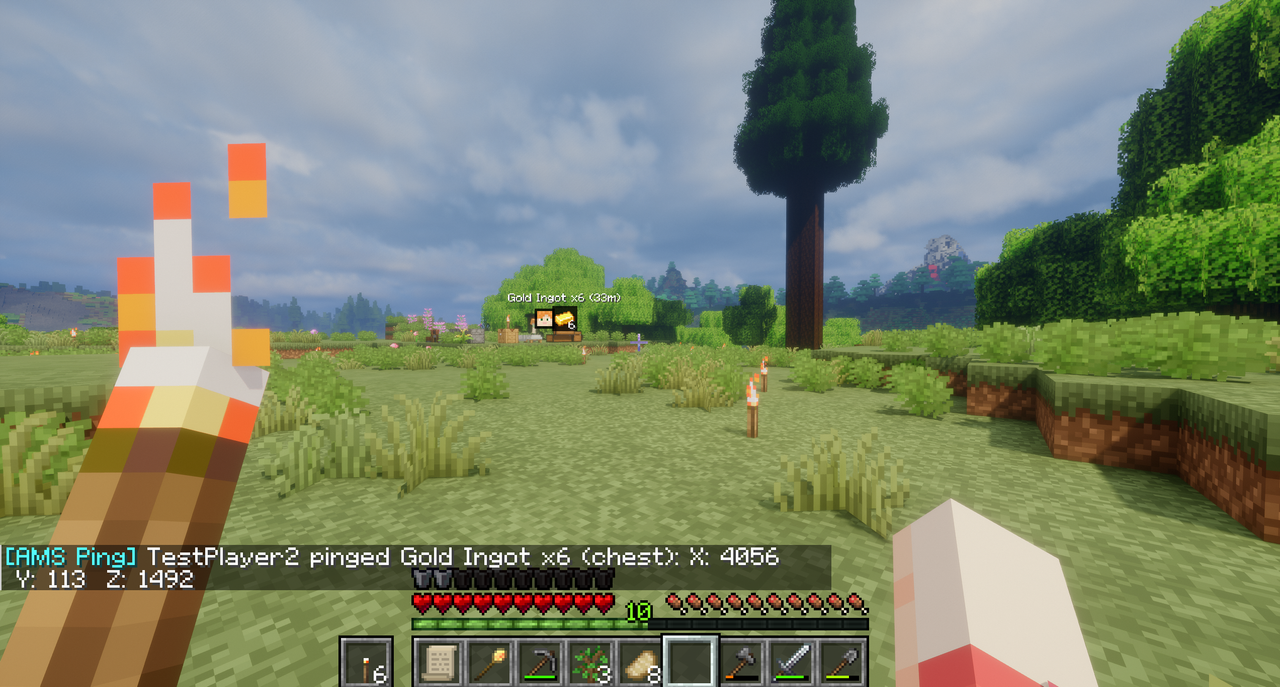
Default hotkeys:
V- ping your own location.B- ping the location you are looking at.Bwhile hovering an item in an inventory/container screen - ping that item.
Hotkeys can be changed in Options -> Controls -> Key Binds under AMS Pings.
Configuration is generated after first launch:
pingDurationMsdefault5000: how long pings stay visible.pingCooldownMsdefault5000: cooldown between pings per player.targetRangeBlocksdefault160: maximum distance for pinging the place you are looking at.markerSizedefault7: marker square size before HUD scaling.showDistancedefaulttrue: shows distance in meters.showOffscreenMarkersdefaulttrue: clamps offscreen pings to the screen edge.
Features
- Self-location pings.
- World location pings for the place you are looking at.
- Hovered item pings from inventories and containers.
- Player faces and item icons where useful.
- Distance in meters.
- Chat coordinates with
X,Y, andZ. - Offscreen edge markers.
- Configurable duration, cooldown, range, marker size, distance text, and edge markers.
Installation
Install the jar on the server and every client that should send or see pings.
Compatibility Notes
- Distant Horizons-only visual terrain may not be pingable because the mod needs an actual in-game surface to detect.
If you enjoy this mod, consider supporting my work.
Project description from CurseForge.
Pick your setup
AMS Pings by Minecraft version and loader
Choose the version and loader you play, then open the matching release.
Minecraft version
1.20.6
1 loader buildMinecraft version
1.20.5
1 loader buildMinecraft version
1.20.4
2 loader buildsMinecraft version
1.20.3
2 loader buildsMinecraft version
1.20.2
2 loader buildsMinecraft version
1.20.1
2 loader buildsCheck the dependencies, then try the file in a copied instance before changing a world you care about.
Recent files
AMS Pings versions and loaders
ams-pings-forge-1.0.0.jar
ams-pings-1.0.0.jar
26 Jun 2026
Client Source doesn’t say Server Source doesn’t say Dependencies No extras listed Listed on Release listing
Check the 1.20.4 · Forge setup 1.20.21.20.1Forge1.20.4 release
ams-pings-fabric-1.0.0.jar
ams-pings-1.0.0.jar
26 Jun 2026
Client Source doesn’t say Server Source doesn’t say Dependencies No extras listed Listed on Release listing
Check the 1.21.1 · Fabric setup Fabric1.21.1 release
ams-pings-fabric-1.0.0.jar
ams-pings-1.0.0.jar
26 Jun 2026
Client Source doesn’t say Server Source doesn’t say Dependencies No extras listed Listed on Release listing
Check the 1.20.6 · Fabric setup 1.20.2Fabric1.20.51.20.1 release
ams-pings-neoforge-1.0.0.jar
ams-pings-1.0.0.jar
24 Jun 2026
Client Source doesn’t say Server Source doesn’t say Dependencies No extras listed Listed on Release listing
Check the 1.21.1 · NeoForge setup 1.21.1NeoForge release
Looking for an older file? The official CurseForge project page is in Resources.
 mod
CurseForge + Modrinth · Minecraft
Enchantment Core
A data-driven enchantment component and utility library.
 mod
CurseForge · Minecraft
NULLzone
Introduces a multiblock structure that keeps monsters from spawning in inside the defined area.
 mod
CurseForge · Minecraft
Boss Tweaks
Fully heal Bosses when all nearby players are defeated, add Bossbars to entities that lack one... And more!