Minecraft version
Back to mods 
CurseForge · Minecraft mod
Contents Director
Runtime mod and file installer for Minecraft modpacks.
Choose a version Pick your version below, then grab the matching file.
Quick answer
Which Contents Director release should I use?
Latest stable file v1.1.0
Game version 1.10, 1.10.1, 1.10.2
Loader Forge
Contents Director v1.1.0 targets 1.10, 1.10.1, 1.10.2 with Forge. Installation on the client is optional. Installation on the dedicated server is optional. No extra mods listed for this file.
Where it goes
Is Contents Director required on the client, server, or both?
Installation on the client is optional. Installation on the dedicated server is optional.
Client Optional
Dedicated server Optional
Loader for this release Forge
Required install it here Optional supported, not mandatory Not supported do not install here Source doesn’t say do not assume
The source marks this as usable on both the client and server.
What else does Contents Director v1.1.0 need?
v1.1.0. Change the file and its required mods may change too.
This file does not list any required mods. Do not add a library just because a different file uses it.
This file does not list any required or optional mods.
Before you install it
Add Contents Director without breaking your instance.
Built for Contents Director v1.1.0. Pick another file and the loader, install side or required mods may change.
- 01
Stick to this file
Use v1.1.0. It targets 1.10, 1.10.1, 1.10.2 with Forge; another release may have different loader, side or dependency requirements.
- 02
Bring the mods it needs
This file does not list any required mods. Do not add a library just because a different file uses it.
- 03
Put it on the correct side
Installation on the client is optional. Installation on the dedicated server is optional.
- 04
Pick the file you checked
Use the “Get this file” button beside v1.1.0. It opens that exact file at the source.
About this project
What does Contents Director add?
Contents Director
⚠️ CurseForge Distribution Discontinued
This project is no longer maintained on CurseForge.
New releases of Contents Director have not been approved by CurseForge moderation. As a result, no further updates will be published here.
Contents Director is still actively maintained. The version available on CurseForge is outdated.
For the latest versions, please refer to the official distribution links at the bottom of this page.
⚠️ CurseForgeでの配布終了について
このプロジェクトはCurseForge上での更新を終了しました。
Contents Directorの新しいバージョンがCurseForgeの審査を通過できないため、今後このページでの更新は行いません。
Contents Director自体の開発・メンテナンスは継続しています。 CurseForgeで公開されているバージョンは古いものです。
最新版については、ページ末尾の公式配布先をご確認ください。
Contents Director is a runtime mod and file installer for Minecraft modpacks. It downloads and installs files that cannot be bundled directly with a modpack, using configuration supplied by the pack author.
It is intended primarily for modpack authors who need a reproducible way to fetch optional, external, or provider-hosted files when a pack starts.
Features
- Download files from direct URLs
- Install files from CurseForge and Modrinth references
- Verify downloaded files with hashes
- Stage downloads before replacing existing files
- Support optional user-selectable components
- Supersede, disable, move, rename, or delete old files
- Extract ZIP-compatible archives
- Load bundled and remote configuration
- Filter entries by client/server side
- Check modpack versions
- Provide a manual CurseForge download fallback on graphical clients
- Localized UI with English, Japanese, and Simplified Chinese support
Compatibility
The distributed project file is the combined shaded artifact:
ContentsDirector-<version>-all.jar
It contains both the LaunchWrapper and ModLauncher integrations and is the recommended artifact for normal use.
Contents Director supports:
- Forge 1.7.10–1.12.2 through LaunchWrapper
- Forge and compatible ModLauncher-era loaders
- NeoForge through Minecraft 1.21.8
Known limitation: NeoForge 1.21.9 and newer changed loader behavior and are not currently supported.
Contents Director targets Java 8 bytecode for runtime compatibility.
Installation
Place the Contents Director -all.jar in the modpack's normal mods directory.
For LaunchWrapper-era Forge (1.7.10–1.12.2), add the following launch argument:
--tweakClass com.juanmuscaria.modpackdirector.launchwrapper.ModpackDirectorTweaker
ModLauncher-era environments discover the integration automatically through the transformation service.
Configuration
Configuration files normally belong in:
config/mod-director/
A minimal direct-download entry, for example example.url.json, looks like:
{
  "url": "https://example.invalid/example-mod.jar",
  "fileName": "example-mod.jar"
}
Contents Director supports several configuration types:
*.url.json— direct downloads*.curse.json— CurseForge files*.modrinth.json— Modrinth versions*.modify.json— move, rename, disable, or delete files*.bundle.json— combine multiple entries*.remote.json— load configuration from HTTP(S)modpack.json— pack-level UI and version settings
For the complete format and examples, see the configuration documentation.
Safety and reliability
Downloads are staged before being committed to the live installation. Configured hashes are checked before replacement, and failed staging or validation does not overwrite an existing working file.
Archive extraction and file modification operations validate paths to prevent escaping the intended installation directory.
Documentation
Credits
Contents Director continues the work of:
Official Distribution / 公式配布先
The latest releases of Contents Director are available on the following platforms.
Contents Directorの最新版は以下のプラットフォームで公開しています。
Project description from CurseForge.
Pick your setup
Contents Director by Minecraft version and loader
Choose the version and loader you play, then open the matching release.
Minecraft version
26.2
2 loader buildsMinecraft version
26.1.2
2 loader buildsMinecraft version
26.1.1
2 loader buildsMinecraft version
26.1
2 loader buildsMinecraft version
1.21.11
2 loader buildsMinecraft version
1.21.10
2 loader buildsMinecraft version
1.21.9
2 loader buildsMinecraft version
1.21.8
2 loader buildsMinecraft version
1.21.7
2 loader buildsMinecraft version
1.21.6
2 loader buildsMinecraft version
1.21.5
2 loader buildsShowing the newest 12 of 76 game versions. Older files are in the list below.
Check the dependencies, then try the file in a copied instance before changing a world you care about.
Recent files
Contents Director versions and loaders
v1.2.0-beta
ContentsDirector-1.2.0-beta-all.jar
29 Sept 2026
Client Optional Server Optional Dependencies No extras listed Listed on Release listing
Check the 26.3 · Forge setup 1.101.10.11.10.21.11 beta
v1.1.0
ContentsDirector-1.1.0-all.jar
26 Sept 2026
Client Optional Server Optional Dependencies No extras listed Listed on Release listing
Check the 26.3 · Forge setup 1.101.10.11.10.21.11 release
Contents Director v1.0.0
ContentsDirector-1.0.0-all.jar
25 Jun 2026
Client Source doesn’t say Server Source doesn’t say Dependencies No extras listed Listed on Release listing
Check the 26.3 · Forge setup 1.16.31.13.11.9.31.8.7 release
Looking for an older file? The official CurseForge project page is in Resources.
 mod
CurseForge + Modrinth · Minecraft
Runeborn | Soulslike RPG progression
A soulslike RPG overhaul: earn runes, level eight attributes at Ember Shrines, wield 74 scaling armaments and hunt seven Sovereigns.
 mod
CurseForge + Modrinth · Minecraft
Tinkers' Gadgets
A lightweight Tinkers' Construct addon featuring tools, new materials, and exclusive projectile traits.
 mod
CurseForge · Minecraft
Target Highlight
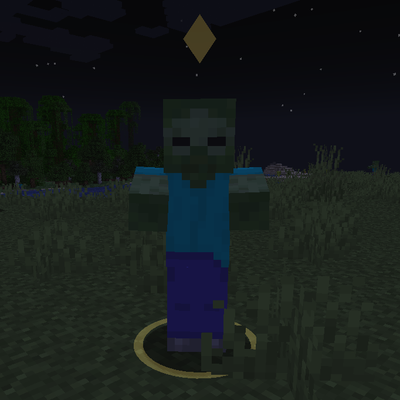
Marks the enemy nearest your crosshair with a soft ground ring and a small marker above its head. Client-side only and fully configurable.