Minecraft version
Back to mods 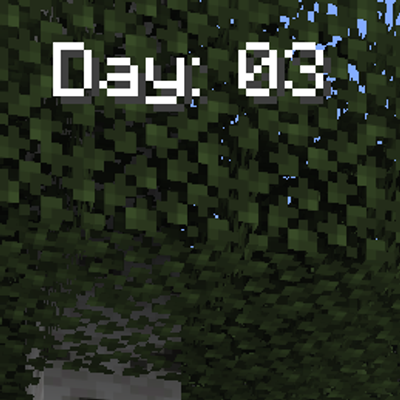
CurseForge · Minecraft mod
DaysCounter
Day Counter** is a clean and lightweight Fabric mod that adds a simple day counter to your Minecraft HUD.
Choose a version Pick your version below, then grab the matching file.
Quick answer
Which DaysCounter release should I use?
Latest stable file sg-day-counter-1.0.1.jar
Game version 26.3
Loader Fabric
DaysCounter sg-day-counter-1.0.1.jar targets 26.3 with Fabric. The project page does not say whether this file belongs on the client, dedicated server, or both. No extra mods listed for this file.
Where it goes
Is DaysCounter required on the client, server, or both?
The project page does not say whether this file belongs on the client, dedicated server, or both.
Client Source doesn’t say
Dedicated server Source doesn’t say
Loader for this release Fabric
Required install it here Optional supported, not mandatory Not supported do not install here Source doesn’t say do not assume
The source does not explicitly classify this release as client-only or server-only.
What else does DaysCounter sg-day-counter-1.0.1.jar need?
sg-day-counter-1.0.1.jar. Change the file and its required mods may change too.
This file does not list any required mods. Do not add a library just because a different file uses it.
This file does not list any required or optional mods.
Before you install it
Add DaysCounter without breaking your instance.
Built for DaysCounter sg-day-counter-1.0.1.jar. Pick another file and the loader, install side or required mods may change.
- 01
Stick to this file
Use sg-day-counter-1.0.1.jar. It targets 26.3 with Fabric; another release may have different loader, side or dependency requirements.
- 02
Bring the mods it needs
This file does not list any required mods. Do not add a library just because a different file uses it.
- 03
Put it on the correct side
The project page does not say whether this file belongs on the client, dedicated server, or both.
- 04
Pick the file you checked
Use the “Get this file” button beside sg-day-counter-1.0.1.jar. It opens that exact file at the source.
About this project
What does DaysCounter add?
Day Counter
Day Counter is a clean and lightweight Fabric mod that adds a simple day counter to your Minecraft HUD.
Instead of opening the F3 debug screen just to check the current day, this mod displays the day directly on your screen in a clean format like:
Day: 01
This is useful for survival players, hardcore worlds, Minecraft 100 Days challenges, multiplayer SMPs, content creators, and anyone who wants an easy way to track world progress.
Features
Shows the current Minecraft day on your HUD
Clean display format: Day: 01
Works in singleplayer and multiplayer when installed on the client
Perfect for Hardcore, Survival, SMP, and 100 Days challenges
Press K to cycle the HUD position
Supports multiple screen positions:
Top Left
Top Center
Top Right
Center Left
Center
Center Right
Bottom Left
Bottom Center
Bottom Right
Optional HUD toggle key through Minecraft Controls
Config file support for changing text, color, margin, shadow, background, and position
Lightweight and simple, with no unnecessary extra features
Config
After launching the game once, the config file will be created here:
.minecraft/config/sg-day-counter.json
You can edit options like:
Enable or disable the HUD
Change the position
Change the prefix text
Change minimum digits
Change text color
Enable or disable shadow
Enable or disable background
Adjust margins
Controls
Default key:
K — Cycle HUD position
The toggle key is available in Minecraft keybind settings but is unbound by default. You can set it from:
Options → Controls → Key Binds → SG Day Counter
Recommended For
Minecraft Survival
Hardcore Minecraft
100 Days Challenges
SMP gameplay
YouTube recordings
Live streams
Players who want a clean day counter without using F3
Project description from CurseForge.
Pick your setup
DaysCounter by Minecraft version and loader
Choose the version and loader you play, then open the matching release.
Minecraft version
26.2
1 loader buildCheck the dependencies, then try the file in a copied instance before changing a world you care about.
Recent files
DaysCounter versions and loaders
sg-day-counter-1.0.1.jar
17 Sept 2026
Client Source doesn’t say Server Source doesn’t say Dependencies No extras listed Listed on Release listing
Check the 26.3 · Fabric setup Fabric26.3 release
sg-day-counter-1.0.0.jar
6 Jul 2026
Client Source doesn’t say Server Source doesn’t say Dependencies No extras listed Listed on Release listing
Check the 26.2 · Fabric setup Fabric26.2 release
sg-day-counter-1.0.0.jar
26 Jun 2026
Client Source doesn’t say Server Source doesn’t say Dependencies No extras listed Listed on Release listing
Check the 26.2 · Fabric setup Fabric26.2 release
Looking for an older file? The official CurseForge project page is in Resources.
 mod
mod CurseForge · Minecraft
Spice of Life: Carrot Edition
A mod based around food that rewards the player instead of punishing them for discovering new foods!
 mod
mod CurseForge · Minecraft
Speedrun Switch
Speedrunning Minecraft, but Every 10 Minutes the Player Changes!
 mod
mod CurseForge · Minecraft
Just Enough Professions (JEP)
A JEI addon that adds profession workstations