Minecraft version
Back to mods 
CurseForge · Minecraft mod
Biome Rings
Mod for biome control by distance of the world center
Choose a version Pick your version below, then grab the matching file.
Quick answer
Which Biome Rings release should I use?
Latest stable file biome-rings-1.0.1.jar
Game version 1.21.1
Loader Fabric
Biome Rings biome-rings-1.0.1.jar targets 1.21.1 with Fabric. The project page does not say whether this file belongs on the client, dedicated server, or both. No extra mods listed for this file.
Where it goes
Is Biome Rings required on the client, server, or both?
The project page does not say whether this file belongs on the client, dedicated server, or both.
Client Source doesn’t say
Dedicated server Source doesn’t say
Loader for this release Fabric
Required install it here Optional supported, not mandatory Not supported do not install here Source doesn’t say do not assume
The source does not explicitly classify this release as client-only or server-only.
What else does Biome Rings biome-rings-1.0.1.jar need?
biome-rings-1.0.1.jar. Change the file and its required mods may change too.
This file does not list any required mods. Do not add a library just because a different file uses it.
This file does not list any required or optional mods.
Before you install it
Add Biome Rings without breaking your instance.
Built for Biome Rings biome-rings-1.0.1.jar. Pick another file and the loader, install side or required mods may change.
- 01
Stick to this file
Use biome-rings-1.0.1.jar. It targets 1.21.1 with Fabric; another release may have different loader, side or dependency requirements.
- 02
Bring the mods it needs
This file does not list any required mods. Do not add a library just because a different file uses it.
- 03
Put it on the correct side
The project page does not say whether this file belongs on the client, dedicated server, or both.
- 04
Pick the file you checked
Use the “Get this file” button beside biome-rings-1.0.1.jar. It opens that exact file at the source.
About this project
What does Biome Rings add?
Biome Rings
This mod aims to provide a json file to force the generation of a biome or a list of biomes in a specified range of the overworld center.
This mod DO NOT changes the terrain, it only forces the biome settings, what affects mob spawnings, structure generations and natural enviroment (trees, grass, flowers, etc).
It only works on new generations, this mod do not overwrites already existing chunks.
Note that this mod was only tested in vanilla 1.21.1, and probably has little to no compatiblity with any other custom biomes/terrain generation mods.
I (the author) have no plans of updating this mod any further than bugfixes, optimization and/or config file QoL. If you want to add features or compatibilities you are strongly incentivated to fork/copy the repository and do your version.
How to use / What it can do
The config file is located in
~/config/biomerings.jsonNote that the config file will be auto-generated with an example code in the config.
the parameters in the config are:
| Key | Description | Default |
|---|---|---|
| roundness | The deformation of the rings, where 1.0 is perfectly circular | 0.7 |
| noise | The repetition of the "stripes" of biome when there are many in the same range, a bigger number means more visible "stripes" | 0.4 |
| global_blacklist | The list of biomes that are not meant to be overrided | […] |
| rules | The list of rules for the generation | […] |
You can force a list of biomes to appear at certain range of the overworld center, settings minimum and maximum distances and pool weigth.
For example, you can set generation to be plains from 0 to 300, pool desert, badlands and wooded_badlands between 300 and 600, and pool forest and dark_forest between 600 and 900 blocks of distance of the world center.
Example of config file
{
  "roundness": 0.4,
  "noise": 0.5,
  "global_blacklist": [
    "minecraft:ocean",
    "minecraft:deep_ocean",
    "minecraft:warm_ocean",
    "minecraft:lukewarm_ocean",
    "minecraft:cold_ocean",
    "minecraft:deep_cold_ocean",
    "minecraft:beach",
    "minecraft:river",
    "minecraft:mushroom_fields"
  ],
  "rules": [
    {
      "biome_id": "minecraft:plains",
      "min_distance": 0.0,
      "max_distance": 300.0,
      "probability": 1.0
    },
    {
      "biome_id": "minecraft:desert",
      "min_distance": 300.0,
      "max_distance": 600.0,
      "probability": 0.4
    },
    {
      "biome_id": "minecraft:badlands",
      "min_distance": 300.0,
      "max_distance": 600.0,
      "probability": 0.3
    },
    {
      "biome_id": "minecraft:wooded_badlands",
      "min_distance": 300.0,
      "max_distance": 600.0,
      "probability": 0.3
    },
    {
      "biome_id": "minecraft:forest",
      "min_distance": 600.0,
      "max_distance": 900.0,
      "probability": 0.7
    },
    {
      "biome_id": "minecraft:dark_forest",
      "min_distance": 600.0,
      "max_distance": 900.0,
      "probability": 0.3
    }
  ]
}
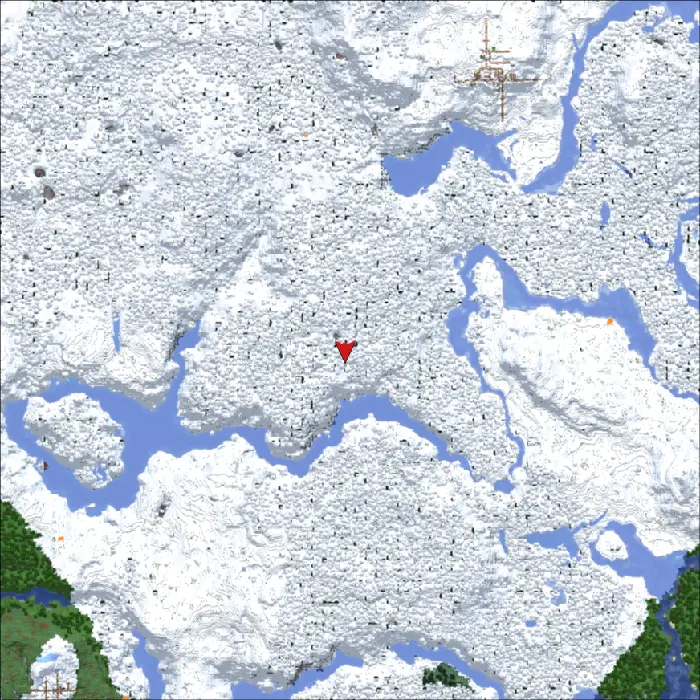
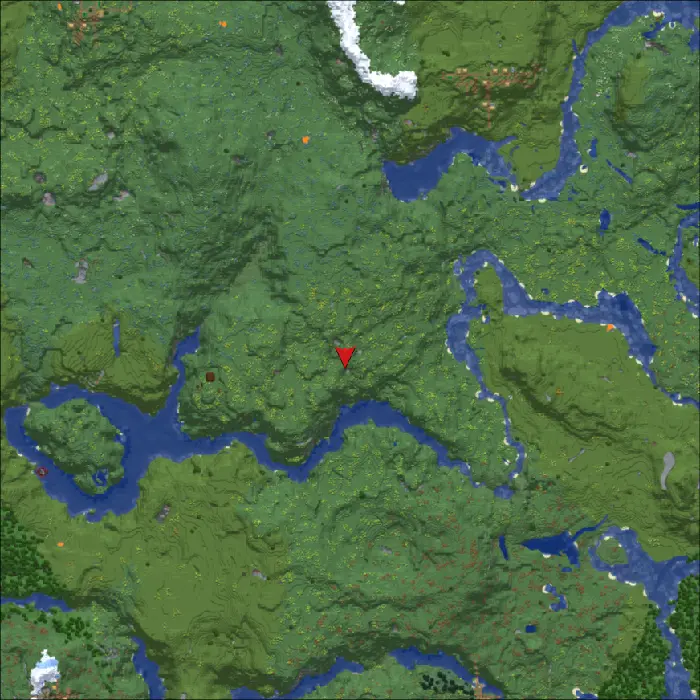
You can also overwrite unwanted biomes at range of the worldspawn by setting then as whitelist of whatever you feel like, for example here i overwrite snow biomes with plains and meadow. (also frozen rivers as rivers and etc)
| Before the rule | After the rule |
|---|---|
 |
 |
Project description from CurseForge.
Pick your setup
Biome Rings by Minecraft version and loader
Choose the version and loader you play, then open the matching release.
Check the dependencies, then try the file in a copied instance before changing a world you care about.
Recent files
Biome Rings versions and loaders
biome-rings-1.0.1.jar
biome-rings-1.0.0.jar
29 Jun 2026
Client Source doesn’t say Server Source doesn’t say Dependencies No extras listed Listed on Release listing
Check the 1.21.1 · Fabric setup Fabric1.21.1 release
biome-rings-1.0.0.jar
28 Jun 2026
Client Source doesn’t say Server Source doesn’t say Dependencies No extras listed Listed on Release listing
Check the 1.21.1 · Fabric setup Fabric1.21.1 release
Looking for an older file? The official CurseForge project page is in Resources.
 mod
mod GitHub · Minecraft
modpacks-ch-github-test
Disposable public fixture for testing the Modpacks.ch GitHub catalogue flow
 mod
mod CurseForge · Minecraft
CBC: Firepower Components
CBC: Firepower Components is a small Create Big Cannons addon that adds compact cannon mounts and practical ammunition-handling blocks for tighter, easier-to-automate artillery builds.
 mod
mod CurseForge · Minecraft
Cobblemon Roulette
Cobblemon Roulette is an exciting Minecraft mod that lets players spin a customizable roulette to win random Pokémon and items, featuring multiplayer support and in-game configuration!