Minecraft version
Back to mods 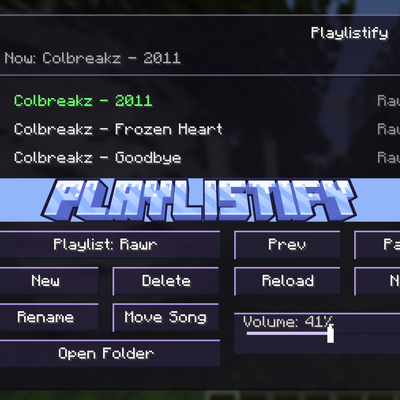
CurseForge · Minecraft mod
Playlistify (custom soundtracks)
Playlistify is a client-side music menu mod that lets you control Minecraft’s background music and play your own custom soundtracks.
Choose a version Pick your version below, then grab the matching file.
Quick answer
Which Playlistify (custom soundtracks) release should I use?
Latest stable file playlistify-neoforge-1.21.11-0.1.0.jar
Game version 1.21.11
Loader NeoForge
Playlistify (custom soundtracks) playlistify-neoforge-1.21.11-0.1.0.jar targets 1.21.11 with NeoForge. The project page does not say whether this file belongs on the client, dedicated server, or both. No extra mods listed for this file.
Where it goes
Is Playlistify (custom soundtracks) required on the client, server, or both?
The project page does not say whether this file belongs on the client, dedicated server, or both.
Client Source doesn’t say
Dedicated server Source doesn’t say
Loader for this release NeoForge
Required install it here Optional supported, not mandatory Not supported do not install here Source doesn’t say do not assume
The source does not explicitly classify this release as client-only or server-only.
What else does Playlistify (custom soundtracks) playlistify-neoforge-1.21.11-0.1.0.jar need?
playlistify-neoforge-1.21.11-0.1.0.jar. Change the file and its required mods may change too.
This file does not list any required mods. Do not add a library just because a different file uses it.
This file does not list any required or optional mods.
Before you install it
Add Playlistify (custom soundtracks) without breaking your instance.
Built for Playlistify (custom soundtracks) playlistify-neoforge-1.21.11-0.1.0.jar. Pick another file and the loader, install side or required mods may change.
- 01
Stick to this file
Use playlistify-neoforge-1.21.11-0.1.0.jar. It targets 1.21.11 with NeoForge; another release may have different loader, side or dependency requirements.
- 02
Bring the mods it needs
This file does not list any required mods. Do not add a library just because a different file uses it.
- 03
Put it on the correct side
The project page does not say whether this file belongs on the client, dedicated server, or both.
- 04
Pick the file you checked
Use the “Get this file” button beside playlistify-neoforge-1.21.11-0.1.0.jar. It opens that exact file at the source.
About this project
What does Playlistify (custom soundtracks) add?
Features:
- Adds an in-game music menu for controlling background music
- Create and manage custom playlists
- Add custom songs from folders
- Supports MP3, WAV, AIFF, AU, and SND files
- Play, pause, skip, previous, shuffle, and repeat controls
- Includes Minecraft’s built-in music in dedicated playlists
- Uses separate folders for each playlist
- Rename and delete playlists
- Move songs between playlists
- Open playlist folders directly from the menu
- Custom-only music mode
- Optional fade behavior
- Built-in volume slider
- Multiple and custom menu themes
- Custom hex color theme support
Supports NeoForge, Fabric, and Forge versions depending on the build.
TO ADD SONGS YOU NEED TO PUT THEM INTO THE PLAYLISTIFY FOLDER WHICH IS IN YOUR INSTANCES MAIN FOLDER
Project description from CurseForge.
Pick your setup
Playlistify (custom soundtracks) by Minecraft version and loader
Choose the version and loader you play, then open the matching release.
Minecraft version
1.21.1
2 loader buildsMinecraft version
1.20.1
1 loader buildCheck the dependencies, then try the file in a copied instance before changing a world you care about.
Recent files
Playlistify (custom soundtracks) versions and loaders
playlistify-neoforge-1.21.11-0.1.0.jar
29 Jun 2026
Client Source doesn’t say Server Source doesn’t say Dependencies No extras listed Listed on Release listing
Check the 1.21.11 · NeoForge setup NeoForge1.21.11 release
playlistify-neoforge-1.21.1-0.1.0.jar
29 Jun 2026
Client Source doesn’t say Server Source doesn’t say Dependencies No extras listed Listed on Release listing
Check the 1.21.1 · NeoForge setup 1.21.1NeoForge release
playlistify-forge-1.20.1-0.1.0.jar
29 Jun 2026
Client Source doesn’t say Server Source doesn’t say Dependencies No extras listed Listed on Release listing
Check the 1.20.1 · Forge setup 1.20.1Forge release
playlistify-fabric-1.21.11-0.1.0.jar
29 Jun 2026
Client Source doesn’t say Server Source doesn’t say Dependencies No extras listed Listed on Release listing
Check the 1.21.11 · Fabric setup Fabric1.21.11 release
playlistify-fabric-1.21.1-0.1.0.jar
29 Jun 2026
Client Source doesn’t say Server Source doesn’t say Dependencies No extras listed Listed on Release listing
Check the 1.21.1 · Fabric setup Fabric1.21.1 release
Looking for an older file? The official CurseForge project page is in Resources.
 mod
CurseForge + Modrinth · Minecraft
VO: Creative Fly Speed
Allows players to adjust their flight speed in Creative and Spectator modes with dynamic mouse-scroll tuning, sprint momentum, and anti-rubberbanding.
 mod
CurseForge + Modrinth · Minecraft
VO: Bed Chat Hider
Bed Chat Hider is a client-only Fabric mod that adds a simple "Hide Chat" / "Show Chat" toggle button next to the "Leave Bed" button while sleeping.
 mod
CurseForge + Modrinth · Minecraft
VO: Better Dogs
Enhances vanilla wolves with unique personalities (Aggressive, Pacifist, Normal), smarter AI, safety behaviors, and combat improvements.