Minecraft version
Back to mods 
CurseForge · Minecraft mod
Floating Damage Indicators
Adds floating damage numbers above every target you hit, and your own incoming damage too. Color-coded by damage type.
Choose a version Pick your version below, then grab the matching file.
Quick answer
Which Floating Damage Indicators release should I use?
Latest stable file fdi-neoforge-3.6.4.2+mc26.3.jar
Game version 26.3
Loader NeoForge
Floating Damage Indicators fdi-neoforge-3.6.4.2+mc26.3.jar targets 26.3 with NeoForge. The project page does not say whether this file belongs on the client, dedicated server, or both. No extra mods listed for this file.
Where it goes
Is Floating Damage Indicators required on the client, server, or both?
The project page does not say whether this file belongs on the client, dedicated server, or both.
Client Source doesn’t say
Dedicated server Source doesn’t say
Loader for this release NeoForge
Required install it here Optional supported, not mandatory Not supported do not install here Source doesn’t say do not assume
The source does not explicitly classify this release as client-only or server-only.
What else does Floating Damage Indicators fdi-neoforge-3.6.4.2+mc26.3.jar need?
fdi-neoforge-3.6.4.2+mc26.3.jar. Change the file and its required mods may change too.
This file does not list any required mods. Do not add a library just because a different file uses it.
This file does not list any required or optional mods.
Before you install it
Add Floating Damage Indicators without breaking your instance.
Built for Floating Damage Indicators fdi-neoforge-3.6.4.2+mc26.3.jar. Pick another file and the loader, install side or required mods may change.
- 01
Stick to this file
Use fdi-neoforge-3.6.4.2+mc26.3.jar. It targets 26.3 with NeoForge; another release may have different loader, side or dependency requirements.
- 02
Bring the mods it needs
This file does not list any required mods. Do not add a library just because a different file uses it.
- 03
Put it on the correct side
The project page does not say whether this file belongs on the client, dedicated server, or both.
- 04
Pick the file you checked
Use the “Get this file” button beside fdi-neoforge-3.6.4.2+mc26.3.jar. It opens that exact file at the source.
About this project
What does Floating Damage Indicators add?
Floating Damage Indicators
Floating damage numbers above every target you hit, and your own incoming damage too. Color-coded by damage type.
Note: FDI must be installed on both the server and client for multiplayer servers.
⚡ Features
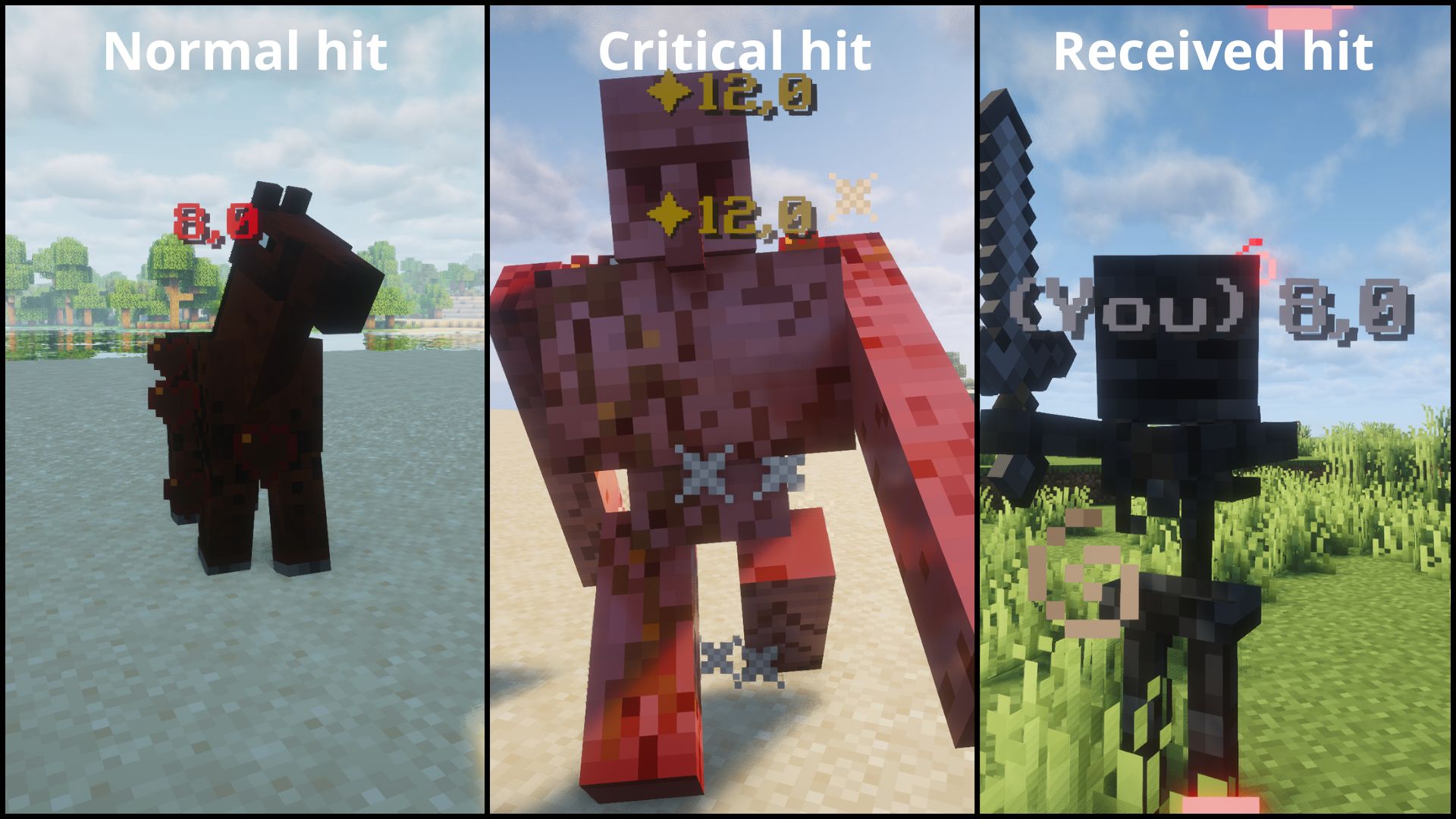
- Floating damage numbers above any entity you hit.
- See your own incoming damage too.
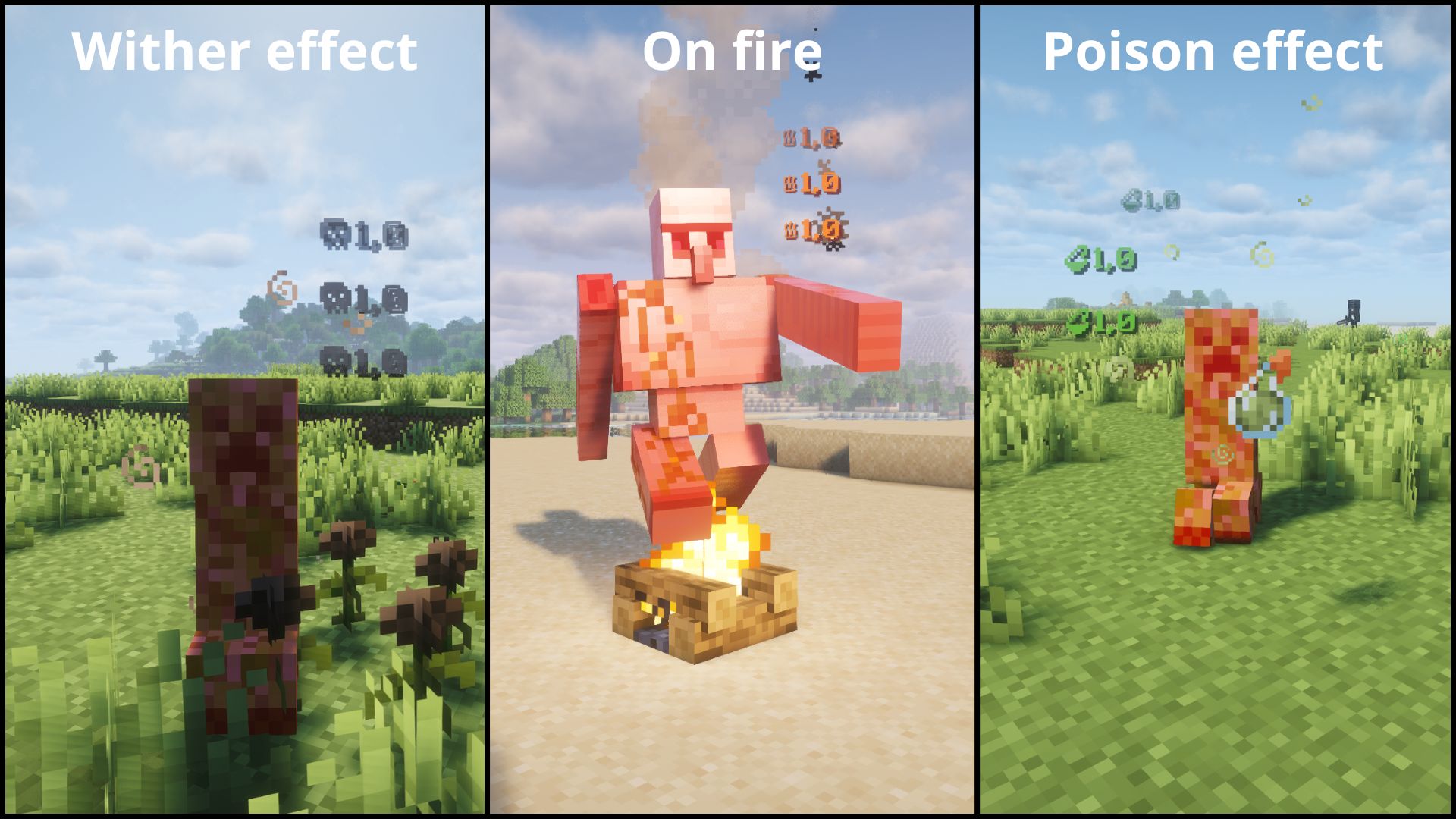
- Color-coded by damage type.
- Configurable. Choose which numbers show up.
- Works in both singleplayer and dedicated multiplayer.
| Type | Icon | Color | Example |
|---|---|---|---|
| NORMAL | — | Red | Normal hit |
| CRITICAL | ✦ | Gold | Jump crit |
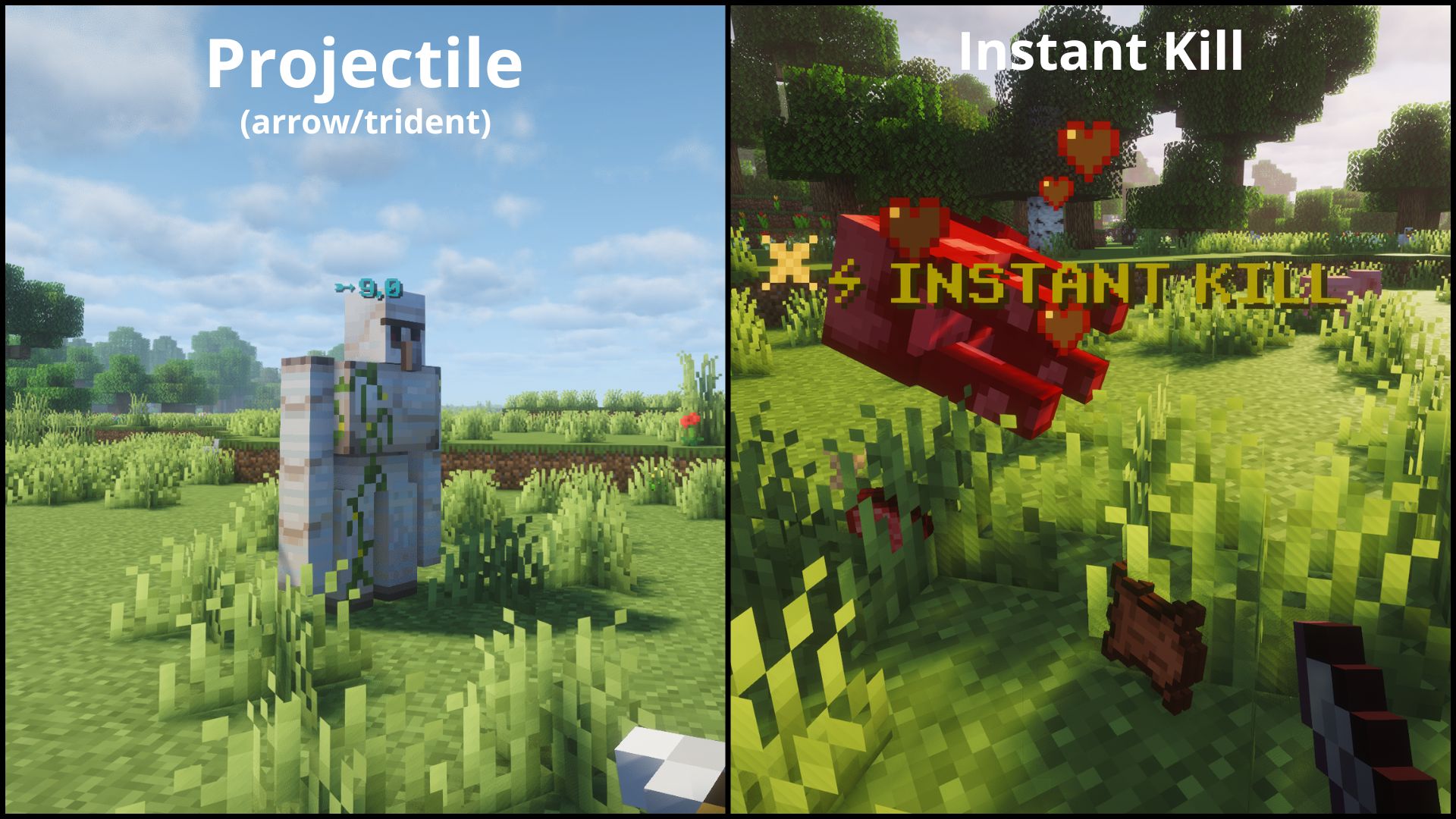
| PROJECTILE | ➵ | Cyan | Arrow, trident |
| FIRE | ♨ | Orange | Fire Aspect |
| POISON | ⚗ | Green | Poison |
| WITHER | ☠ | Dark gray | Wither effect |
| RECEIVING | — | Light gray | Damage you take |
| INSTANT_KILL | ⚡ INSTANT KILL | Gold | Kill an enemy in one hit |
⚙️ Configuration
The easiest way to configure Floating Damage Indicators is in-game: open Mod Menu (Fabric) or the Config button in the mods list (NeoForge).
Note: The in-game screen is intentionally minimal. It only shows the two main toggles and a button to open the config file. Colors, prefixes and per-type options are edited directly in the config file (see below).
After launching the game once, a configuration file will be generated:
config/floatingdamageindicators.json
Available options:
Important:
showDamageis the master switch. If it is set tofalse, no numbers are shown at all, including your own incoming damage.showReceivedDamageonly takes effect whileshowDamageistrue, so keepshowDamageenabled to see the damage you take.
Note: The
formatssection is client-side only. The server only readsshowDamage,showReceivedDamage, andINSTANT_KILL'senabled. To customize prefixes, colors, orshowDamage, edit the config file on your client.Tip: Some Unicode characters or emojis may not display correctly depending on your Minecraft font. If a character shows as a blank square, try a different one. Stick to basic Unicode symbols for best results.
Tip: Colors must be 6-digit hex (RRGGBB). Invalid values like
"ZZZ123"or"FF"will silently fall back to the default for that damage type.
{
  "showDamage": true,
  "showReceivedDamage": true,
  "formats": {
    "NORMAL":       { "enabled": true, "prefix": "", "color": "FF3333", "showDamage": true },
    "CRITICAL":     { "enabled": true, "prefix": "\u2726", "color": "FFD700", "showDamage": true },
    "PROJECTILE":   { "enabled": true, "prefix": "\u27B5", "color": "00FFFF", "showDamage": true },
    "FIRE":         { "enabled": true, "prefix": "\u2668", "color": "FF6600", "showDamage": true },
    "POISON":       { "enabled": true, "prefix": "\u2697", "color": "4A9E2F", "showDamage": true },
    "WITHER":       { "enabled": true, "prefix": "\u2620", "color": "3C3C3C", "showDamage": true },
    "RECEIVING":    { "enabled": true, "prefix": "(You) ", "color": "AAAAAA", "showDamage": true },
    "INSTANT_KILL": { "enabled": true, "prefix": "\u26A1 INSTANT KILL", "color": "FFD700", "showDamage": false }
  }
}
Each format entry:
- enabled: show/hide this damage type entirely
- prefix: custom text shown before (or instead of) the number
- color: 6-digit hex color (RGB)
- showDamage: if false, only the prefix is shown (no damage number)
📦 Requirements
Fabric
- Fabric API
- Mod Menu (optional)
- (+26.X) Java 25 or newer
NeoForge
- (+26.X) Java 25 or newer
💬 Suggestions & Issues
If you have an idea, a suggestion, or found a bug, feel free to leave a comment on the CurseForge page or open an issue on the GitHub repository.
❓ FAQ
Can I use this mod in a public modpack?
Yes! You're free to include it in any public or private modpack, no permission needed.
📜 License
This project is licensed under the MIT License.
Project description from CurseForge.
Pick your setup
Floating Damage Indicators by Minecraft version and loader
Choose the version and loader you play, then open the matching release.
Minecraft version
26.2
2 loader buildsMinecraft version
26.1.2
2 loader buildsMinecraft version
1.21.11
2 loader buildsMinecraft version
1.21.1
2 loader buildsCheck the dependencies, then try the file in a copied instance before changing a world you care about.
Recent files
Floating Damage Indicators versions and loaders
fdi-neoforge-3.6.4.2+mc26.3.jar
8 Oct 2026
Client Source doesn’t say Server Source doesn’t say Dependencies No extras listed Listed on Release listing
Check the 26.3 · NeoForge setup NeoForge26.3 release
fdi-neoforge-3.6.3.2+mc1.21.1.jar
8 Oct 2026
Client Source doesn’t say Server Source doesn’t say Dependencies No extras listed Listed on Release listing
Check the 1.21.1 · NeoForge setup 1.21.1NeoForge release
fdi-neoforge-3.6.2.2+mc1.21.11.jar
8 Oct 2026
Client Source doesn’t say Server Source doesn’t say Dependencies No extras listed Listed on Release listing
Check the 1.21.11 · NeoForge setup NeoForge1.21.11 release
fdi-neoforge-3.6.1.2+mc26.2.jar
8 Oct 2026
Client Source doesn’t say Server Source doesn’t say Dependencies No extras listed Listed on Release listing
Check the 26.2 · NeoForge setup NeoForge26.2 release
fdi-neoforge-3.6.0.2+mc26.1.2.jar
8 Oct 2026
Client Source doesn’t say Server Source doesn’t say Dependencies No extras listed Listed on Release listing
Check the 26.1.2 · NeoForge setup NeoForge26.1.2 release
fdi-fabric-3.6.4.2+mc26.3.jar
8 Oct 2026
Client Source doesn’t say Server Source doesn’t say Dependencies 2 required · 2 unchecked Listed on Release listing
Check the 26.3 · Fabric setup Fabric26.3 release
fdi-fabric-3.6.3.2+mc1.21.1.jar
8 Oct 2026
Client Source doesn’t say Server Source doesn’t say Dependencies 2 required · 2 unchecked Listed on Release listing
Check the 1.21.1 · Fabric setup Fabric1.21.1 release
fdi-fabric-3.6.2.2+mc1.21.11.jar
8 Oct 2026
Client Source doesn’t say Server Source doesn’t say Dependencies 2 required · 2 unchecked Listed on Release listing
Check the 1.21.11 · Fabric setup Fabric1.21.11 release
fdi-fabric-3.6.1.2+mc26.2.jar
8 Oct 2026
Client Source doesn’t say Server Source doesn’t say Dependencies 2 required · 2 unchecked Listed on Release listing
Check the 26.2 · Fabric setup Fabric26.2 release
fdi-fabric-3.6.0.2+mc26.1.2.jar
8 Oct 2026
Client Source doesn’t say Server Source doesn’t say Dependencies 2 required · 2 unchecked Listed on Release listing
Check the 26.1.2 · Fabric setup Fabric26.1.2 release
fdi-neoforge-3.6.3.1+mc1.21.1.jar
5 Oct 2026
Client Source doesn’t say Server Source doesn’t say Dependencies No extras listed Listed on Release listing
Check the 1.21.1 · NeoForge setup 1.21.1NeoForge release
fdi-neoforge-3.6.2.1+mc1.21.11.jar
5 Oct 2026
Client Source doesn’t say Server Source doesn’t say Dependencies No extras listed Listed on Release listing
Check the 1.21.11 · NeoForge setup NeoForge1.21.11 release
Looking for an older file? The official CurseForge project page is in Resources.
 mod
mod CurseForge · Minecraft
SKY ACES
Fly 26 jets, WWII warbirds, helicopters, warships and submarines! F-22, F-35, Spitfire, Apache, a sailing Nimitz carrier, air refuelling, a campaign, dogfights and airbase defence. (Formerly known as Fighter Jets Overhaul)
 mod
mod CurseForge · Minecraft
Minecolonies: Epicfied (Epic Colonies)
EpicColonies is a mod which not only adds support for Epic Fight & Minecolonies, but also adds life-like expressions/Models to the game! Allowing your citizens to feel more alive than ever!
 mod
mod CurseForge · Minecraft
DarkHeads - RPG Player Heads
RPG Theme, Drops a player head every time a player dies in Singleplayer and Multiplayer