Minecraft version
Back to mods 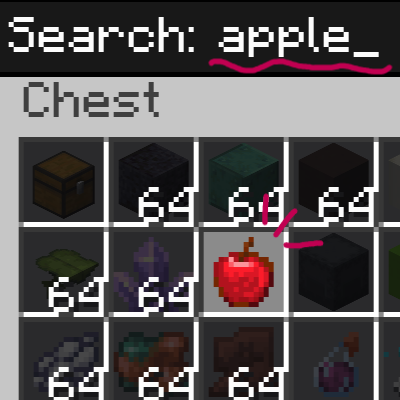
CurseForge · Minecraft mod
ItemSearch: Ctrl+F
Press Ctrl+F inside any chest, shulker box, or inventory to instantly filter items by name.
Choose a version Pick your version below, then grab the matching file.
Quick answer
Which ItemSearch: Ctrl+F release should I use?
Latest stable file ItemSearch-NeoForge-26.1.jar
Game version 26.1, 26.1.1, 26.1.2
Loader NeoForge
ItemSearch: Ctrl+F ItemSearch-NeoForge-26.1.jar targets 26.1, 26.1.1, 26.1.2 with NeoForge. The project page does not say whether this file belongs on the client, dedicated server, or both. No extra mods listed for this file.
Where it goes
Is ItemSearch: Ctrl+F required on the client, server, or both?
The project page does not say whether this file belongs on the client, dedicated server, or both.
Client Source doesn’t say
Dedicated server Source doesn’t say
Loader for this release NeoForge
Required install it here Optional supported, not mandatory Not supported do not install here Source doesn’t say do not assume
The source does not explicitly classify this release as client-only or server-only.
What else does ItemSearch: Ctrl+F ItemSearch-NeoForge-26.1.jar need?
ItemSearch-NeoForge-26.1.jar. Change the file and its required mods may change too.
This file does not list any required mods. Do not add a library just because a different file uses it.
This file does not list any required or optional mods.
Before you install it
Add ItemSearch: Ctrl+F without breaking your instance.
Built for ItemSearch: Ctrl+F ItemSearch-NeoForge-26.1.jar. Pick another file and the loader, install side or required mods may change.
- 01
Stick to this file
Use ItemSearch-NeoForge-26.1.jar. It targets 26.1, 26.1.1, 26.1.2 with NeoForge; another release may have different loader, side or dependency requirements.
- 02
Bring the mods it needs
This file does not list any required mods. Do not add a library just because a different file uses it.
- 03
Put it on the correct side
The project page does not say whether this file belongs on the client, dedicated server, or both.
- 04
Pick the file you checked
Use the “Get this file” button beside ItemSearch-NeoForge-26.1.jar. It opens that exact file at the source.
About this project
What does ItemSearch: Ctrl+F add?
Description (Markdown body — same for both platforms)
ItemSearch
Press Ctrl+F inside any container to instantly filter your items.
Tired of scrolling through a packed shulker box or storage chest looking for one item? ItemSearch adds a lightweight Ctrl+F search bar to every container screen — inventory, chests, barrels, shulker boxes, and more — so you can find what you need at a glance.
Features
- Ctrl+F to search — opens a small search box inside any
AbstractContainerScreen. Type to filter; matching items stay highlighted, everything else dims. - Works everywhere — chests, barrels, shulker boxes, your own inventory, and other inventory-style screens.
- Smart Creative Mode handling — on the Survival/Inventory tab, ItemSearch dims your own items just like everywhere else. On the Creative item-palette tabs, ItemSearch stays out of the way so vanilla's own creative search keeps working.
- Match by item ID (optional) — toggle whether the search also checks the item's registry ID (e.g.
minecraft:diamond_sword), not just its display name. - Fully repositionable search box — open the settings screen, then drag the search box anywhere on screen and resize it with scroll or +/- buttons.
- Adjustable dim strength — control how strongly non-matching items are darkened.
- Lightweight & client-side only — no server install required, safe for singleplayer and any multiplayer server.
Controls
| Key | Action |
|---|---|
Ctrl + F |
Open/close the search box (while a container screen is open) |
| (typing) | Filter items live as you type |
Esc / Enter / Ctrl + F |
Close the search box and clear the query |
K |
Open ItemSearch settings |
Settings are also available from the Mods list → Config.
Settings
- Enable/disable the feature
- Match item ID toggle
- Dim strength (−/+)
- Search box size (−/+ or scroll)
- Drag-to-move search box position
- Reset position & size
Support
If you find ItemSearch useful, consider supporting development on Ko-fi (link in-game via the settings screen, and shown once on first join).
Compatibility
Client-side only — install on the client; no server-side requirement. Available for Forge, NeoForge, and Fabric across a wide range of Minecraft versions (see version list below).
Supported Versions / Loaders (for reference when filling out the version picker)
Forge: 1.20.1, 1.20.2, 1.20.4, 1.20.6
NeoForge: 1.20.2, 1.20.4, 1.20.6, 1.21.1, 1.21.3, 1.21.4, 1.21.5, 1.21.8, 1.21.10, 1.21.11, 26.1
Fabric: 1.20.1, 1.20.2, 1.20.4, 1.20.6, 1.21.1, 1.21.3, 1.21.4, 1.21.5, 1.21.8, 1.21.10, 1.21.11
Side: Client only
Project description from CurseForge.
Pick your setup
ItemSearch: Ctrl+F by Minecraft version and loader
Choose the version and loader you play, then open the matching release.
Minecraft version
26.1.1
1 loader buildMinecraft version
26.1
1 loader buildMinecraft version
1.21.11-snapshot
2 loader buildsMinecraft version
1.21.11
2 loader buildsMinecraft version
1.21.10
2 loader buildsMinecraft version
1.21.9-snapshot
1 loader buildMinecraft version
1.21.9
1 loader buildMinecraft version
1.21.8
2 loader buildsMinecraft version
1.21.7
1 loader buildMinecraft version
1.21.6-snapshot
2 loader buildsMinecraft version
1.21.6
2 loader buildsShowing the newest 12 of 30 game versions. Older files are in the list below.
Check the dependencies, then try the file in a copied instance before changing a world you care about.
Recent files
ItemSearch: Ctrl+F versions and loaders
ItemSearch-NeoForge-26.1.jar
1 Jul 2026
Client Source doesn’t say Server Source doesn’t say Dependencies No extras listed Listed on Release listing
Check the 26.1.2 · NeoForge setup NeoForge26.126.1.126.1.2 release
ItemSearch-NeoForge-1.21.11.jar
1 Jul 2026
Client Source doesn’t say Server Source doesn’t say Dependencies No extras listed Listed on Release listing
Check the 1.21.11-snapshot · NeoForge setup NeoForge1.21.11-snapshot1.21.11 release
ItemSearch-NeoForge-1.21.10.jar
1 Jul 2026
Client Source doesn’t say Server Source doesn’t say Dependencies No extras listed Listed on Release listing
Check the 1.21.10 · NeoForge setup NeoForge1.21.10 release
ItemSearch-NeoForge-1.21.8.jar
1 Jul 2026
Client Source doesn’t say Server Source doesn’t say Dependencies No extras listed Listed on Release listing
Check the 1.21.9-snapshot · NeoForge setup 1.21.8NeoForge1.21.9-snapshot1.21.9 release
ItemSearch-NeoForge-1.21.5.jar
1 Jul 2026
Client Source doesn’t say Server Source doesn’t say Dependencies No extras listed Listed on Release listing
Check the 1.21.6-snapshot setup 1.21.6-snapshot1.21.51.21.6 release
ItemSearch-NeoForge-1.21.4.jar
1 Jul 2026
Client Source doesn’t say Server Source doesn’t say Dependencies No extras listed Listed on Release listing
Check the 1.21.4-Snapshot · NeoForge setup 1.21.4NeoForge1.21.4-Snapshot release
ItemSearch-NeoForge-1.21.3.jar
1 Jul 2026
Client Source doesn’t say Server Source doesn’t say Dependencies No extras listed Listed on Release listing
Check the 1.21.3 · NeoForge setup 1.21.3NeoForge release
ItemSearch-NeoForge-1.21.1.jar
1 Jul 2026
Client Source doesn’t say Server Source doesn’t say Dependencies No extras listed Listed on Release listing
Check the 1.21.2-Snapshot · NeoForge setup 1.21.2-Snapshot1.21.1-Snapshot1.21.1NeoForge release
ItemSearch-NeoForge-1.20.6.jar
1 Jul 2026
Client Source doesn’t say Server Source doesn’t say Dependencies No extras listed Listed on Release listing
Check the 1.20.6 · NeoForge setup 1.20.6NeoForge release
ItemSearch-NeoForge-1.20.4.jar
1 Jul 2026
Client Source doesn’t say Server Source doesn’t say Dependencies No extras listed Listed on Release listing
Check the 1.20.5-Snapshot · NeoForge setup 1.20.5-Snapshot1.20.51.20.4NeoForge release
ItemSearch-NeoForge-1.20.2.jar
1 Jul 2026
Client Source doesn’t say Server Source doesn’t say Dependencies No extras listed Listed on Release listing
Check the 1.20.3-Snapshot · NeoForge setup 1.20.2NeoForge1.20.3-Snapshot1.20.3 release
ItemSearch-Forge-1.20.6.jar
1 Jul 2026
Client Source doesn’t say Server Source doesn’t say Dependencies No extras listed Listed on Release listing
Check the 1.20.6 · Forge setup Forge1.20.6 release
Looking for an older file? The official CurseForge project page is in Resources.
 mod
mod CurseForge + Modrinth · Minecraft
No Chat Autofocus When Sleeping
Disable chat menu autofocus when sleeping. Now you need to manually open the chat menu while sleeping.
 mod
mod CurseForge · Minecraft
RoJo's Inter-Armies
All Nations' Armies, whether if it is superpowers or major powers
 mod
mod CurseForge + Modrinth · Minecraft
GTMoreTools
Cross-mod tool integration add-on for GregTech CEu.