Minecraft version
Back to mods 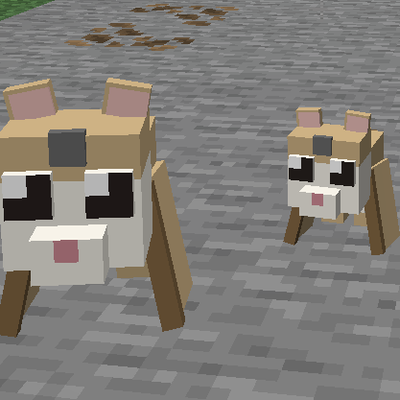
CurseForge · Minecraft mod
Momo (Flying Lemur)
Adds Flying Lemurs to MC!
Choose a version Pick your version below, then grab the matching file.
Quick answer
Which Momo (Flying Lemur) release should I use?
Latest stable file momosmod-1.0.2.jar
Game version 26.3
Loader Fabric
Momo (Flying Lemur) momosmod-1.0.2.jar targets 26.3 with Fabric. The project page does not say whether this file belongs on the client, dedicated server, or both. No extra mods listed for this file.
Where it goes
Is Momo (Flying Lemur) required on the client, server, or both?
The project page does not say whether this file belongs on the client, dedicated server, or both.
Client Source doesn’t say
Dedicated server Source doesn’t say
Loader for this release Fabric
Required install it here Optional supported, not mandatory Not supported do not install here Source doesn’t say do not assume
The source does not explicitly classify this release as client-only or server-only.
What else does Momo (Flying Lemur) momosmod-1.0.2.jar need?
momosmod-1.0.2.jar. Change the file and its required mods may change too.
This file does not list any required mods. Do not add a library just because a different file uses it.
This file does not list any required or optional mods.
Before you install it
Add Momo (Flying Lemur) without breaking your instance.
Built for Momo (Flying Lemur) momosmod-1.0.2.jar. Pick another file and the loader, install side or required mods may change.
- 01
Stick to this file
Use momosmod-1.0.2.jar. It targets 26.3 with Fabric; another release may have different loader, side or dependency requirements.
- 02
Bring the mods it needs
This file does not list any required mods. Do not add a library just because a different file uses it.
- 03
Put it on the correct side
The project page does not say whether this file belongs on the client, dedicated server, or both.
- 04
Pick the file you checked
Use the “Get this file” button beside momosmod-1.0.2.jar. It opens that exact file at the source.
About this project
What does Momo (Flying Lemur) add?
Adds Flying Lemurs to MC!
Tame them, equip their armor, and explore with your loyal friend!
How to Use Momo's Mod
Finding Lemurs
- Flying Lemurs spawn naturally in jungles, mountains, and occasionally across the Overworld
- Use a Spawn Egg (Creative tab) to spawn one manually
Taming
- Feed a wild Flying Lemur its favorite food to tame it
- Once tamed, it will follow you and roam nearby when you're standing still
Armor & Gems
- Craft lemur armor using phantom membrane, feathers, and the corresponding material (leather, iron, gold, diamond)
- Equip armor by right-clicking the lemur with the armor item
- A colored gem appears on the lemur's forehead matching the armor type
- Sneak + left-click an armored lemur to remove its armor
- Armor tiers: Leather → Iron → Gold → Diamond → Netherite (via smithing table)
- Netherite armor gives the strongest regeneration
Regeneration
- Armored lemurs passively regenerate health over time
- Higher-tier armor = faster regeneration (Netherite is fastest)
Commands
/momo here— Teleports all your tamed lemurs in the current dimension to your location
Flying
- Lemurs glide through the air with their wing membranes
- Tamed lemurs will fly to keep up with you
Project description from CurseForge.
Pick your setup
Momo (Flying Lemur) by Minecraft version and loader
Choose the version and loader you play, then open the matching release.
Minecraft version
26.2
1 loader buildCheck the dependencies, then try the file in a copied instance before changing a world you care about.
Recent files
Momo (Flying Lemur) versions and loaders
momosmod-1.0.2.jar
17 Sept 2026
Client Source doesn’t say Server Source doesn’t say Dependencies No extras listed Listed on Release listing
Check the 26.3 · Fabric setup Fabric26.3 release
momosmod-1.0.1.jar
momosmod-1.0.0.jar
5 Jul 2026
Client Source doesn’t say Server Source doesn’t say Dependencies No extras listed Listed on Release listing
Check the 26.2 · Fabric setup Fabric26.2 release
momosmod-1.0.0.jar
1 Jul 2026
Client Source doesn’t say Server Source doesn’t say Dependencies No extras listed Listed on Release listing
Check the 26.2 · Fabric setup Fabric26.2 release
Looking for an older file? The official CurseForge project page is in Resources.
 mod
mod CurseForge + Modrinth · Minecraft
rankboard
Scoreboard ranking mod: web dashboard access, historical data query, point lookup for arbitrary post-install dates.
 mod
mod CurseForge + Modrinth · Minecraft
Storage Drawers
Interactive compartment storage for your workshops.
 mod
mod CurseForge + Modrinth · Minecraft
Freeze It, and Heat It!
A food temperature system as an addon for cold sweat.