Fzzy Config Needed by MapStitch 1.1.0 for NeoForge 26.2
requiredMatching file found Matched file: fzzy_config-0.7.6+26.2+neoforge
CurseForge · Minecraft mod
World map and minimap using vanilla maps
Quick answer
MapStitch 1.1.0 for NeoForge 26.2 targets 26.2 with NeoForge. The project page does not say whether this file belongs on the client, dedicated server, or both. All 3 required mods have matching files.
Where it goes
The project page does not say whether this file belongs on the client, dedicated server, or both.
The source does not explicitly classify this release as client-only or server-only.
1.1.0 for NeoForge 26.2 on 26.2 NeoForge. Every mod below is checked against that same setup.
Install Fzzy Config, KotlinLangForge, KotlinLangForge first. We found matching files for this game-version and loader setup. 2 come through another mod in the chain.
2 extra mods were pulled in by other dependencies. Indented rows show who needs each one. We only count dependency files that match this setup. A file for another loader does not fill the gap.
Before you install it
Built for MapStitch 1.1.0 for NeoForge 26.2 on 26.2 NeoForge. Pick another file and the loader, install side or required mods may change.
Use 1.1.0 for NeoForge 26.2. It targets 26.2 with NeoForge; another release may have different loader, side or dependency requirements.
Install Fzzy Config, KotlinLangForge, KotlinLangForge first. We found matching files for this game-version and loader setup. 2 come through another mod in the chain.
The project page does not say whether this file belongs on the client, dedicated server, or both.
Use the “Get this file” button beside 1.1.0 for NeoForge 26.2. It opens that exact file at the source.
About this project
This mod adds a world map and a minimap using vanilla maps and makes vanilla maps cheaper and easier to manage by using the new Atlas item.
Unlike other world map/minimap mods which ignore vanilla maps and make them obsolete, MapStitch makes them much more enjoyable to use and turns them into a core part of the world map and minimap.
Requires:
MapStitch uses atlases from your inventory to create a world map which you can open at any time by pressing M or right-clicking while holding an atlas.
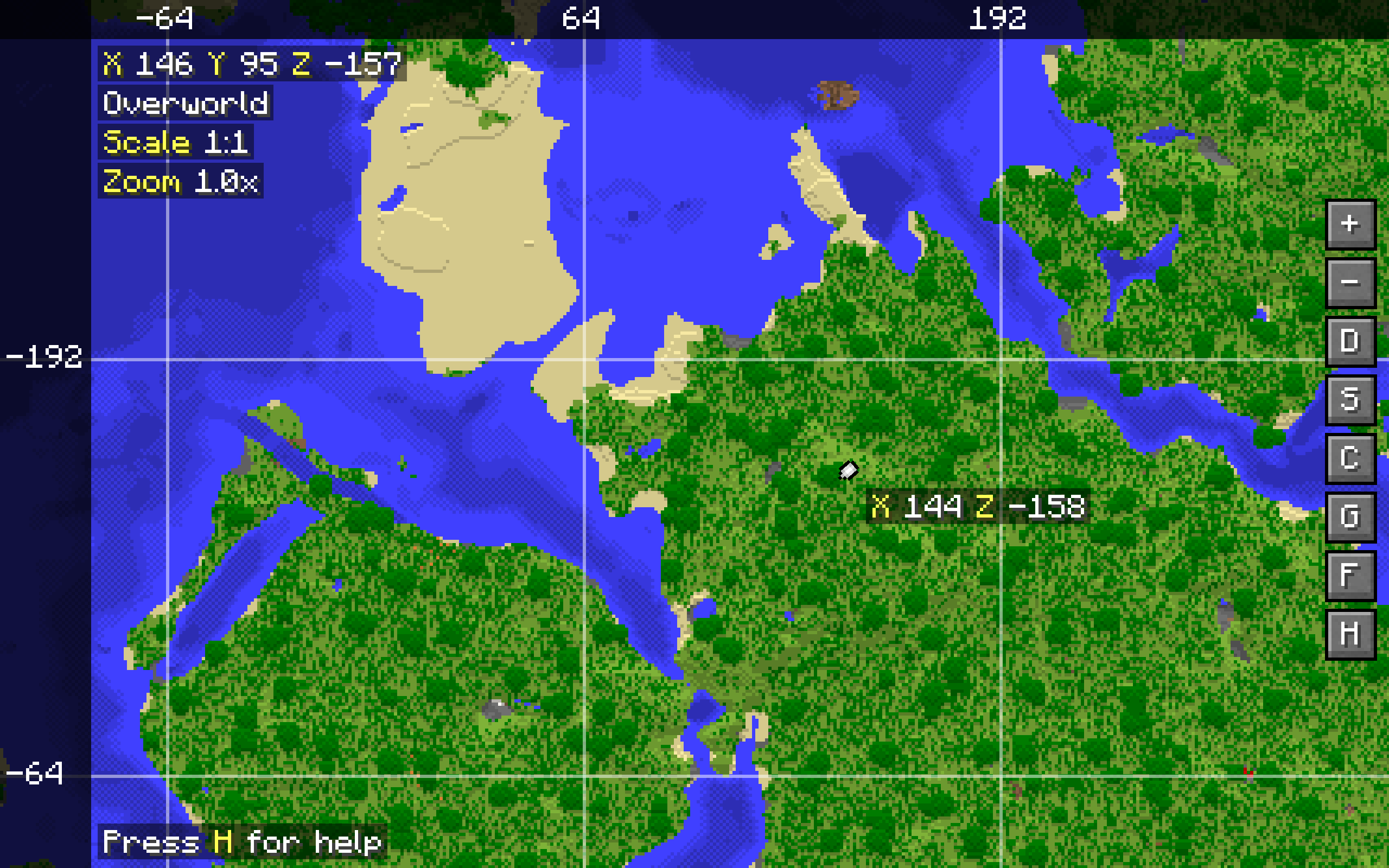
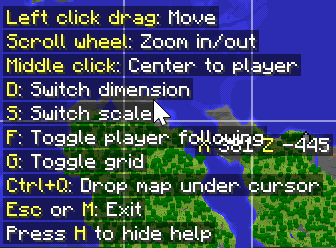
The world map can only show one dimension and scale at once. These can be switched in the world map itself. There are basic controls like panning and zooming using the mouse, and toggleable player following and map grid overlay. A keybind reference can be brought up at any time by pressing H. Most of the keybinds can be rebound in the vanilla Controls menu.
The player marker, coordinates, and grid overlay require having a compass anywhere in the inventory.
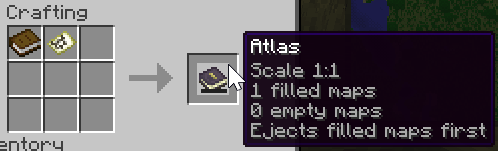
Create an atlas by combining a filled map and a book. The atlas can then be used like a bundle to store empty maps and filled maps matching the scale of the filled map used to create the atlas (up to 16384 items in total, configurable via a game rule).
Maps from the atlas will be used to create the world map, and the atlas will automatically turn empty maps inside it into filled maps as you enter unmapped areas.
Having an atlas in the hotbar and a compass anywhere in your inventory will display a minimap showing the map where you're currently located.
If multiple atlases are present, the minimap will prioritize the atlas in your hands, otherwise the first atlas will be used.
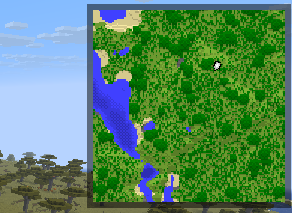
The minimap can show some basic information like real time, game time, coordinates, biome and weather, with each being toggleable. These are all disabled by default. Note that in order to enable these, just enabling them in the client configuration isn't enough - they also need to be allowed in the common/server configuration.
MapStitch enables maps in the Nether - no other mods required. The way Nether maps are displayed can be configured, and additional ceiling dimensions can be added to enable maps in them.
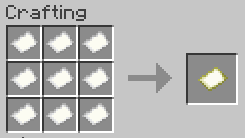
Making maps is now cheaper, requiring only 9 paper instead of 8 paper and a compass, but they won't show your position unless you have a compass in your inventory.
Many aspects of the mod are configurable. It's highly recommended to use the in-game configuration screen to configure the mod. On Fabric, you can access it by installing Mod Menu. On NeoForge, you can access it in the mod loader's built-in mod menu.
Client-side settings can also be configured from the Sodium video settings screen if Sodium is installed.
Some notable settings include:
Project description from CurseForge.
Pick your setup
Choose the version and loader you play, then open the matching release.
Check the dependencies, then try the file in a copied instance before changing a world you care about.
Recent files
mapstitch-neoforge-1.1.0+26.2.jar
30 Aug 2026
Looking for an older file? The official CurseForge project page is in Resources.