Minecraft version
Back to mods 
CurseForge · Minecraft mod
Restrictive Core
Allows developers to restrict actions of certain Items and Blocks through custom syntax JSON
Choose a version Pick your version below, then grab the matching file.
Quick answer
Which Restrictive Core release should I use?
Latest stable file restrictive_core-1.0.0 Alpha-neoforge-1.21.1.jar
Game version 1.21.1
Loader NeoForge
Restrictive Core restrictive_core-1.0.0 Alpha-neoforge-1.21.1.jar targets 1.21.1 with NeoForge. The project page does not say whether this file belongs on the client, dedicated server, or both. No extra mods listed for this file.
Where it goes
Is Restrictive Core required on the client, server, or both?
The project page does not say whether this file belongs on the client, dedicated server, or both.
Client Source doesn’t say
Dedicated server Source doesn’t say
Loader for this release NeoForge
Required install it here Optional supported, not mandatory Not supported do not install here Source doesn’t say do not assume
The source does not explicitly classify this release as client-only or server-only.
What else does Restrictive Core restrictive_core-1.0.0 Alpha-neoforge-1.21.1.jar need?
restrictive_core-1.0.0 Alpha-neoforge-1.21.1.jar. Change the file and its required mods may change too.
This file does not list any required mods. Do not add a library just because a different file uses it.
This file does not list any required or optional mods.
Before you install it
Add Restrictive Core without breaking your instance.
Built for Restrictive Core restrictive_core-1.0.0 Alpha-neoforge-1.21.1.jar. Pick another file and the loader, install side or required mods may change.
- 01
Stick to this file
Use restrictive_core-1.0.0 Alpha-neoforge-1.21.1.jar. It targets 1.21.1 with NeoForge; another release may have different loader, side or dependency requirements.
- 02
Bring the mods it needs
This file does not list any required mods. Do not add a library just because a different file uses it.
- 03
Put it on the correct side
The project page does not say whether this file belongs on the client, dedicated server, or both.
- 04
Pick the file you checked
Use the “Get this file” button beside restrictive_core-1.0.0 Alpha-neoforge-1.21.1.jar. It opens that exact file at the source.
About this project
What does Restrictive Core add?
Restrictive Core
Restrictive Core is a lightweight, strictly data-driven server utility framework designed for modpack developers. It provides absolute, code-free control over player interactions, item utilization, and block mechanics.
Built entirely around JSON configuration and NBT evaluation, Restrictive Core allows you to construct complex progression stages, dynamic gating systems, and custom UI restrictions without requiring external scripting languages (like KubeJS or CraftTweaker).


How the mod operates from the developer's POV
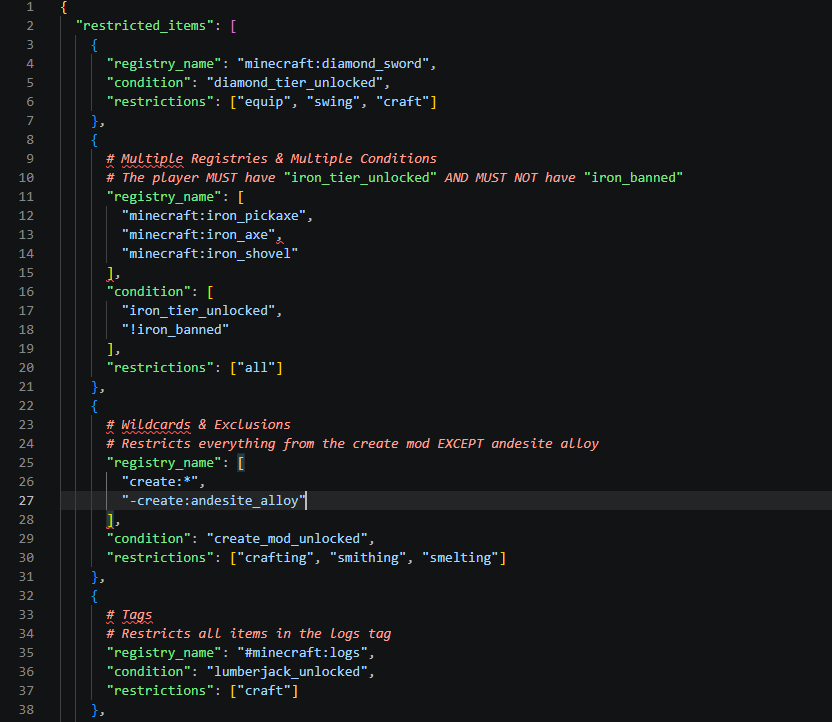
The mod operates via JSON files generated in your config/restrictive_core/ directory. Changes made to the configuration can be evaluated at runtime without restarting the server—simply execute /reload (soon will add /rc reload) to re-parse the data and apply restrictions instantly.
How the mod operates from the player's POV
The mod operates through canceling events and preventing players from obtaining, using, placing and breaking items and blocks. All the player sees is a message in their action bar, tooltip or a red outline in their inventory/hotbar, which is all editable in the json files provided on game load.
Syntax & Parser Engine
Standard JSON is highly rigid, but Restrictive Core utilizes a custom parser to make pack development faster, easier and better:
- Comment Support: Safely annotate your files using
#to leave notes for your development team without breaking the parser or misaligning line number errors. - Wildcards & Exclusions: Target entire mod namespaces using wildcards (e.g.,
"create:*"). Need an exception? Prepend a minus sign (e.g.,"-create:andesite_alloy") to exclude specific registry items from a broader tag or wildcard restriction. - Array Grouping: Pass multiple items, tags, or conditions into a single array block
[ ]to condense your configurations.
Comprehensive Restriction Modules
Restrictive Core monitors event triggers across both block and item environments. Target registry names, tags (e.g., #minecraft:logs), or wildcards and apply combinations of the following restriction flags:
- Item Restrictions:
use,consume,drop,pickup,equip,swing,craft,smelt,process,smith. - Block Restrictions:
use,break,place. - Macro Keywords: Use
"all"(comprehensive lockdown),"nall"(restricts utility but allows safe environmental dropping/pickup),"obtain"(restricts crafting/smelting/smithing simultaneously), or"none"(whitelist overrides soon to be replaced with the "-" symbol so its suggested you do this to whitelist from lists of restricted items/blocks "-minecraft:oak_log").
Conditional Progression & State Logic
Gating is handled via NBT/Component data condition checks. By appending a "condition": "stage_iron" parameter to an item, the item remains locked until the player's persistent data contains a matching boolean set to true.
- Condition Inversions: Prepend an exclamation mark (
!) to require the absence of a state (e.g.,"!iron_banned"). Useful for dynamic penalty systems.
Smart UI & Processing Compatibility
Vanilla processing grids (furnaces, crafting tables, smithing) are supported natively. For modded machinery, Restrictive Core features a highly configurable UI bridging system (custom_interfaces.json):
- Map directly to a custom machine's Menu Type registry namespace.
- Define
output_slotsindexing for crafting overrides. - Evaluation Modes: Choose between
"smelt"(predictive evaluation of internal recipes—blocks inputs if outputs are restricted) and"process"(direct validation of raw input components).
Dynamic Messaging & Placeholders
Provide your users with clear feedback using a robust messaging system:
- Assign multiple discrete
deny_messageandinfo_tooltiparrays to single registry targets (e.g., one message for denied crafting, another for denied usage). - Supports legacy
&color formatting translation. - Live Placeholders: Built-in macros like
<player>,<item>,<block>, and<action>. - Custom NBT Mapping: Map your own custom placeholders (e.g.,
<mana>) to live player NBT keys viacustom_placeholders.json, dynamically extracting and rendering the data into your messages at runtime.
Diagnostic & Administrative Tooling
Restrictive Core ships with an extensive suite of /restrictivecore (/rc) commands to speed up modpack development:
- Integrated Validator: Run
/rc debug [target]to invoke the built-in semantic validator. It audits your JSON files for missing brackets, invalid macro keywords, and cross-contamination (e.g., utilizing item restriction flags within block configurations) while returning accurate line errors. - In-Game Inspector: Use
/rc inspect [holding/looking] [modifier]to read raw NBT data, block states, required tool tiers, associated loot tables, or active JSON restrictions for specific items in real-time. - Admin Controls: Quickly grant, revoke, or check player progression conditions via
/rc admincommands to test gating limits. - In-Game Documentation: The
/rc helpUI is embedded directly into the chat log and has all the documentation you need to use this on a server or modpack.
Why was Restrictive Core made?
Restrictive Core was a personal project of mine. I work with a friend on his server The Bingus SMP, where I have been lead developer for a while now, and I noticed that some players would join a new Season and spend hours decking themselves out using the most broken parts of mods. When players new to the Season would then log on a couple of hours later or a day later, they would be leagues behind. The players who had been grinding would then give items/access to farms that would break progression for the new player. Using Restrictive Core you can avoid all of that, using the json file provided. Once I realised the potential of the mod I worked on it more and more. Even with all this work though the mod is still is Alpha. I would much appreaciate if you were to leave a comment IF you find a bug. Also compatibility isnt great at the moment but I tried my best with the time I have. If you notice a mod doesnt have compatibility or you have a suggestion, please leave a comment OR email me at coakrinmods@gmail.com
Current list of Supported mods:
(Remember that although you can add your own compatibility, it is not always reliable so please email or comment)
- Crafting Station
- Refined Storage
- AE2
- Iron Furnaces
Modpack Policy: You are free to include Restrictive Core in any CurseForge modpack.
Other Information
Restritive Core requires both Client and Server side to work. I'm currently working on a video on how to use my mod and that will be available soon.
Where you can support me
buymeacoffee.com/Coakrin - The option to donate is here but I'd much rather you build something cool with my hard work!
Project description from CurseForge.
Pick your setup
Restrictive Core by Minecraft version and loader
Choose the version and loader you play, then open the matching release.
Check the dependencies, then try the file in a copied instance before changing a world you care about.
Recent files
Restrictive Core versions and loaders
restrictive_core-1.0.0 Alpha-neoforge-1.21.1.jar
6 Jul 2026
Client Source doesn’t say Server Source doesn’t say Dependencies No extras listed Listed on Release listing
Check the 1.21.1 · NeoForge setup 1.21.1NeoForge release
Looking for an older file? The official CurseForge project page is in Resources.