Create Needed by Create: Advanced Optimization 1.4
requiredMatching file found Matched file: Create 6.0.10 for mc1.21.1

CurseForge · Minecraft mod
Optimize key Create systems and diagnose large factories, logistics networks, packages, trains, and processing chains with built-in profiling reports.
Quick answer
Create: Advanced Optimization 1.4 targets 1.21.1 with NeoForge. The project page does not say whether this file belongs on the client, dedicated server, or both. All 1 required mods have matching files.
Where it goes
The project page does not say whether this file belongs on the client, dedicated server, or both.
The source does not explicitly classify this release as client-only or server-only.
Create: Advanced Optimization 1.4. Change the file and its required mods may change too.
Install Create first. We found matching files for this game-version and loader setup.
We only count dependency files that match this setup. A file for another loader does not fill the gap.
Before you install it
Built for Create: Advanced Optimization 1.4. Pick another file and the loader, install side or required mods may change.
Use Create: Advanced Optimization 1.4. It targets 1.21.1 with NeoForge; another release may have different loader, side or dependency requirements.
Install Create first. We found matching files for this game-version and loader setup.
The project page does not say whether this file belongs on the client, dedicated server, or both.
Use the “Get this file” button beside Create: Advanced Optimization 1.4. It opens that exact file at the source.
About this project



A lightweight server-side optimization and diagnostics mod for Create on NeoForge.
Optimize key Create systems and diagnose large factories, logistics networks, packages, trains, and processing chains with built-in profiling reports.
Create factories can become enormous, interconnected, automated, and slightly terrifying.
Create: Advanced Optimization reduces avoidable background work in selected Create systems while preserving normal mechanics, recipes, progression, and machine behavior.
These optimizations target specific operations. Systems such as trains, railway graphs, logistics networks, pipes, and Redstone Links are monitored by the profiler but are not directly modified unless explicitly listed above.
No recipes are changed. No machines are nerfed. No Create gameplay is altered.
Large package networks can create significant background activity on busy servers.
The integrated package monitor tracks:
Use /cao packages top to quickly identify areas containing unusually large numbers of active packages.
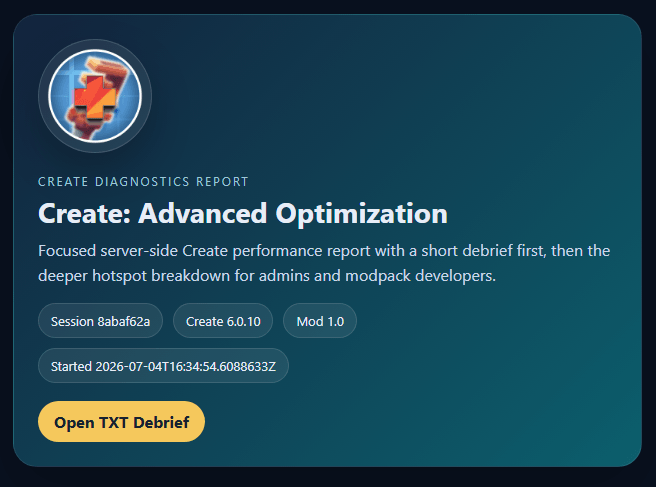
Profile your Create setup directly in-game and identify which systems consume the most server time.
The profiler can measure activity from:
Profiler coverage means that these systems are measured. It does not necessarily mean that their internal behavior is modified.
Each session exports:
Open the HTML report in any browser for a clear overview of the profiling session.
See the Gallery for a preview of the HTML report.
All commands require permission level 2.
/cao status - Shows enabled optimizations, profiler status, and package statistics./cao profile start <seconds> - Starts a profiling session lasting between 5 and 3600 seconds./cao profile stop - Stops the active profiling session and exports its reports./cao report - Exports a report from the latest available profiler data./cao report last - Shows information about the latest exported report./cao packages top [limit] - Lists chunks with the highest active Package Entity counts./cao reset - Resets profiler and package monitoring data.The full /createadvancedoptimization command is also available.
Server owners can configure:
Most systems can be disabled independently for compatibility testing or diagnostics.
Feedback, suggestions, compatibility reports, and bug reports are welcome.
Join the Our Story Network Discord for support and project updates.
Need a server for your Create world?
Host with BisectHosting and use code OURSTORY for 25% off your first month.
Every purchase made through our partner link helps support Our Story projects.
Support future updates and projects through:
Thank you for supporting our work!
This mod may be included in public or private modpacks.
Do not reupload the mod as a standalone project, redistribute modified builds, or claim the project as your own. When possible, link to the official CurseForge or Modrinth project page.
Project description from CurseForge.
Pick your setup
Choose the version and loader you play, then open the matching release.
Check the dependencies, then try the file in a copied instance before changing a world you care about.
Recent files
createadvancedoptimization-1.4.jar
24 Aug 2026
createadvancedoptimization-1.3.jar
6 Aug 2026
createadvancedoptimization-1.2.jar
27 Jul 2026
createadvancedoptimization-1.1.jar
22 Jul 2026
createadvancedoptimization-1.0.jar
4 Jul 2026
Looking for an older file? The official CurseForge project page is in Resources.
 mod
modA Create: Aeronautics addon adding a full magnetism layer for Sable-driven contraptions: emitters that pull or push ships (electromagnets, anchors, tractor beams, repulsor coils, excavators), permanent and temporary magnets.
 mod
modUnofficial companion mod for Patrix's Bonus Items and Addons resource packs, adding its content as placeable Creative Mode blocks. Not affiliated with or endorsed by Patrix.
 mod
modA client-side Minecraft 1.12.2 mod that lets you select mobs to view spawn conditions and track live, no item required.
