Minecraft version
Back to mods 
CurseForge · Minecraft mod
Pocket Weather
Ever wished you could carry the perfect forecast in your pocket? With Pocket Weather, you can. Control the local climate, hydrate your farms instantly, create strategic advantage with a localized snowstorm, or simply enjoy a perfect day, anytime, anywhere.
Choose a version Pick your version below, then grab the matching file.
Quick answer
Which Pocket Weather release should I use?
Latest stable file pocket-weather-0.1.0.jar
Game version 26.2
Loader Fabric
Pocket Weather pocket-weather-0.1.0.jar targets 26.2 with Fabric. The project page does not say whether this file belongs on the client, dedicated server, or both. No extra mods listed for this file.
Where it goes
Is Pocket Weather required on the client, server, or both?
The project page does not say whether this file belongs on the client, dedicated server, or both.
Client Source doesn’t say
Dedicated server Source doesn’t say
Loader for this release Fabric
Required install it here Optional supported, not mandatory Not supported do not install here Source doesn’t say do not assume
The source does not explicitly classify this release as client-only or server-only.
What else does Pocket Weather pocket-weather-0.1.0.jar need?
pocket-weather-0.1.0.jar. Change the file and its required mods may change too.
This file does not list any required mods. Do not add a library just because a different file uses it.
This file does not list any required or optional mods.
Before you install it
Add Pocket Weather without breaking your instance.
Built for Pocket Weather pocket-weather-0.1.0.jar. Pick another file and the loader, install side or required mods may change.
- 01
Stick to this file
Use pocket-weather-0.1.0.jar. It targets 26.2 with Fabric; another release may have different loader, side or dependency requirements.
- 02
Bring the mods it needs
This file does not list any required mods. Do not add a library just because a different file uses it.
- 03
Put it on the correct side
The project page does not say whether this file belongs on the client, dedicated server, or both.
- 04
Pick the file you checked
Use the “Get this file” button beside pocket-weather-0.1.0.jar. It opens that exact file at the source.
About this project
What does Pocket Weather add?
This Fabric mod for Minecraft 26.2 introduces a series of powerful, upgradeable weather bottles that allow players to capture and release specific weather phenomena.
Key Features:
Capture Weather: Right-click an Empty Weather Bottle during various weather states to capture them:
Clear Sky Bottle: Captured during Clear weather.
Rain Bottle: Captured during Rain.
Thunder Bottle: Captured during a Thunderstorm.
Snow Bottle: Captured during Snowfall.
Release & Control: Take your filled bottles and release the captured weather elsewhere with another right-click. Each filled bottle has three uses.
Localized Effects: Unlike global weather commands, these bottles create local "Pocket Weather" zones that interact dynamically with the environment.
Understanding the Effects:
Rain: Hydrates farmland, extinguishes fires.
Snow: Accumulates snow, and over time, gradually freezes players.
Thunder: Creates rain and localized lightning strikes within the effect zone.
Clear Sky: Instantly removes any active Pocket Weather zone in its area.
The Progression Tiers:
Unlock larger areas and longer duration effects by upgrading your empty bottles. (See image below for the complete bottle types, referencing image_0.png for visual styles).
Tier I: The Copper Core
Effects: Affects a 1-chunk area for 5 minutes.
Crafting Recipe: See Recipe Card 1
Tier II: The Diamond Standard (Shapeless Upgrade)
Effects: Affects a 4-chunk area for 8 minutes.
Upgrade Recipe: Combine a Tier I Empty Weather Bottle, 4 Diamonds, 1 Breeze Rod, and 1 Eye of Ender. See Recipe Card 2
Tier III: The Netherite Pinnacle (Shapeless Upgrade)
Effects: Affects a massive 12-chunk area for 12 minutes.
Upgrade Recipe: Combine a Tier II Empty Weather Bottle, 1 Nether Star, 1 Heavy Core, 1 Dragon’s Breath, 1 Echo Shard, and 4 Netherite Scraps. See Recipe Card 3
Advanced Weather Brewing (Optional Feature):
Combine different weather types through brewing stands to create complex, multi-layered climate systems like "Thunderous Snow" or localized Fog (Fog reduces visibility and interacts with redstone).
Recipe Visualizations:
Below are standard Minecraft crafting visualizations for creating the upgradeable bottles. The visual style of the final output bottles corresponds directly to the tiers shown in image_0.png.
Recipe Visualizations:
Below are standard Minecraft crafting visualizations for creating and upgrading the various weather bottles. The visual style of the bottles in the output slots corresponds directly to the three tiers shown in the mod's asset catalog, image_0.png.
- Tier I Empty Weather Bottle (The Foundation)
This recipe requires a standard 3x3 crafting grid. Players must assemble the core bottle using Copper and Echo Shards.
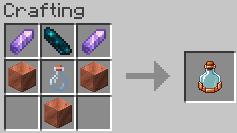
Ingredients: 2x Amethyst Shard, 1x Echo Shard (Top Row); 2x Copper Block, 1x Glass Bottle (Middle Row); 1x Copper Block (Bottom-Center).
Result: 1x Tier I Empty Weather Bottle (Copper trim).
- Tier II Upgrade (Shapeless)
This is a shapeless recipe that can be crafted in any 2x2 or 3x3 grid (like the Player Inventory crafting area). It requires combining valuable materials with the Tier I bottle.
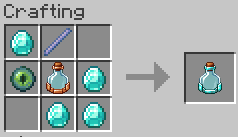
Ingredients: 1x Tier I Empty Weather Bottle, 4x Diamonds, 1x Breeze Rod, 1x Eye of Ender.
Result: 1x Tier II Empty Weather Bottle (Diamond trim).
- Tier III Upgrade (Shapeless)
This is the ultimate shapeless upgrade, demanding end-game materials to unlock maximum weather control.
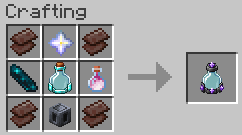
Ingredients: 1x Tier II Empty Weather Bottle, 1x Nether Star, 1x Heavy Core, 1x Dragon’s Breath, 1x Echo Shard, 4x Netherite Scraps.
Result: 1x Tier III Empty Weather Bottle (Netherite and Amethyst trim).
Modrinth: https://modrinth.com/mod/pocket-weather
Project description from CurseForge.
Pick your setup
Pocket Weather by Minecraft version and loader
Choose the version and loader you play, then open the matching release.
Check the dependencies, then try the file in a copied instance before changing a world you care about.
Recent files
Pocket Weather versions and loaders
pocket-weather-0.1.0.jar
5 Jul 2026
Client Source doesn’t say Server Source doesn’t say Dependencies No extras listed Listed on Release listing
Check the 26.2 · Fabric setup Fabric26.2 release
Looking for an older file? The official CurseForge project page is in Resources.