Minecraft version
Back to mods 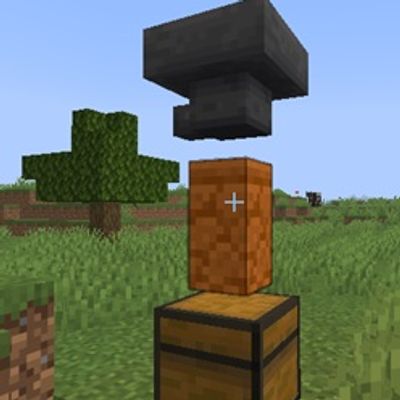
CurseForge · Minecraft mod
RedSandstoneWall as upper (inverted hopper)
RedSandstone Wall transport items vertically between connected containers with the efficiency and speed of a standard hopper.
Choose a version Pick your version below, then grab the matching file.
Quick answer
Which RedSandstoneWall as upper (inverted hopper) release should I use?
Latest stable file RedSandstoneWall as upper (inverted hopper)-1.0.0-neoforge-26.1.2.jar
Game version 26.1.2
Loader NeoForge
RedSandstoneWall as upper (inverted hopper)-1.0.0-neoforge-26.1.2.jar targets 26.1.2 with NeoForge. The project page does not say whether this file belongs on the client, dedicated server, or both. No extra mods listed for this file.
Where it goes
Is RedSandstoneWall as upper (inverted hopper) required on the client, server, or both?
The project page does not say whether this file belongs on the client, dedicated server, or both.
Client Source doesn’t say
Dedicated server Source doesn’t say
Loader for this release NeoForge
Required install it here Optional supported, not mandatory Not supported do not install here Source doesn’t say do not assume
The source does not explicitly classify this release as client-only or server-only.
What else does RedSandstoneWall as upper (inverted hopper)-1.0.0-neoforge-26.1.2.jar need?
RedSandstoneWall as upper (inverted hopper)-1.0.0-neoforge-26.1.2.jar. Change the file and its required mods may change too.
This file does not list any required mods. Do not add a library just because a different file uses it.
This file does not list any required or optional mods.
Before you install it
Add RedSandstoneWall as upper (inverted hopper) without breaking your instance.
Built for RedSandstoneWall as upper (inverted hopper)-1.0.0-neoforge-26.1.2.jar. Pick another file and the loader, install side or required mods may change.
- 01
Stick to this file
Use RedSandstoneWall as upper (inverted hopper)-1.0.0-neoforge-26.1.2.jar. It targets 26.1.2 with NeoForge; another release may have different loader, side or dependency requirements.
- 02
Bring the mods it needs
This file does not list any required mods. Do not add a library just because a different file uses it.
- 03
Put it on the correct side
The project page does not say whether this file belongs on the client, dedicated server, or both.
- 04
Pick the file you checked
Use the “Get this file” button beside RedSandstoneWall as upper (inverted hopper)-1.0.0-neoforge-26.1.2.jar. It opens that exact file at the source.
About this project
What does RedSandstoneWall as upper (inverted hopper) add?
RedSandstone Wall-Lift
An elegant, utility-focused addition for builders and engineers.
Description Tired of bulky item elevators taking up too much space in your base? RedSandstone Wall-Lift introduces a specialized "Inverted Hopper" mechanic to your Minecraft world. By utilizing the aesthetic versatility of Red Sandstone Walls, this mod allows you to transport items vertically between connected containers with the efficiency and speed of a standard hopper.
Key Features
Seamless Integration: Transforms any standard Red Sandstone Wall into a vertical item conduit when placed between two valid containers (e.g., Chests, Barrels).
Hopper-Speed Logic: Maintains the classic 8-tick item transfer rhythm for balanced survival gameplay.
Intuitive Mechanics: Simply place the wall between your containers, and the system automatically engages—no complex configuration or manual power source required.
Performance Optimized: Built for modern versions of the game using the latest NeoForge transfer protocols to ensure zero-lag item movement.
Why use this? Whether you are optimizing a storage room, automating a farm, or simply looking to save space in your builds, the RedSandstone Wall-Lift offers a clean, non-intrusive way to manage your logistics. No more exposed redstone or floating tubes—just clean, functional walls.
Project description from CurseForge.
Pick your setup
RedSandstoneWall as upper (inverted hopper) by Minecraft version and loader
Choose the version and loader you play, then open the matching release.
Check the dependencies, then try the file in a copied instance before changing a world you care about.
Recent files
RedSandstoneWall as upper (inverted hopper) versions and loaders
RedSandstoneWall as upper (inverted hopper)-1.0.0-neoforge-26.1.2.jar
6 Jul 2026
Client Source doesn’t say Server Source doesn’t say Dependencies No extras listed Listed on Release listing
Check the 26.1.2 · NeoForge setup NeoForge26.1.2 release
Looking for an older file? The official CurseForge project page is in Resources.
 mod
mod CurseForge + Modrinth · Minecraft
Reliable Remover
A lightweight utility for completely removing items via simple JSON configuration.
 mod
mod CurseForge + Modrinth · Minecraft
Stardew Fishing Fabric
Making fishing fun with a minigame directly inspired by Stardew Valley(fabric version of Stardew Fishing)!
 mod
mod CurseForge + Modrinth · Minecraft
VO: Better Dogs
Enhances vanilla wolves with unique personalities (Aggressive, Pacifist, Normal), smarter AI, safety behaviors, and combat improvements.