Minecraft version
Back to mods 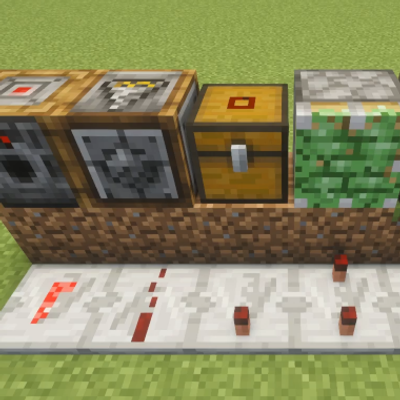
CurseForge · Minecraft mod
RedstoneExpansion
Added many practical redstone components, very suitable for players who love redstone
Choose a version Pick your version below, then grab the matching file.
Quick answer
Which RedstoneExpansion release should I use?
Latest stable file redstone-expansion-1.0.3-26.3.jar
Game version 26.3
Loader Fabric
RedstoneExpansion redstone-expansion-1.0.3-26.3.jar targets 26.3 with Fabric. The project page does not say whether this file belongs on the client, dedicated server, or both. No extra mods listed for this file.
Where it goes
Is RedstoneExpansion required on the client, server, or both?
The project page does not say whether this file belongs on the client, dedicated server, or both.
Client Source doesn’t say
Dedicated server Source doesn’t say
Loader for this release Fabric
Required install it here Optional supported, not mandatory Not supported do not install here Source doesn’t say do not assume
The source does not explicitly classify this release as client-only or server-only.
What else does RedstoneExpansion redstone-expansion-1.0.3-26.3.jar need?
redstone-expansion-1.0.3-26.3.jar. Change the file and its required mods may change too.
This file does not list any required mods. Do not add a library just because a different file uses it.
This file does not list any required or optional mods.
Before you install it
Add RedstoneExpansion without breaking your instance.
Built for RedstoneExpansion redstone-expansion-1.0.3-26.3.jar. Pick another file and the loader, install side or required mods may change.
- 01
Stick to this file
Use redstone-expansion-1.0.3-26.3.jar. It targets 26.3 with Fabric; another release may have different loader, side or dependency requirements.
- 02
Bring the mods it needs
This file does not list any required mods. Do not add a library just because a different file uses it.
- 03
Put it on the correct side
The project page does not say whether this file belongs on the client, dedicated server, or both.
- 04
Pick the file you checked
Use the “Get this file” button beside redstone-expansion-1.0.3-26.3.jar. It opens that exact file at the source.
About this project
What does RedstoneExpansion add?
Added many practical redstone components, very suitable for players who love redstone. Each component can be pushed by a piston for automation.
Introduction
User
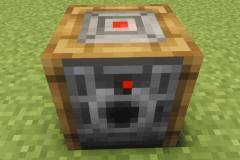
It can interact with blocks or entities ahead, with the farthest interaction distance equal to the strength of the received redstone signal. For example, fertilizing, opening doors, building roads, etc.
Excavator
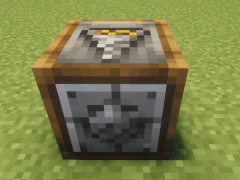
It can excavate the blocks ahead, and the maximum excavation distance depends on the strength of the input redstone signal. You can place a tool in it.
Wireless Transmitter & Wireless Receiver
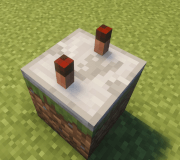
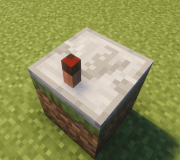
The Wireless Transmitter can transmit redstone signals to Wireless Receivers on the same channel. You can right-click on them or send redstone pulse signals to their left or right to change the channel.
Relay Chest
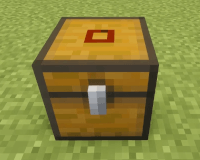
A chest used for remote transmission of items. It has two modes of input and output. The input mode chest will transfer items to the input mode chest on the same channel. The transmission speed depends on the strength of the receive redstone signal. Both modes of chests require receive of redstone signals to work.
Inverter
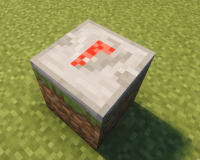
Reverse the strength of the input redstone signal. Output = 15 - Input.
Pulser
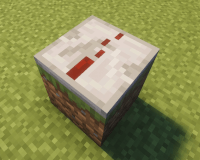
Convert continuous input signals into pulse signals. Right click to adjust pulse frequency.
Magnet Hopper
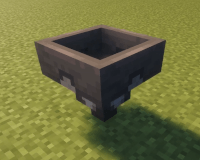
It can collect items with a maximum radius of 7.
Strong Piston
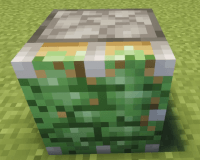
It can simultaneously push or pull up to 15 blocks ahead (the maximum number depends on the strength of the input redstone signal).
Consumption Detector
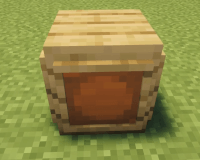
Right click on one side of the handheld item. When you consume or use the item, it will emit a redstone pulse signal forward. You can use it to make escape or teleportation devices.
Redstone Dial
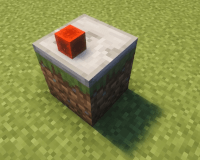
Right click to set the output redstone signal strength. Inputting redstone pulse signals to the left/right can also reduce/increase the strength of redstone signals.
Chunk Loader
Force loading of surrounding blocks. Radius = Strength of redstone signal / 4. Right click to view the currently loaded block range.
Project description from CurseForge.
Pick your setup
RedstoneExpansion by Minecraft version and loader
Choose the version and loader you play, then open the matching release.
Minecraft version
26.2
1 loader buildMinecraft version
26.1.2
1 loader buildCheck the dependencies, then try the file in a copied instance before changing a world you care about.
Recent files
RedstoneExpansion versions and loaders
redstone-expansion-1.0.3-26.3.jar
15 Oct 2026
Client Source doesn’t say Server Source doesn’t say Dependencies No extras listed Listed on Release listing
Check the 26.3 · Fabric setup Fabric26.3 release
redstone-expansion-1.0.3-26.2.jar
15 Oct 2026
Client Source doesn’t say Server Source doesn’t say Dependencies No extras listed Listed on Release listing
Check the 26.2 · Fabric setup Fabric26.2 release
redstone-expansion-1.0.3-26.1.2.jar
15 Oct 2026
Client Source doesn’t say Server Source doesn’t say Dependencies No extras listed Listed on Release listing
Check the 26.1.2 · Fabric setup Fabric26.1.2 release
redstone-expansion-1.0.2-26.2.jar
21 Jul 2026
Client Source doesn’t say Server Source doesn’t say Dependencies No extras listed Listed on Release listing
Check the 26.2 · Fabric setup Fabric26.2 release
redstone-expansion-1.0.2-26.1.2.jar
21 Jul 2026
Client Source doesn’t say Server Source doesn’t say Dependencies No extras listed Listed on Release listing
Check the 26.1.2 · Fabric setup Fabric26.1.2 release
redstone-expansion-1.0.1-26.2.jar
17 Jul 2026
Client Source doesn’t say Server Source doesn’t say Dependencies No extras listed Listed on Release listing
Check the 26.2 · Fabric setup Fabric26.2 release
redstone-expansion-1.0.1-26.1.2.jar
17 Jul 2026
Client Source doesn’t say Server Source doesn’t say Dependencies No extras listed Listed on Release listing
Check the 26.1.2 · Fabric setup Fabric26.1.2 release
redstone-expansion-1.0.0-26.2.jar
6 Jul 2026
Client Source doesn’t say Server Source doesn’t say Dependencies No extras listed Listed on Release listing
Check the 26.2 · Fabric setup Fabric26.2 release
redstone-expansion-1.0.0-26.1.2.jar
6 Jul 2026
Client Source doesn’t say Server Source doesn’t say Dependencies No extras listed Listed on Release listing
Check the 26.1.2 · Fabric setup Fabric26.1.2 release
Looking for an older file? The official CurseForge project page is in Resources.
 mod
CurseForge · Minecraft
TON 618 Addition
TON 618 Addition, an unofficial addon for TON 618: TA-01 Last Light (TON618 evaporates by Hawking radiation and the world comes back) and TA-02 Quasar Jets (feed a star to TON618, its quasar jet hits the Earth). Needs RimuLib.
 mod
CurseForge · Minecraft
Custom Multiblock Machines
Data-driven multiblock machines for NeoForge.
 mod
CurseForge · Minecraft
Novaris
A technic mod with energy production, machinery and more!