Minecraft version
Back to mods 
CurseForge · Minecraft mod
GooeyRed
Wireless redstone control in a handy GUI
Choose a version Pick your version below, then grab the matching file.
Quick answer
Which GooeyRed release should I use?
Latest stable file gooeyred-1.1.0.jar
Game version 26.1.2
Loader NeoForge
gooeyred-1.1.0.jar targets 26.1.2 with NeoForge. The project page does not say whether this file belongs on the client, dedicated server, or both. No extra mods listed for this file.
Where it goes
Is GooeyRed required on the client, server, or both?
The project page does not say whether this file belongs on the client, dedicated server, or both.
Client Source doesn’t say
Dedicated server Source doesn’t say
Loader for this release NeoForge
Required install it here Optional supported, not mandatory Not supported do not install here Source doesn’t say do not assume
The source does not explicitly classify this release as client-only or server-only.
What else does gooeyred-1.1.0.jar need?
gooeyred-1.1.0.jar. Change the file and its required mods may change too.
This file does not list any required mods. Do not add a library just because a different file uses it.
This file does not list any required or optional mods.
Before you install it
Add GooeyRed without breaking your instance.
Built for gooeyred-1.1.0.jar. Pick another file and the loader, install side or required mods may change.
- 01
Stick to this file
Use gooeyred-1.1.0.jar. It targets 26.1.2 with NeoForge; another release may have different loader, side or dependency requirements.
- 02
Bring the mods it needs
This file does not list any required mods. Do not add a library just because a different file uses it.
- 03
Put it on the correct side
The project page does not say whether this file belongs on the client, dedicated server, or both.
- 04
Pick the file you checked
Use the “Get this file” button beside gooeyred-1.1.0.jar. It opens that exact file at the source.
About this project
What does GooeyRed add?
Gooey Red is a centralized redstone control mod — instead of running physical wire everywhere, you tune blocks to named channels and flip them on/off from anywhere.
Core blocks:
- Goo Activator — outputs a redstone signal whenever its tuned channel is on. Right-click to toggle it directly (like a lever); Shift+right-click to open the tuning screen and rename it, change its channel, or make it public/private.
- Goo Controller (and a wall-mounted variant) — a monitor screen showing every channel you have access to. Toggle individual channels or whole groups, reorder them, rename/edit, or remove them entirely.
- Portable Goo Controller (item) — the same controller GUI from your inventory, opened with a configurable keybind. Right-click also opens it.
Channels & groups:
- Channels are named and either public (anyone can see/toggle) or private (owner-only).
- Channels can be organized into groups — toggle an entire group at once instead of hunting down individual channels.
- Server admins get emergency override commands (
/gooeyred channel|group on|off <public|player> <name>,/gooeyred all on|off) to force-toggle anything without needing to find the physical block — useful as a lag/griefing circuit breaker.
Redstone Goo (wiring):
- A solid, waterloggable alternative to redstone dust — behaves identically (connections, power propagation) but isn't destroyed by water, so it survives underwater builds and flooding.
Redstone Goo Block:
- Combines Slime Block's bounce/sticky behavior with a permanently-on redstone power source (like a Redstone Block) — mostly a crafting ingredient and a bit of "lore" flavor, but functional if you want a stackable always-on source with slime physics.
Crafting:
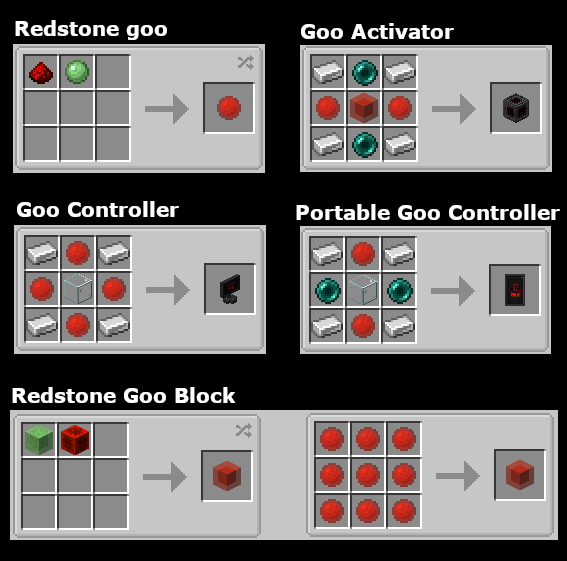
Project description from CurseForge.
Pick your setup
GooeyRed by Minecraft version and loader
Choose the version and loader you play, then open the matching release.
Minecraft version
1.21.1
1 loader buildMinecraft version
1.20.1
1 loader buildCheck the dependencies, then try the file in a copied instance before changing a world you care about.
Recent files
GooeyRed versions and loaders
gooeyred-1.1.0.jar
12 Jul 2026
Client Source doesn’t say Server Source doesn’t say Dependencies No extras listed Listed on Release listing
Check the 26.1.2 · NeoForge setup NeoForge26.1.2 release
gooeyred-1.0.0-mc26.1.2.jar
8 Jul 2026
Client Source doesn’t say Server Source doesn’t say Dependencies No extras listed Listed on Release listing
Check the 26.1.2 · NeoForge setup NeoForge26.1.2 release
gooeyred-1.0.0-mc1.21.1.jar
8 Jul 2026
Client Source doesn’t say Server Source doesn’t say Dependencies No extras listed Listed on Release listing
Check the 1.21.1 · NeoForge setup 1.21.1NeoForge release
gooeyred-1.0.0-mc1.20.1.jar
8 Jul 2026
Client Source doesn’t say Server Source doesn’t say Dependencies No extras listed Listed on Release listing
Check the 1.20.1 · Forge setup 1.20.1Forge release
Looking for an older file? The official CurseForge project page is in Resources.
 mod
CurseForge + Modrinth · Minecraft
Modern Morph
A modern port of iChun's iconic Morph mod
 mod
CurseForge · Minecraft
Equestria: Mythical Creatures Legacy
An unofficial Forge 1.20.1 legacy port of MLP Mythical Creatures, restoring its creatures, bosses and chaotic combat.
 mod
CurseForge · Minecraft
TownTopia: Integrations
Connects TownTopia villages with Diorama, Xaero's, JourneyMap, FTB Teams and Quests, Waystones, Supplementaries, modded trees, Artifacts, Relics, Visual Workbench, Iron Furnaces, Jade and JEI. All optional.