Minecraft version
Back to mods 
CurseForge · Minecraft mod
ChronoFlora
"ChronoFlora introduces the GrowthCatalyst, a magical staff that accelerates crop development with the simple click of a button."
Choose a version Pick your version below, then grab the matching file.
Quick answer
Which ChronoFlora release should I use?
Latest stable file chronoflora-1.0.0-neoforge-26.1.2.jar
Game version 26.1.2
Loader NeoForge
chronoflora-1.0.0-neoforge-26.1.2.jar targets 26.1.2 with NeoForge. The project page does not say whether this file belongs on the client, dedicated server, or both. No extra mods listed for this file.
Where it goes
Is ChronoFlora required on the client, server, or both?
The project page does not say whether this file belongs on the client, dedicated server, or both.
Client Source doesn’t say
Dedicated server Source doesn’t say
Loader for this release NeoForge
Required install it here Optional supported, not mandatory Not supported do not install here Source doesn’t say do not assume
The source does not explicitly classify this release as client-only or server-only.
What else does chronoflora-1.0.0-neoforge-26.1.2.jar need?
chronoflora-1.0.0-neoforge-26.1.2.jar. Change the file and its required mods may change too.
This file does not list any required mods. Do not add a library just because a different file uses it.
This file does not list any required or optional mods.
Before you install it
Add ChronoFlora without breaking your instance.
Built for chronoflora-1.0.0-neoforge-26.1.2.jar. Pick another file and the loader, install side or required mods may change.
- 01
Stick to this file
Use chronoflora-1.0.0-neoforge-26.1.2.jar. It targets 26.1.2 with NeoForge; another release may have different loader, side or dependency requirements.
- 02
Bring the mods it needs
This file does not list any required mods. Do not add a library just because a different file uses it.
- 03
Put it on the correct side
The project page does not say whether this file belongs on the client, dedicated server, or both.
- 04
Pick the file you checked
Use the “Get this file” button beside chronoflora-1.0.0-neoforge-26.1.2.jar. It opens that exact file at the source.
About this project
What does ChronoFlora add?
"Master the art of rapid farming with the power of ChronoFlora."
Overview
ChronoFlora adds the GrowthCatalyst to Minecraft, a powerful, magical staff designed to make farming efficient and fun. Whether you are building a massive automated farm or just need a quick supply of food, this tool is your best companion.
Features
Instant Growth: Right-click on any crop (Wheat, Carrots, Potatoes, Beetroot) to instantly accelerate its growth using the staff’s magical energy.
Magical Particles: Experience a stunning visual effect with every use, featuring custom "Spell Witch" particles that bring your farm to life.
Balanced Gameplay: The staff is balanced with durability and a cooldown mechanic, ensuring it remains a valuable tool without breaking the game's economy.
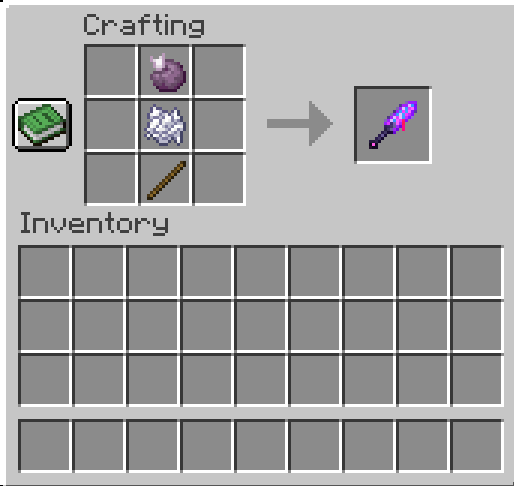
Easy Crafting: Simple and intuitive crafting recipe using Chorus Fruit, Bonemeal, and a Stick.
Crafting Recipe
How to Use
Craft your GrowthCatalyst using the recipe above.
Hold the staff in your main hand.
Simply Right-Click on any crop block.
Watch it reach maturity instantly!
Project description from CurseForge.
Pick your setup
ChronoFlora by Minecraft version and loader
Choose the version and loader you play, then open the matching release.
Check the dependencies, then try the file in a copied instance before changing a world you care about.
Recent files
ChronoFlora versions and loaders
chronoflora-1.0.0-neoforge-26.1.2.jar
9 Jul 2026
Client Source doesn’t say Server Source doesn’t say Dependencies No extras listed Listed on Release listing
Check the 26.1.2 · NeoForge setup NeoForge26.1.2 release
Looking for an older file? The official CurseForge project page is in Resources.
 mod
mod CurseForge + Modrinth · Minecraft
Starcatcher
A fishing overhaul mod with 100+ fishes, and a ton of new fishing related content
 mod
mod CurseForge + Modrinth · Minecraft
Cobblemon: Mega Showdown
Adds Mega Evolution, Z-Moves, Teralization, Dyna/Gigantamax, Ultra Burst & Fusions to Cobblemon!
 mod
mod CurseForge · Minecraft
Swivel - Better 3rd Person / Third Person Camera, Free Look & Orbit Camera (Controller Support)
A better camera for Minecraft. In first person, hold a key to look around without turning. Swing the third-person camera all the way around your character and still mine, build and aim at whatever is under your crosshair. Controlify controller support now!