Minecraft version
Back to mods 
CurseForge · Minecraft mod
Champions Optimization
Improved compatibility between the Champions mod and hostile mobs from other mods
Choose a version Pick your version below, then grab the matching file.
Quick answer
Which Champions Optimization release should I use?
Latest stable file ChampionsOptimization-forge-1.20.1-3.0.1.jar
Game version 1.20.1
Loader Forge
Champions Optimization ChampionsOptimization-forge-1.20.1-3.0.1.jar targets 1.20.1 with Forge. The project page does not say whether this file belongs on the client, dedicated server, or both. No extra mods listed for this file.
Where it goes
Is Champions Optimization required on the client, server, or both?
The project page does not say whether this file belongs on the client, dedicated server, or both.
Client Source doesn’t say
Dedicated server Source doesn’t say
Loader for this release Forge
Required install it here Optional supported, not mandatory Not supported do not install here Source doesn’t say do not assume
The source does not explicitly classify this release as client-only or server-only.
What else does Champions Optimization ChampionsOptimization-forge-1.20.1-3.0.1.jar need?
ChampionsOptimization-forge-1.20.1-3.0.1.jar. Change the file and its required mods may change too.
This file does not list any required mods. Do not add a library just because a different file uses it.
This file does not list any required or optional mods.
Before you install it
Add Champions Optimization without breaking your instance.
Built for Champions Optimization ChampionsOptimization-forge-1.20.1-3.0.1.jar. Pick another file and the loader, install side or required mods may change.
- 01
Stick to this file
Use ChampionsOptimization-forge-1.20.1-3.0.1.jar. It targets 1.20.1 with Forge; another release may have different loader, side or dependency requirements.
- 02
Bring the mods it needs
This file does not list any required mods. Do not add a library just because a different file uses it.
- 03
Put it on the correct side
The project page does not say whether this file belongs on the client, dedicated server, or both.
- 04
Pick the file you checked
Use the “Get this file” button beside ChampionsOptimization-forge-1.20.1-3.0.1.jar. It opens that exact file at the source.
About this project
What does Champions Optimization add?
Let the Champions mod truly recognize every hostile mob in the modpack, with interpretable detection rules, in-game visual editing, runtime compatibility with the entire Champions 2.1.10.x series for 1.20.1 Forge. However, do NOT use the Champions 20.1.1.x series!!! The recommended version is Champions 2.1.10.2 [Content 1] Support all hostile mobs to become champion monsters, instead of only supporting vanilla hostile mobs in Minecraft
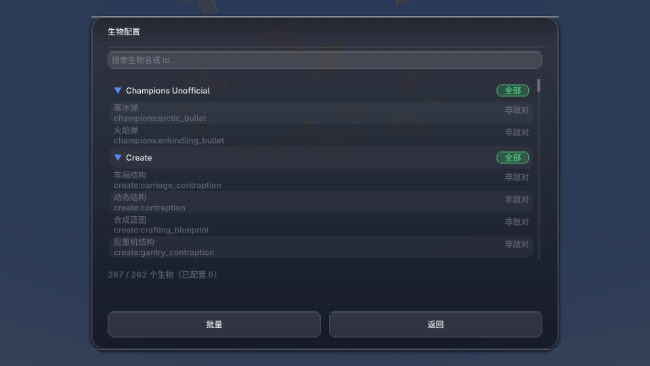
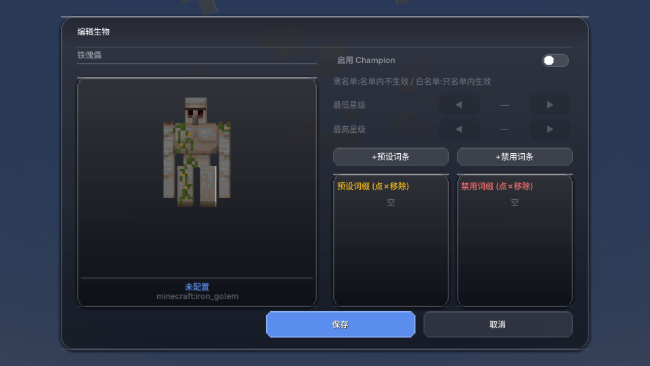
[Content 2] Press the [K] key to open the visual configuration to toggle whether the champion option is enabled for each mob. You can also edit the mob's star rating and related settings, as well as star rating and affix configuration and other functions (Version 3.0.0 features major optimizations and improvements to the UI, interface and operation experience)) 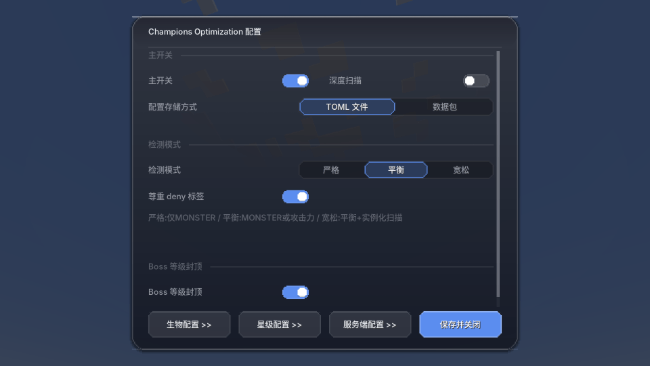
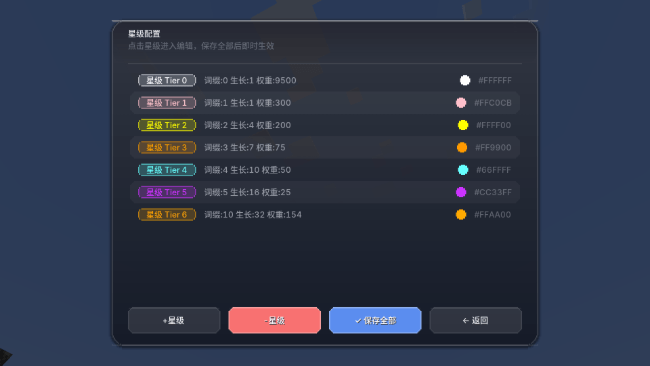
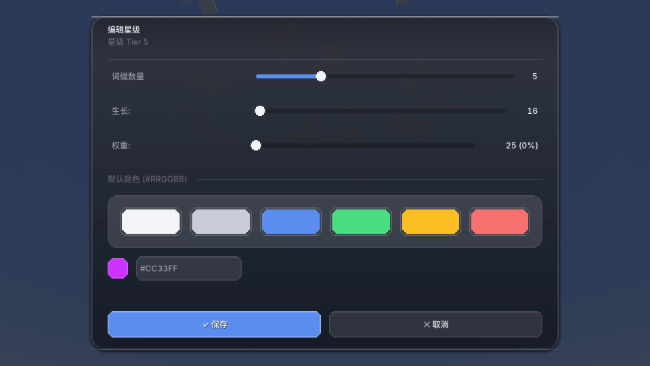
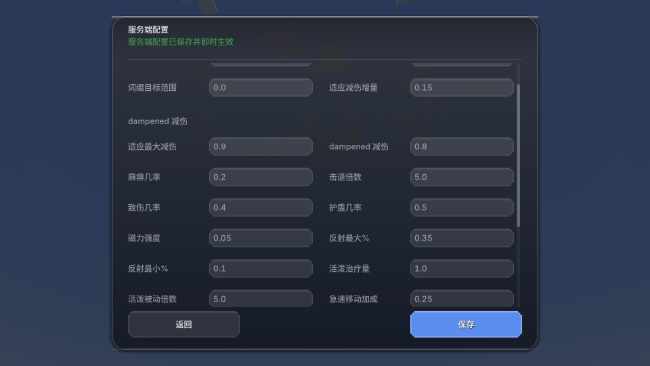
Project description from CurseForge.
Pick your setup
Champions Optimization by Minecraft version and loader
Choose the version and loader you play, then open the matching release.
Check the dependencies, then try the file in a copied instance before changing a world you care about.
Recent files
Champions Optimization versions and loaders
ChampionsOptimization-forge-1.20.1-3.0.1.jar
championsoptimization-forge-1.20.1-3.0.1.jar
14 Sept 2026
Client Source doesn’t say Server Source doesn’t say Dependencies No extras listed Listed on Release listing
Check the 1.20.1 · Forge setup 1.20.1Forge release
ChampionsOptimization-forge-1.20.1-3.0.0.jar
championsoptimization-forge-1.20.1-3.0.0.jar
13 Sept 2026
Client Source doesn’t say Server Source doesn’t say Dependencies No extras listed Listed on Release listing
Check the 1.20.1 · Forge setup 1.20.1Forge release
ChampionsOptimization-1.20.1-2.5.1.jar
ChampionsOptimization-1.20.1-2.5.1 (2).jar
26 Jul 2026
Client Source doesn’t say Server Source doesn’t say Dependencies No extras listed Listed on Release listing
Check the 1.20.1 · Forge setup 1.20.1Forge release
ChampionsOptimization-1.20.1-2.5.0.jar
17 Jul 2026
Client Source doesn’t say Server Source doesn’t say Dependencies No extras listed Listed on Release listing
Check the 1.20.1 · Forge setup 1.20.1Forge release
ChampionsOptimization-1.20.1-2.4.8.jar
17 Jul 2026
Client Source doesn’t say Server Source doesn’t say Dependencies No extras listed Listed on Release listing
Check the 1.20.1 · Forge setup 1.20.1Forge release
ChampionsOptimization-1.20.1-2.4.6.jar
17 Jul 2026
Client Source doesn’t say Server Source doesn’t say Dependencies No extras listed Listed on Release listing
Check the 1.20.1 · Forge setup 1.20.1Forge release
ChampionsOptimization-1.20.1-2.3.9.jar
11 Jul 2026
Client Source doesn’t say Server Source doesn’t say Dependencies No extras listed Listed on Release listing
Check the 1.20.1 · Forge setup 1.20.1Forge release
ChampionsOptimization-1.20.1-2.3.7.jar
11 Jul 2026
Client Source doesn’t say Server Source doesn’t say Dependencies No extras listed Listed on Release listing
Check the 1.20.1 · Forge setup 1.20.1Forge release
ChampionsFix-1.0.3.jar
11 Jul 2026
Client Source doesn’t say Server Source doesn’t say Dependencies No extras listed Listed on Release listing
Check the 1.20.1 · Forge setup 1.20.1Forge release
championsfix-1.0.2.jar
10 Jul 2026
Client Source doesn’t say Server Source doesn’t say Dependencies No extras listed Listed on Release listing
Check the 1.20.1 · Forge setup 1.20.1Forge release
ChampionsFix-1.0.0.jar
9 Jul 2026
Client Source doesn’t say Server Source doesn’t say Dependencies No extras listed Listed on Release listing
Check the 1.20.1 · Forge setup 1.20.1Forge release
Looking for an older file? The official CurseForge project page is in Resources.
 mod
mod CurseForge + Modrinth · Minecraft
Field Guide
Discover Plants, Animals and Monsters with a Spyglass. Collect them all and take notes in your personal Field Guide!
 mod
mod CurseForge · Minecraft
Siege Overhaul - A Villager Recruits Addon
Turn your kingdom into a battlefield: recruit armies, fortify your walls, and defend your Siege Core against invading factions or fight to reclaim it in this tactical PvE siege addon for Villager Recruits on Minecraft 1.20.1 Forge.
 mod
mod CurseForge · Minecraft
KENSHICRAFT
Kenshi's world in vanilla Minecraft: body-part combat, factions and their law, squads, sieges, and cities you take and hold. Beta.