Sodium Optional for Better Resolution BetterResolution-1.1.0+mc1.21.1.jar
optionalMatching file found Matched file: Sodium 0.8.13 for Fabric 1.21.1
CurseForge · Minecraft mod
Better Resolution improves GPU performance by lowering Minecraft’s internal world render resolution and then reconstructing it back to native resolution using smart and lightweight algorithms.
Quick answer
Better Resolution BetterResolution-1.1.0+mc1.21.1.jar targets 1.21.1 with Fabric. The project page does not say whether this file belongs on the client, dedicated server, or both. All 1 required mods have matching files.
Where it goes
The project page does not say whether this file belongs on the client, dedicated server, or both.
The source does not explicitly classify this release as client-only or server-only.
BetterResolution-1.1.0+mc1.21.1.jar. Change the file and its required mods may change too.
Install Fabric API first. We found matching files for this game-version and loader setup.
We only count dependency files that match this setup. A file for another loader does not fill the gap.
Before you install it
Built for Better Resolution BetterResolution-1.1.0+mc1.21.1.jar. Pick another file and the loader, install side or required mods may change.
Use BetterResolution-1.1.0+mc1.21.1.jar. It targets 1.21.1 with Fabric; another release may have different loader, side or dependency requirements.
Install Fabric API first. We found matching files for this game-version and loader setup.
The project page does not say whether this file belongs on the client, dedicated server, or both.
Use the “Get this file” button beside BetterResolution-1.1.0+mc1.21.1.jar. It opens that exact file at the source.
About this project
Better Resolution improves GPU performance by rendering Minecraft’s 3D world at a configurable internal resolution, then back to native resolution using smart and lightweight algorithms.
It is both higher quality and higher performance than alternatives. It was created because I had a personal gripe with how pixelated, aliased and blurry the game becomes when using other scaling mods.
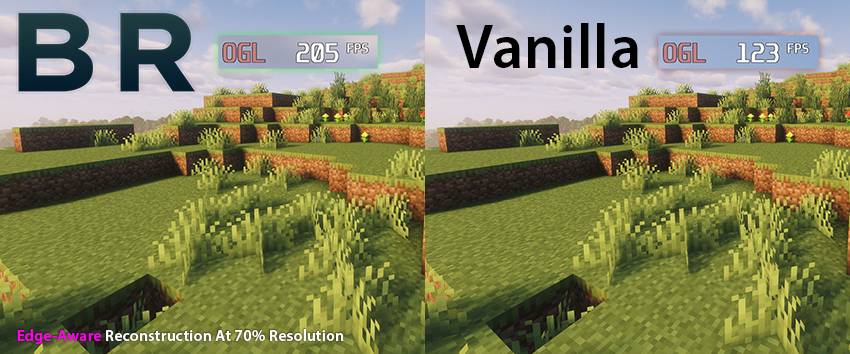
Better Resolution provides a large GPU performance boost, especially on systems limited by graphics performance.
The benefit can be even more significant with shaders, where lowering the world render resolution can greatly reduce the cost of shader rendering.
For lower-end GPUs, this can make higher settings or shaders much more practical.
The world is rendered at the selected internal resolution and reconstructed to your display resolution. This keeps the interface sharp while allowing the 3D scene to scale for better performance.
You can use built-in presets or manually adjust the internal world resolution with a slider.
Lower scales improve performance more. Higher scales increase the quality of the render.
Better Resolution includes two upscaling methods.
The default option.
Smooth uses lightweight edge-aware reconstruction to reduce harsh aliasing, pixelation and improve line stability.
This helps the image feel closer to how it should look while keeping the upscale fast.
A lightweight sharp reconstruction option.
Sharp keeps the image crisp with smart sharpening. This option is useful if you prefer a sharper look. Provides the highest performance without any blurring.
Available in Sodium’s Video Settings.
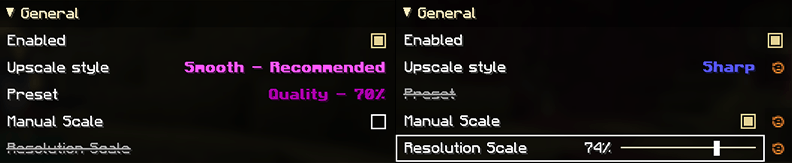
You can enable or disable the mod, choose the upscaling method, select a resolution preset, or enable the manual resolution scale slider.
The manual slider is disabled when presets are enabled.
Better Resolution is a client-side Fabric mod.
It is designed to work with Sodium and popular performance mods. If you find an incompatibility, please report it and I will check it out.
I will be updating this mod to every stable Minecraft release.
Further image quality improvements and performance optimizations, new features will be added over time.
The mod will be ported back to some earlier versions of Minecraft. Head over to Discord if the mod isn't available in a version you are playing in.
You can join the Discord server to report bugs, request features, ask questions, or reach out to me.
Project description from CurseForge.
Pick your setup
Choose the version and loader you play, then open the matching release.
Check the dependencies, then try the file in a copied instance before changing a world you care about.
Recent files
9 Oct 2026
3 Oct 2026
17 Sept 2026
13 Sept 2026
13 Sept 2026
13 Sept 2026
18 Aug 2026
18 Aug 2026
18 Aug 2026
14 Aug 2026
23 Jul 2026
9 Jul 2026
Looking for an older file? The official CurseForge project page is in Resources.