Cushion Backport Needed by Optimized Cushions [26.2] 1.0.0
requiredMatching file found Matched file: cushionbackport-26.2-NeoForge-1.0.5.jar
CurseForge · Minecraft mod
Optimizing cushions on client and server
Quick answer
Optimized Cushions [26.2] 1.0.0 targets 26.2 with NeoForge. The project page does not say whether this file belongs on the client, dedicated server, or both. All 2 required mods have matching files.
Where it goes
The project page does not say whether this file belongs on the client, dedicated server, or both.
The source does not explicitly classify this release as client-only or server-only.
[26.2] 1.0.0 on 26.2. Every mod below is checked against that same setup.
Install Cushion Backport, Cushion Backport first. We found matching files for this game-version and loader setup.
We only count dependency files that match this setup. A file for another loader does not fill the gap.
Before you install it
Built for Optimized Cushions [26.2] 1.0.0 on 26.2. Pick another file and the loader, install side or required mods may change.
Use [26.2] 1.0.0. It targets 26.2 with NeoForge; another release may have different loader, side or dependency requirements.
Install Cushion Backport, Cushion Backport first. We found matching files for this game-version and loader setup.
The project page does not say whether this file belongs on the client, dedicated server, or both.
Use the “Get this file” button beside [26.2] 1.0.0. It opens that exact file at the source.
About this project
Vanilla 26.3 added cushions as entities. A cushion never moves, yet it costs the same as any other entity, both on the client and on the server.
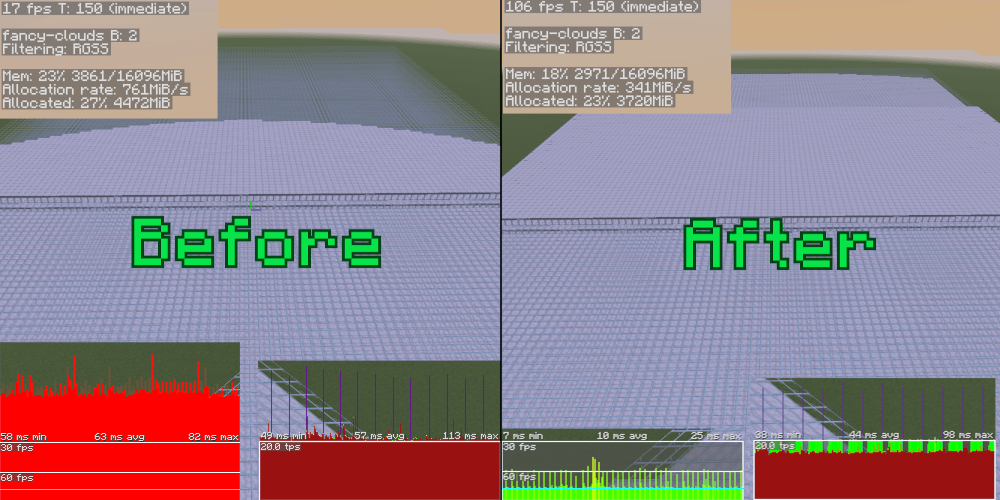
This mod treats a cushion as what it is: a static thing. The client bakes it into the terrain so it renders like a block; the server drops the per-tick tracking and ticking overhead. Gameplay is unchanged: sitting, breaking, picking, sounds, particles, drops and saves are all vanilla.
On versions without vanilla cushions the same cushions come from Cushion-Backport, which is required there. The optimizations are the same on every version.
To be honest: cushions are already a very light entity, especially server-side, so you will only see a difference if you have a LOT of them.
A cushion is rendered like any other block: baked straight into the chunk mesh and terrain is far cheaper to draw than entities.
On the server, cushions that have nobody sitting on them skip the entity tracker and tick-list and run through one lightweight loop instead. The moment someone sits down (or you /ride one) that cushion snaps back to the full vanilla path, so behavior stays exact.
If you encounter any incompatibility, please create an issue or send me a message on the Discord server. Thanks!
A few small, deliberate differences from vanilla — none affect gameplay (drops, riding, sounds, damage and saves are identical):
Project description from CurseForge.
Pick your setup
Choose the version and loader you play, then open the matching release.
Check the dependencies, then try the file in a copied instance before changing a world you care about.
Recent files
optimizedcushionsbackport-neoforge-mc26.2-1.0.0.jar
19 Sept 2026
optimizedcushionsbackport-fabric-mc26.2-1.0.0.jar
19 Sept 2026
optimizedcushions-0.1.0.jar
10 Jul 2026
Looking for an older file? The official CurseForge project page is in Resources.