Minecraft version
Back to mods 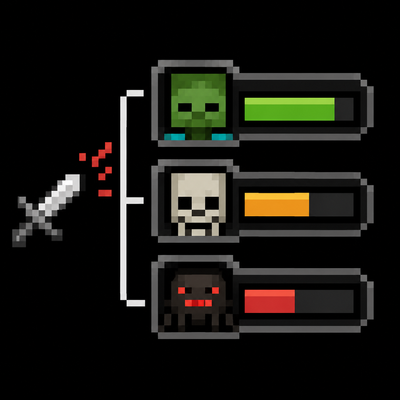
CurseForge · Minecraft mod
TargetsIndicate
Displays recently damaged targets in a clean, animated HUD with health bars, entity icons, and customizable layouts.
Choose a version Pick your version below, then grab the matching file.
Quick answer
Which TargetsIndicate release should I use?
Latest stable file targetsindicate-1.20.1-1.2.0
Game version 1.20.1
Loader Forge
targetsindicate-1.20.1-1.2.0 targets 1.20.1 with Forge. The project page does not say whether this file belongs on the client, dedicated server, or both. No extra mods listed for this file.
Where it goes
Is TargetsIndicate required on the client, server, or both?
The project page does not say whether this file belongs on the client, dedicated server, or both.
Client Source doesn’t say
Dedicated server Source doesn’t say
Loader for this release Forge
Required install it here Optional supported, not mandatory Not supported do not install here Source doesn’t say do not assume
The source does not explicitly classify this release as client-only or server-only.
What else does targetsindicate-1.20.1-1.2.0 need?
targetsindicate-1.20.1-1.2.0. Change the file and its required mods may change too.
This file does not list any required mods. Do not add a library just because a different file uses it.
This file does not list any required or optional mods.
Before you install it
Add TargetsIndicate without breaking your instance.
Built for targetsindicate-1.20.1-1.2.0. Pick another file and the loader, install side or required mods may change.
- 01
Stick to this file
Use targetsindicate-1.20.1-1.2.0. It targets 1.20.1 with Forge; another release may have different loader, side or dependency requirements.
- 02
Bring the mods it needs
This file does not list any required mods. Do not add a library just because a different file uses it.
- 03
Put it on the correct side
The project page does not say whether this file belongs on the client, dedicated server, or both.
- 04
Pick the file you checked
Use the “Get this file” button beside targetsindicate-1.20.1-1.2.0. It opens that exact file at the source.
About this project
What does TargetsIndicate add?
Targets Indicate
Targets Indicate is a lightweight client-side HUD mod that helps you keep track of recently damaged entities during combat.
Whenever you deal damage to a living entity, it is added to an animated target list showing its current health, health bar, and optional entity icon. The target you are currently looking at can also be prioritized, making it easier to focus on the right enemy in busy fights.
Demo Video: https://www.bilibili.com/video/BV1DfNL61EaQ
Features
- Animated target HUD
- Tracks recently damaged entities
- Smooth health bar animations
- Optional entity model icons
- Prioritize the entity under your crosshair
- Configurable position, scale, spacing, and colors
- Adjustable health display (value and percentage)
- Lightweight and fully client-side
Configuration
Nearly every aspect of the HUD can be customized, including:
- Screen side
- Maximum displayed targets
- Entry lifetime
- Health bar size
- Icon size
- HUD scaling
- Margins and spacing
- Background color
- Health bar colors
- Displayed health information
Project description from CurseForge.
Pick your setup
TargetsIndicate by Minecraft version and loader
Choose the version and loader you play, then open the matching release.
Minecraft version
1.20.1
1 loader buildCheck the dependencies, then try the file in a copied instance before changing a world you care about.
Recent files
TargetsIndicate versions and loaders
targetsindicate-1.20.1-1.2.0
targetsindicate-1.20.1-1.2.0.jar
23 Aug 2026
Client Source doesn’t say Server Source doesn’t say Dependencies No extras listed Listed on Release listing
Check the 1.20.1 · Forge setup 1.20.1Forge release
targetsindicate-1.21.1-1.2.0
targetsindicate-1.21.1-1.2.0.jar
23 Aug 2026
Client Source doesn’t say Server Source doesn’t say Dependencies No extras listed Listed on Release listing
Check the 1.21.1 · NeoForge setup 1.21.1NeoForge release
targetsindicate-1.20.1-1.1.1
targetsindicate-1.20.1-1.1.1.jar
21 Aug 2026
Client Source doesn’t say Server Source doesn’t say Dependencies No extras listed Listed on Release listing
Check the 1.20.1 · Forge setup 1.20.1Forge release
targetsindicate-1.21.1-1.1.1
targetsindicate-1.21.1-1.1.1.jar
16 Aug 2026
Client Source doesn’t say Server Source doesn’t say Dependencies No extras listed Listed on Release listing
Check the 1.21.1 · NeoForge setup 1.21.1NeoForge release
targetsindicate-1.21.1-1.1.0
targetsindicate-1.21.1-1.1.0.jar
16 Aug 2026
Client Source doesn’t say Server Source doesn’t say Dependencies No extras listed Listed on Release listing
Check the 1.21.1 · NeoForge setup 1.21.1NeoForge release
targetsindicate-1.21.1-1.0.0
targetsindicate-1.21.1-1.0.0.jar
10 Jul 2026
Client Source doesn’t say Server Source doesn’t say Dependencies No extras listed Listed on Release listing
Check the 1.21.1 · NeoForge setup 1.21.1NeoForge release
Looking for an older file? The official CurseForge project page is in Resources.
 mod
mod CurseForge + Modrinth · Minecraft
Carpet-FGA-Addition
An AI-powered Carpet extension mod packed with practical utilities, including longer player name support and fake-player area mining.
 mod
mod CurseForge · Minecraft
The Underworld dimension
A simple mod that adds a new dimension, new ores, new tools, weapons, and armor, as well as various features.
 mod
mod CurseForge · Minecraft
Changed Siren Course
Become a cursed siren or shark mermaid in the Changed universe, where water is your life and your curse.