Minecraft version
Back to mods 
CurseForge · Minecraft mod
SoundBlock
Like a note block, but can play any sound.
Choose a version Pick your version below, then grab the matching file.
Quick answer
Which SoundBlock release matches 1.20.1 Forge?
Best match for your filters SoundBlock - Forge/NeoForge - 1.20.1 - 1.0.0.jar
Game version 1.20.1
Loader Forge, NeoForge
SoundBlock - Forge/NeoForge - 1.20.1 - 1.0.0.jar targets 1.20.1 with Forge, NeoForge. The project page does not say whether this file belongs on the client, dedicated server, or both. No extra mods listed for this file.
Where it goes
Is SoundBlock required on the client, server, or both?
The project page does not say whether this file belongs on the client, dedicated server, or both.
Client Source doesn’t say
Dedicated server Source doesn’t say
Loader for this release Forge, NeoForge
Required install it here Optional supported, not mandatory Not supported do not install here Source doesn’t say do not assume
The source does not explicitly classify this release as client-only or server-only.
What else does SoundBlock - Forge/NeoForge - 1.20.1 - 1.0.0.jar need?
SoundBlock - Forge/NeoForge - 1.20.1 - 1.0.0.jar on 1.20.1 Forge. Every mod below is checked against that same setup.
This file does not list any required mods. Do not add a library just because a different file uses it.
This file does not list any required or optional mods.
Before you install it
Add SoundBlock without breaking your instance.
Built for SoundBlock - Forge/NeoForge - 1.20.1 - 1.0.0.jar on 1.20.1 Forge. Pick another file and the loader, install side or required mods may change.
- 01
Stick to this file
Use SoundBlock - Forge/NeoForge - 1.20.1 - 1.0.0.jar. It targets 1.20.1 with Forge, NeoForge; another release may have different loader, side or dependency requirements.
- 02
Bring the mods it needs
This file does not list any required mods. Do not add a library just because a different file uses it.
- 03
Put it on the correct side
The project page does not say whether this file belongs on the client, dedicated server, or both.
- 04
Pick the file you checked
Use the “Get this file” button beside SoundBlock - Forge/NeoForge - 1.20.1 - 1.0.0.jar. It opens that exact file at the source.
About this project
What does SoundBlock add?
This mod adds the Sound Block.

It looks and acts a lot like a note block, however instead of notes it can play any sound in the game, including sounds from other mods.
How it Works
Right click the block to open the sound picker. Sounds are sorted into categories like Blocks, Mobs & Entities, Items and more, or you can just search for what you want. Pick a sound, then set the pitch and hit Done. You can also preview sounds before saving.
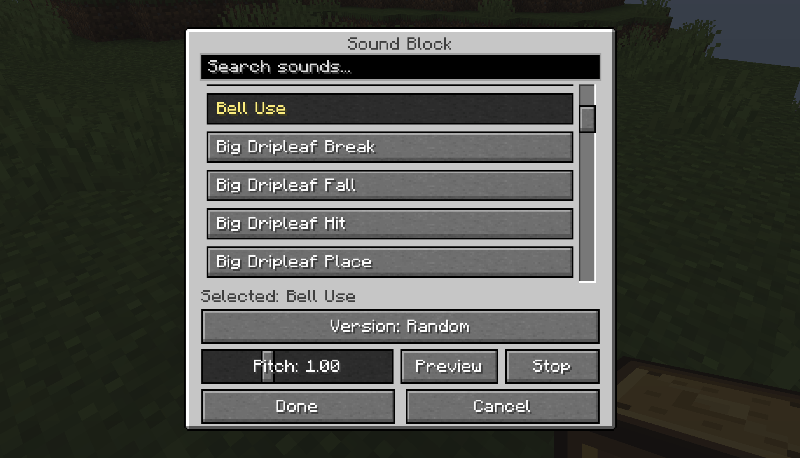
Left click the block or power it with redstone to play the sound. Range and volume work just like a note block.
Some sounds come in several versions. The block can pick one at random like vanilla does, or you can pick one specific version.
To stop a sound early, there's a Stop button in the block's GUI, and breaking the block will also do the same.
Config
Music tracks, music discs, event, ambient, weather and other sounds are off by default, though any of them can be enabled in the config. When on a server, server config takes precedent. Modded sounds are on by default but can be turned off.
(Also configurable via ModMenu or Forge config)
Crafting Recipe
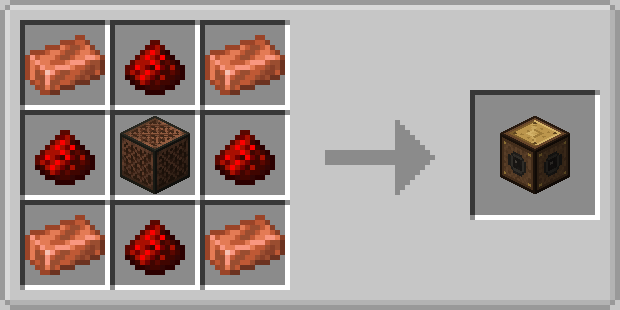
Any feedback or suggestions are appreciated!
(Feel free to use in modpacks).
Project description from CurseForge.
Pick your setup
SoundBlock by Minecraft version and loader
Choose the version and loader you play, then open the matching release.
Check the dependencies, then try the file in a copied instance before changing a world you care about.
Recent files
SoundBlock versions and loaders
SoundBlock - Forge/NeoForge - 1.20.1 - 1.0.0.jar
soundblock-forge-1.0.0.jar
10 Jul 2026
Client Source doesn’t say Server Source doesn’t say Dependencies No extras listed Listed on Release listing
Check the 1.20.1 · Forge setup 1.20.1ForgeNeoForge release
Looking for an older file? The official CurseForge project page is in Resources.
 mod
CurseForge · Minecraft
Sky's Building Pieces
More ways to build with familiar Minecraft materials: vertical slabs, steps, corners, stairs, walls and panes, with ordinary crafting and flexible placement.
 mod
CurseForge · Minecraft
Etr Economy
EtrEconomymod (etreco) is an economy, trade, and machine-based Minecraft mod It adds player-to-player commerce, jobs, banking tools, and RF-powered machines for survival and multiplayer servers. Have A Fun While Playing :D
 mod
CurseForge · Minecraft
AmbiEngine
The main acoustic processing engine and primary sound system for Minecraft. Delivers dynamic pause filters, underwater immersion, tactile UI audio, and powers all AmbiMod expansions.