Minecraft version
Back to mods 
CurseForge · Minecraft mod
Hands To Yourself
Controls how your hand and camera overlays visible, not hidden from HUD. Now with crosshair and block outline!
Choose a version Pick your version below, then grab the matching file.
Quick answer
Which Hands To Yourself release should I use?
Latest stable file 1.2.1 (NeoForge 26.3)
Game version 26.3
Loader NeoForge
Hands To Yourself 1.2.1 (NeoForge 26.3) targets 26.3 with NeoForge. The project page does not say whether this file belongs on the client, dedicated server, or both. No extra mods listed for this file.
Where it goes
Is Hands To Yourself required on the client, server, or both?
The project page does not say whether this file belongs on the client, dedicated server, or both.
Client Source doesn’t say
Dedicated server Source doesn’t say
Loader for this release NeoForge
Required install it here Optional supported, not mandatory Not supported do not install here Source doesn’t say do not assume
The source does not explicitly classify this release as client-only or server-only.
What else does Hands To Yourself 1.2.1 (NeoForge 26.3) need?
1.2.1 (NeoForge 26.3). Change the file and its required mods may change too.
This file does not list any required mods. Do not add a library just because a different file uses it.
This file does not list any required or optional mods.
Before you install it
Add Hands To Yourself without breaking your instance.
Built for Hands To Yourself 1.2.1 (NeoForge 26.3). Pick another file and the loader, install side or required mods may change.
- 01
Stick to this file
Use 1.2.1 (NeoForge 26.3). It targets 26.3 with NeoForge; another release may have different loader, side or dependency requirements.
- 02
Bring the mods it needs
This file does not list any required mods. Do not add a library just because a different file uses it.
- 03
Put it on the correct side
The project page does not say whether this file belongs on the client, dedicated server, or both.
- 04
Pick the file you checked
Use the “Get this file” button beside 1.2.1 (NeoForge 26.3). It opens that exact file at the source.
About this project
What does Hands To Yourself add?
Hands To Yourself
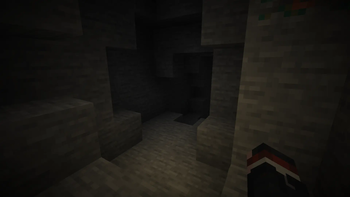
Hands To Yourself separates your hand and camera overlays (like vingette) to not be hidden from the "Toggle GUI" (F1) button and make them as their own buttons. Great for making first person cinematic shots!
Now with option to show crosshair and block outline!
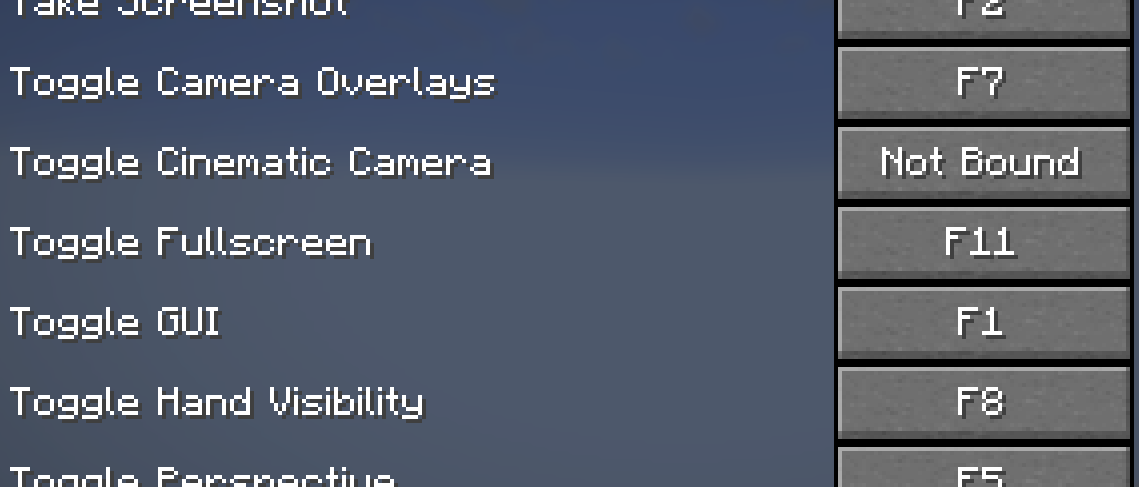
F7 - Show/hide camera overlays (shown by default)
F8 - Show/hide hand (shown by default)
F9 - Show/hide crosshair (hidden by default)
F10 - Show/hide block outline (hidden by default)
Special Credit
Credit to this old relic that has never been updated. This mod would (probably) not exist because of it. https://www.curseforge.com/minecraft/mc-mods/removehudbutnothand
FAQ
- Will this mod be ported to another mod-loader?
["Yes… but this may take a while… Please be patient."]The mod has been ported to NeoForge - Will this mod be backported?
["Yes… but this may take a while… Please be patient."]The mod has been backported down to 1.21.1 (plan to further backport this mod is still unknown) - Will the mod be ported to future version?
["Yes… but the mod minimum version is set to its minimum compatible Minecraft version, you should be able to use it in the future version. I'm only updating the mod if the new version breaks the current one."] - Can I put this in a modpack?
["Yes… go ahead."]
Project description from CurseForge.
Pick your setup
Hands To Yourself by Minecraft version and loader
Choose the version and loader you play, then open the matching release.
Minecraft version
26.2
3 loader buildsMinecraft version
26.1.2
3 loader buildsMinecraft version
26.1.1
2 loader buildsMinecraft version
26.1
2 loader buildsMinecraft version
1.21.11
3 loader buildsMinecraft version
1.21.10
3 loader buildsMinecraft version
1.21.9
3 loader buildsMinecraft version
1.21.8
2 loader buildsMinecraft version
1.21.7
2 loader buildsMinecraft version
1.21.6
2 loader buildsMinecraft version
1.21.5
3 loader buildsShowing the newest 12 of 16 game versions. Older files are in the list below.
Check the dependencies, then try the file in a copied instance before changing a world you care about.
Recent files
Hands To Yourself versions and loaders
1.2.1 (NeoForge 26.3)
hty-1.2.1+26.3-neoforge.jar
3 Oct 2026
Client Source doesn’t say Server Source doesn’t say Dependencies No extras listed Listed on Release listing
Check the 26.3 · NeoForge setup NeoForge26.3 release
1.2.0 (NeoForge 26.3)
hty-1.2.0+26.3-neoforge+no_iris.jar
27 Sept 2026
Client Source doesn’t say Server Source doesn’t say Dependencies No extras listed Listed on Release listing
Check the 26.3 · NeoForge setup NeoForge26.3 release
1.2.0 (Fabric 26.3)
hty-1.2.0+26.3-fabric.jar
27 Sept 2026
Client Source doesn’t say Server Source doesn’t say Dependencies No extras listed Listed on Release listing
Check the 26.3 · Fabric setup Fabric26.3 release
1.2.0 (NeoForge 26.2)
hty-1.2.0+26.2-neoforge.jar
27 Sept 2026
Client Source doesn’t say Server Source doesn’t say Dependencies No extras listed Listed on Release listing
Check the 26.2 · NeoForge setup NeoForge26.2 release
1.2.0 (Fabric 26.2)
hty-1.2.0+26.2-fabric.jar
27 Sept 2026
Client Source doesn’t say Server Source doesn’t say Dependencies No extras listed Listed on Release listing
Check the 26.2 · Fabric setup Fabric26.2 release
1.2.0 (NeoForge 26.1.2)
hty-1.2.0+26.1.2-neoforge.jar
27 Sept 2026
Client Source doesn’t say Server Source doesn’t say Dependencies No extras listed Listed on Release listing
Check the 26.1.2 · NeoForge setup NeoForge26.1.2 release
1.2.0 (Fabric 26.1)
hty-1.2.0+26.1-fabric.jar
27 Sept 2026
Client Source doesn’t say Server Source doesn’t say Dependencies No extras listed Listed on Release listing
Check the 26.1.2 · Fabric setup Fabric26.126.1.126.1.2 release
1.2.0 (NeoForge 1.21.11)
hty-1.2.0+1.21.11-neoforge.jar
27 Sept 2026
Client Source doesn’t say Server Source doesn’t say Dependencies No extras listed Listed on Release listing
Check the 1.21.11 · NeoForge setup NeoForge1.21.11 release
1.2.0 (NeoForge 1.21.9 - 1.21.10)
hty-1.2.0+1.21.9-neoforge.jar
27 Sept 2026
Client Source doesn’t say Server Source doesn’t say Dependencies No extras listed Listed on Release listing
Check the 1.21.10 · NeoForge setup NeoForge1.21.91.21.10 release
1.2.0 (Fabric 1.21.9 - 1.21.11)
hty-1.2.0+1.21.9-fabric.jar
27 Sept 2026
Client Source doesn’t say Server Source doesn’t say Dependencies No extras listed Listed on Release listing
Check the 1.21.11 · Fabric setup FabricQuilt1.21.91.21.10 release
1.2.0 (NeoForge 1.21.6 - 1.21.8)
hty-1.2.0+1.21.6-neoforge.jar
27 Sept 2026
Client Source doesn’t say Server Source doesn’t say Dependencies No extras listed Listed on Release listing
Check the 1.21.8 · NeoForge setup 1.21.81.21.61.21.7NeoForge release
1.2.0 (Fabric 1.21.6-1.21.8)
hty-1.2.0+1.21.6-fabric.jar
27 Sept 2026
Client Source doesn’t say Server Source doesn’t say Dependencies No extras listed Listed on Release listing
Check the 1.21.8 · Fabric setup Fabric1.21.81.21.61.21.7 release
Looking for an older file? The official CurseForge project page is in Resources.