blockbench import library Needed by Bricks' Enchanting Menu BricksEnchantingMenu-1.0+1.21.9.jar
requiredNo matching file

CurseForge · Minecraft mod
Replaces the flat vanilla interface with a fully interactive 3D menu integrated into the world itself.
Quick answer
Bricks' Enchanting Menu BricksEnchantingMenu-1.0+1.21.9.jar targets 1.21.9, 1.21.10 with Fabric. The project page does not say whether this file belongs on the client, dedicated server, or both. 1 required mod needs a matching file.
Where it goes
The project page does not say whether this file belongs on the client, dedicated server, or both.
The source does not explicitly classify this release as client-only or server-only.
BricksEnchantingMenu-1.0+1.21.9.jar. Change the file and its required mods may change too.
Install blockbench import library, Bricks' Menu Library, Polymer first, but 1 required mod has no matching file for this setup. Do not mix loader builds to force a match.
We only count dependency files that match this setup. A file for another loader does not fill the gap.
Before you install it
Built for Bricks' Enchanting Menu BricksEnchantingMenu-1.0+1.21.9.jar. Pick another file and the loader, install side or required mods may change.
Use BricksEnchantingMenu-1.0+1.21.9.jar. It targets 1.21.9, 1.21.10 with Fabric; another release may have different loader, side or dependency requirements.
Install blockbench import library, Bricks' Menu Library, Polymer first, but 1 required mod has no matching file for this setup. Do not mix loader builds to force a match.
The project page does not say whether this file belongs on the client, dedicated server, or both.
Use the “Get this file” button beside BricksEnchantingMenu-1.0+1.21.9.jar. It opens that exact file at the source.
About this project

Enchant without leaving the world.
Bricks' Enchanting Menu transforms Minecraft's enchanting experience by replacing the traditional full-screen interface with a fully 3D in-world menu. Instead of interrupting gameplay with a GUI, the enchanting interface appears directly above the enchanting table, keeping your focus on the world around you while preserving the familiar enchanting mechanics.
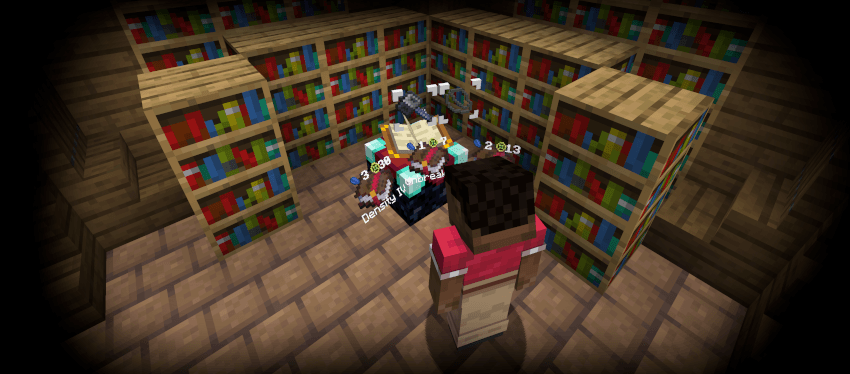
Vanilla enchanting pauses the action and covers your screen with a menu. Bricks' Enchanting Menu keeps everything where it belongs—in the world.
As you interact with an enchanting table, the interface seamlessly appears above it, allowing you to browse enchantments and place items without breaking immersion. Whether you're building a wizard's tower or enchanting gear before an adventure, the experience feels like a natural part of the game.
Bricks' Enchanting Menu is built to complement Minecraft rather than replace it. The enchanting mechanics remain familiar, while the presentation is reimagined to make enchanting feel like you're interacting with a magical workstation instead of a menu.
Found a bug or have an idea for a future feature? Feedback is always welcome! Your suggestions help shape future updates and the continued growth of the Bricks' In-World series.
Happy enchanting!
Project description from CurseForge.
Pick your setup
Choose the version and loader you play, then open the matching release.
Check the dependencies, then try the file in a copied instance before changing a world you care about.
Recent files
16 Jul 2026
16 Jul 2026
16 Jul 2026
Looking for an older file? The official CurseForge project page is in Resources.
 mod
modTeleport from waystone to waystone or craft magical scrolls to warp.
 mod
modThe core mod for my modpack Thaumic Industries. Adds specific features that don't fit in my other mods.
 mod
modA magical mod that allows you to expand the world of Minecraft. The mod is divided into 3 categories: Alchemy, Runology and Magical blacksmithing