Minecraft version
Back to mods 
CurseForge · Minecraft mod
ModernTabs
A standalone, cross-platform library that makes creative mode tabs more customizable
Choose a version Pick your version below, then grab the matching file.
Quick answer
Which ModernTabs release should I use?
Latest stable file ModernTabs Fabric v.1.2.0
Game version 1.21.1
Loader Fabric
ModernTabs Fabric v.1.2.0 targets 1.21.1 with Fabric. The project page does not say whether this file belongs on the client, dedicated server, or both. No extra mods listed for this file.
Where it goes
Is ModernTabs required on the client, server, or both?
The project page does not say whether this file belongs on the client, dedicated server, or both.
Client Source doesn’t say
Dedicated server Source doesn’t say
Loader for this release Fabric
Required install it here Optional supported, not mandatory Not supported do not install here Source doesn’t say do not assume
The source does not explicitly classify this release as client-only or server-only.
What else does ModernTabs Fabric v.1.2.0 need?
ModernTabs Fabric v.1.2.0. Change the file and its required mods may change too.
This file does not list any required mods. Do not add a library just because a different file uses it.
This file does not list any required or optional mods.
Before you install it
Add ModernTabs without breaking your instance.
Built for ModernTabs Fabric v.1.2.0. Pick another file and the loader, install side or required mods may change.
- 01
Stick to this file
Use ModernTabs Fabric v.1.2.0. It targets 1.21.1 with Fabric; another release may have different loader, side or dependency requirements.
- 02
Bring the mods it needs
This file does not list any required mods. Do not add a library just because a different file uses it.
- 03
Put it on the correct side
The project page does not say whether this file belongs on the client, dedicated server, or both.
- 04
Pick the file you checked
Use the “Get this file” button beside ModernTabs Fabric v.1.2.0. It opens that exact file at the source.
About this project
What does ModernTabs add?
What is ModernTabs?
It is a library mod that adds a cross-platform solution for customzing any creative tab even further than what is currently possible on both NeoForge and Fabric.
ModernTabs makes it possible to add individual sections with an assigned banner, change the scrollbar sprite, modify the tab icon background sprite and adds an option for using any sprite as a tab icon.
The idea for the creative tab banners comes from the Create Aeronautics/Simulated mod and therefore includes portions of its code.
Example Creative Tab
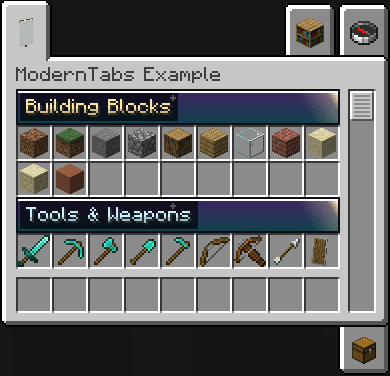
This example creative tab is only enabled in the development enviroment. That means it will not show up in a regular modpack.
For Developers
How to use ModernTabs in your own mod (Setup):
You have to define this in your build.gradle file:
repositories { maven { name = "Jitpack" url 'https://jitpack.io' }}dependencies { // Required: contains the common module used on both platoforms and therefore most of this mod's code modImplementation("com.github.Roboter007.ModernTabs:ModernTabs-common:${rootProject.moderntabs_version}") // Optional: contains the Fabric specific module modImplementation("com.github.Roboter007.ModernTabs:ModernTabs-fabric:${rootProject.moderntabs_version}") // Optional: contains the NeoForge specific module modImplementation("com.github.Roboter007.ModernTabs:ModernTabs-neoforge:${rootProject.moderntabs_version}")}
Then you can define this in your gradle.properties file:
// for the latest version:moderntabs_version=v1.2.0
What you need to do in order to implement the creative tab banners correctly in your mod:
// The TabIconBackground class combines any possible state of the tab icon background // It uses the default vanilla sprite if it doesn't find a sprite in the given location// the sprites for the icon background has to be located under textures/gui/sprites/creative_inventory/// the sprite file for the icon background depends on: tab_tabIdentifer_row_column_selectionState.png// example file name: tab_example_top_left_selected.pngTabIconBackground exampleTabBackgrounds = new TabIconBackground(ExampleMod.MOD_ID, "example"); // example is the tabIdentifierModernTabs.builder(EXAMPLE_TAB) // makes it possible for the defined creative tab to use custom sections .withEnabledSections(true) // changes the tab icon background sprite in any given state .withCustomTabIconBackground(exampleTabBackgrounds) // displays a sprite instance of an regular Minecraft item. // the sprite for the custom icon has to be located under textures/gui/sprites/ .withCustomTabIcon(ResourceLocation.fromNamespaceAndPath(ExampleMod.MOD_ID, "example_icon")) // changes the sprite for the scrollbar // the scrollbar for the custom icon has to be located under textures/gui/sprites/ .withCustomScroller(ResourceLocation.fromNamespaceAndPath(ExampleMod.MOD_ID, "example_scroller"));// this defines which items are included in which section// for creating a section you need to define a json file in your assets folder (scroll down a little, if you want to know how create a section)SectionedItems.addItem(ExampleItems.EXAMPLE_ITEM, ResourceLocation.fromNamespaceAndPath(ExampleMod.MOD_ID, "example_section"));// hide a debug item from the grid but keep it searchableTabItemTransforms.setVisibility(MyItems.DEBUG_STICK, TabItemTransforms.VisibilityType.SEARCH_ONLY);
In order for the creative tab sections to work properly, you need to create one JSON file for each creative tab section you want to have.
These json files have to be in the location: assets/mymod/moderntabs/sections/example_section.json and the defined section in your code has to match one json file in this location.
Example JSON file:
{ "priority": 0, "title": { "text": { "translate": "itemGroup.example_mod.basics" }, "color": "#FFFFFF", "background": "#AA000000" }, "sprite": "example_mod:basics_banner", "only_animate_on_hover": false}
| Field | Type | Default | Notes |
|---|---|---|---|
priority |
positive int | 0 |
Lower values are drawn first (higher up in the tab). |
title.text |
component | required | Any normal text/translatable component. |
title.color |
"#RRGGBB" / "#AARRGGBB" |
#FFFFFFFF |
Primary text fill color. |
title.secondary_color |
"#RRGGBB" / "#AARRGGBB" |
20% darker than title.color |
Outline/"aura" color. |
title.background |
"#RRGGBB" / "#AARRGGBB" |
#AA000000 |
Background color of the pill behind the text. |
sprite |
GUI sprite ID | moderntabs:default_banner |
A texture under textures/gui/sprites/, 162×18 px per animation frame. |
only_animate_on_hover |
boolean | false |
If the sprite is animated, it will pause until the mouse hovers over the banner. |
FAQ
Why another such mod that adds creative tab banners?
➔ I created this library so I can use it for some upcoming mods by me and therefore, I need both a supported NeoForge and Fabric version. Additionly, I plan on adding some more features in the future.
Will the Minecraft version x be supported?
➔ I will not backport it. If anyone plans on doing it, feel free to do it and if you want, you can create a pull request on GitHub. I might update it to newer versions in the future (but I will not guarantee it).
Bugs & Feature Requests
Please report any bugs you encounter or feature requests on the linked GitHub.
Credits
- Thank you to the Create Aeronautics/Simulated mod team and contributors for creating such a great mod.
Project description from CurseForge.
Pick your setup
ModernTabs by Minecraft version and loader
Choose the version and loader you play, then open the matching release.
Check the dependencies, then try the file in a copied instance before changing a world you care about.
Recent files
ModernTabs versions and loaders
ModernTabs Fabric v.1.2.0
ModernTabs-fabric-1.2.0.jar
3 Aug 2026
Client Source doesn’t say Server Source doesn’t say Dependencies No extras listed Listed on Release listing
Check the 1.21.1 · Fabric setup Fabric1.21.1 release
ModernTabs NeoForge v.1.2.0
ModernTabs-neoforge-1.2.0.jar
3 Aug 2026
Client Source doesn’t say Server Source doesn’t say Dependencies No extras listed Listed on Release listing
Check the 1.21.1 · NeoForge setup 1.21.1NeoForge release
ModernTabs Fabric v.1.1.2
ModernTabs-fabric-1.1.2.jar
21 Jul 2026
Client Source doesn’t say Server Source doesn’t say Dependencies No extras listed Listed on Release listing
Check the 1.21.1 · Fabric setup Fabric1.21.1 release
ModernTabs NeoForge v.1.1.2
ModernTabs-neoforge-1.1.2.jar
21 Jul 2026
Client Source doesn’t say Server Source doesn’t say Dependencies No extras listed Listed on Release listing
Check the 1.21.1 · NeoForge setup 1.21.1NeoForge release
ModernTabs Fabric v.1.1.1
ModernTabs-fabric-1.1.1.jar
21 Jul 2026
Client Source doesn’t say Server Source doesn’t say Dependencies No extras listed Listed on Release listing
Check the 1.21.1 · Fabric setup Fabric1.21.1 release
ModernTabs NeoForge v.1.1.1
ModernTabs-neoforge-1.1.1.jar
21 Jul 2026
Client Source doesn’t say Server Source doesn’t say Dependencies No extras listed Listed on Release listing
Check the 1.21.1 · NeoForge setup 1.21.1NeoForge release
ModernTabs Fabric v.1.1.0
ModernTabs-fabric-1.1.0.jar
21 Jul 2026
Client Source doesn’t say Server Source doesn’t say Dependencies No extras listed Listed on Release listing
Check the 1.21.1 · Fabric setup Fabric1.21.1 release
ModernTabs NeoForge v.1.1.0
ModernTabs-neoforge-1.1.0.jar
21 Jul 2026
Client Source doesn’t say Server Source doesn’t say Dependencies No extras listed Listed on Release listing
Check the 1.21.1 · NeoForge setup 1.21.1NeoForge release
ModernTabs Fabric v.1.0.0
ModernTabs-fabric-1.0.0.jar
11 Jul 2026
Client Source doesn’t say Server Source doesn’t say Dependencies No extras listed Listed on Release listing
Check the 1.21.1 · Fabric setup Fabric1.21.1 release
ModernTabs NeoForge v.1.0.0
ModernTabs-neoforge-1.0.0.jar
11 Jul 2026
Client Source doesn’t say Server Source doesn’t say Dependencies No extras listed Listed on Release listing
Check the 1.21.1 · NeoForge setup 1.21.1NeoForge release
Looking for an older file? The official CurseForge project page is in Resources.
 mod
mod CurseForge + Modrinth · Minecraft
BRNTalk
A simple IM-style dialogue / talk UI mod for Minecraft
 mod
mod CurseForge · Minecraft
Alltheimbaium
Added some machines that disrupt the balance.
 mod
mod CurseForge + Modrinth · Minecraft
Instant Feedback
Implements the most requested features from feedback.minecraft.net