Minecraft version
Back to mods 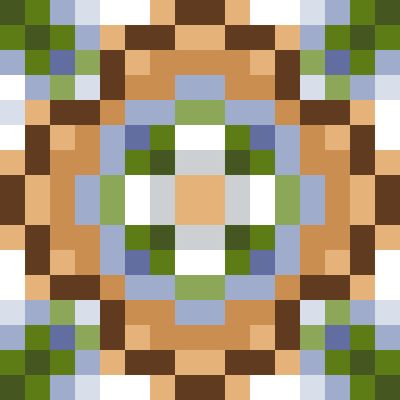
CurseForge · Minecraft mod
K8 Deco: Bricks & Tiles
Adds colorful bricks and tiles!
Choose a version Pick your version below, then grab the matching file.
Quick answer
Which K8 Deco: Bricks & Tiles release should I use?
Latest stable file k8_deco-forge-1.20.1-1.0.0.jar
Game version 1.20.1
Loader Forge
K8 Deco: Bricks & Tiles k8_deco-forge-1.20.1-1.0.0.jar targets 1.20.1 with Forge. The project page does not say whether this file belongs on the client, dedicated server, or both. No extra mods listed for this file.
Where it goes
Is K8 Deco: Bricks & Tiles required on the client, server, or both?
The project page does not say whether this file belongs on the client, dedicated server, or both.
Client Source doesn’t say
Dedicated server Source doesn’t say
Loader for this release Forge
Required install it here Optional supported, not mandatory Not supported do not install here Source doesn’t say do not assume
The source does not explicitly classify this release as client-only or server-only.
What else does K8 Deco: Bricks & Tiles k8_deco-forge-1.20.1-1.0.0.jar need?
k8_deco-forge-1.20.1-1.0.0.jar. Change the file and its required mods may change too.
This file does not list any required mods. Do not add a library just because a different file uses it.
This file does not list any required or optional mods.
Before you install it
Add K8 Deco: Bricks & Tiles without breaking your instance.
Built for K8 Deco: Bricks & Tiles k8_deco-forge-1.20.1-1.0.0.jar. Pick another file and the loader, install side or required mods may change.
- 01
Stick to this file
Use k8_deco-forge-1.20.1-1.0.0.jar. It targets 1.20.1 with Forge; another release may have different loader, side or dependency requirements.
- 02
Bring the mods it needs
This file does not list any required mods. Do not add a library just because a different file uses it.
- 03
Put it on the correct side
The project page does not say whether this file belongs on the client, dedicated server, or both.
- 04
Pick the file you checked
Use the “Get this file” button beside k8_deco-forge-1.20.1-1.0.0.jar. It opens that exact file at the source.
About this project
What does K8 Deco: Bricks & Tiles add?
This mod adds colorful bricks using the same palette as dyed terracotta. To craft these, it's simply a bricks block and a dye. In a few cases, I added bricks with a more vivid color as well (bluer, blacker, and grayer bricks). These require two of the same color of dye.
This mod also has tiles inspired by Portugese azulejos. Unlike the Vanilla glazed terracotta, these patterns are 1x1 block and are not directional. To craft them, you'll first use dyes to craft an azulejo pattern. Then you can craft the pattern with a bricks block to make an azulejo block!
In Creative, you can find these blocks in the "Colored Blocks" category. In survival, you'll need to get a bricks block to unlock the crafting recipes for all of these blocks.
Azulejo Blocks: Sunburst, Indigo, Baroque, Vines, Geometric, Garden, Blue Petal, Yellow Petal, Cross
Terracotta Colored Bricks: Black, Blue, Brown, Gray, Green, Light Blue, Light Gray, Lime, Magenta, Orange, Pink, Purple, Red, Cyan, White, Yellow
Vivid Colored Bricks: Blacker, Bluer, Grayer
I hope you enjoy the mod! Please let me know in the comments you find a bug.
Project description from CurseForge.
Pick your setup
K8 Deco: Bricks & Tiles by Minecraft version and loader
Choose the version and loader you play, then open the matching release.
Minecraft version
1.20.1
2 loader buildsCheck the dependencies, then try the file in a copied instance before changing a world you care about.
Recent files
K8 Deco: Bricks & Tiles versions and loaders
k8_deco-forge-1.20.1-1.0.0.jar
30 Aug 2026
Client Source doesn’t say Server Source doesn’t say Dependencies No extras listed Listed on Release listing
Check the 1.20.1 · Forge setup 1.20.1Forge release
k8_deco-1.20.4-1.0.1.jar
1 Aug 2026
Client Source doesn’t say Server Source doesn’t say Dependencies No extras listed Listed on Release listing
Check the 1.20.4 · Fabric setup Fabric1.20.4 release
k8_deco-1.0.1.jar
12 Jul 2026
Client Source doesn’t say Server Source doesn’t say Dependencies No extras listed Listed on Release listing
Check the 1.20.1 · Fabric setup Fabric1.20.1 release
k8_deco-1.0.0.jar
11 Jul 2026
Client Source doesn’t say Server Source doesn’t say Dependencies No extras listed Listed on Release listing
Check the 1.20.1 · Fabric setup Fabric1.20.1 release
Looking for an older file? The official CurseForge project page is in Resources.
 mod
mod CurseForge · Minecraft
[NEW] Camera Inertia! - Cross Platform 3.0
Brings your camera to life with realistic inertia, damage reactions, vehicle bobbing, and mining feedback. No motion sickness, just immersion.
 mod
mod CurseForge + Modrinth · Minecraft
Rebind Narrator
it's 2021 and you can't change the narrator key UPDATE: it's 2022 and you still can't change the narrator key UPDATE: it's 2023 and you still can't change the narrator key UPDATE: it's 2024 and you still can't change the narrator key UPDATE: it's 2025 and
 mod
mod CurseForge + Modrinth · Minecraft
Crowmap
Make maps update anywhere in your inventory.