Minecraft version
Back to mods 
CurseForge · Minecraft mod
(Sodium) Sightline
Improves performance by getting rid of anything thats not in view (and more)
Choose a version Pick your version below, then grab the matching file.
Quick answer
Which (Sodium) Sightline release should I use?
Latest stable file sightline-neoforge-26.2.jar
Game version 26.1.2
Loader NeoForge
(Sodium) Sightline sightline-neoforge-26.2.jar targets 26.1.2 with NeoForge. The project page does not say whether this file belongs on the client, dedicated server, or both. No extra mods listed for this file.
Where it goes
Is (Sodium) Sightline required on the client, server, or both?
The project page does not say whether this file belongs on the client, dedicated server, or both.
Client Source doesn’t say
Dedicated server Source doesn’t say
Loader for this release NeoForge
Required install it here Optional supported, not mandatory Not supported do not install here Source doesn’t say do not assume
The source does not explicitly classify this release as client-only or server-only.
What else does (Sodium) Sightline sightline-neoforge-26.2.jar need?
sightline-neoforge-26.2.jar. Change the file and its required mods may change too.
This file does not list any required mods. Do not add a library just because a different file uses it.
This file does not list any required or optional mods.
Before you install it
Add (Sodium) Sightline without breaking your instance.
Built for (Sodium) Sightline sightline-neoforge-26.2.jar. Pick another file and the loader, install side or required mods may change.
- 01
Stick to this file
Use sightline-neoforge-26.2.jar. It targets 26.1.2 with NeoForge; another release may have different loader, side or dependency requirements.
- 02
Bring the mods it needs
This file does not list any required mods. Do not add a library just because a different file uses it.
- 03
Put it on the correct side
The project page does not say whether this file belongs on the client, dedicated server, or both.
- 04
Pick the file you checked
Use the “Get this file” button beside sightline-neoforge-26.2.jar. It opens that exact file at the source.
About this project
What does (Sodium) Sightline add?
(Sodium) Sightline
Sodium already skips chunks you cannot see. Sightline handles what is left: the mob behind the wall, the chest round the corner, the faces between leaf blocks, sign text too far away to read and the particle flood in a storm. Client only.

Support me and get early access on my Patreon.
Occlusion culling
- Entities and block entities fully hidden behind opaque blocks are not drawn. Raycasts on a background thread check each one every 75 ms, up to 96 blocks away.
- Everything starts visible and is only skipped after a confirmed "hidden": an unchecked target or an unloaded chunk keeps drawing.
- Exempt: anything within 12 blocks, glowing entities, the ender dragon and other very large ones, anything just hit, Sable and LittleTiles builds, everything during Iris's shadow pass.
- Block entities whose own box is off screen are skipped too; vanilla and Sodium only cull them by chunk section.
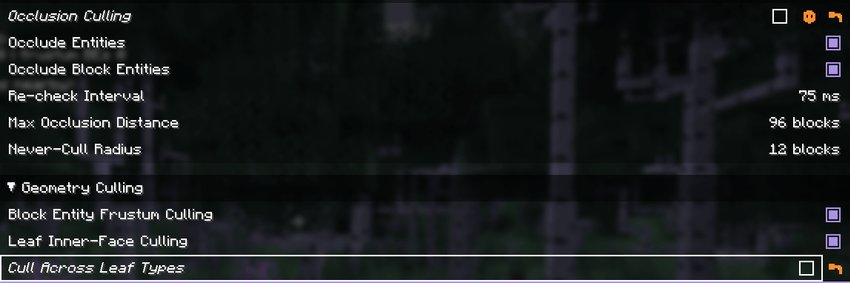
Distance trims
- Nameplates draw up to 48 blocks away (vanilla 64), sign text up to 24. The sign itself always draws.
- Item frames and dropped items stop at 48 blocks; more types can be capped in the config file.
- Entity and block entity render distance scales as a percentage of each type's own, down to 20%.
Leaves and particles
- The faces between two leaf blocks of the same type are left out; across leaf types is an option. A change shows after a chunk rebuild (F3+A).
- Above 3 000 live particles, new ambient ones (rain, splash, smoke, spores) are dropped with rising probability, all of them from 4 500. Other particles are never touched.
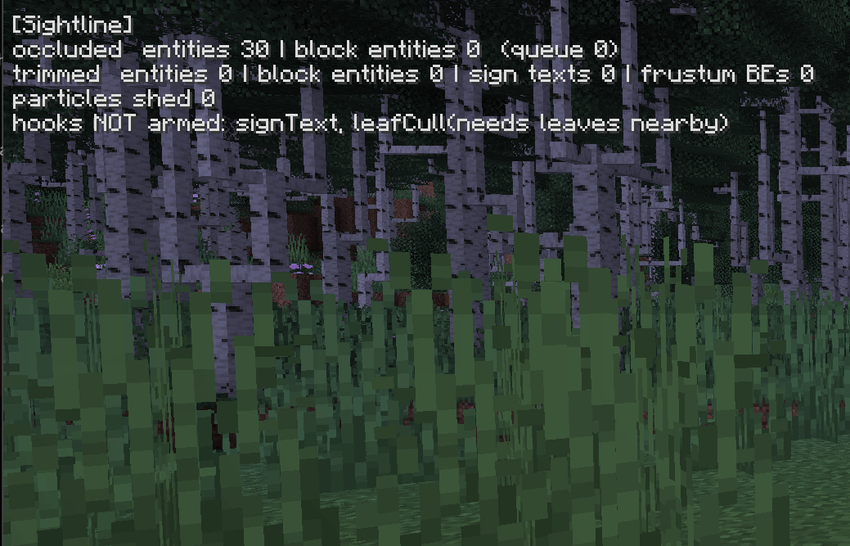
Debug overlay
The overlay counts what was occluded, trimmed and shed each tick, and lists any hook that did not attach.
Requirements
Minecraft 1.20.1 (Forge or Fabric), 1.21.1 or 26.2 (NeoForge or Fabric), on Java 17, 21 and 25 respectively. The Fabric builds need Fabric API. Client only. Sodium is optional: on 1.21.1 and 26.2 the options are two pages in its video settings (Reese's Sodium Options too); otherwise in config/sightline-client.toml, or config/sightline.json on Fabric.
This mod has been abandoned. It works fine, but it will not receive updates.

Related mods
The other performance mods
NeoForge 1.21.1 and 26.2, Fabric 1.20.1, 1.21.1 and 26.2, Forge 1.20.1. Client only. Free to use in modpacks.
Project description from CurseForge.
Pick your setup
(Sodium) Sightline by Minecraft version and loader
Choose the version and loader you play, then open the matching release.
Minecraft version
1.21.1
2 loader buildsMinecraft version
1.20.1
2 loader buildsCheck the dependencies, then try the file in a copied instance before changing a world you care about.
Recent files
(Sodium) Sightline versions and loaders
sightline-neoforge-26.2.jar
15 Jul 2026
Client Source doesn’t say Server Source doesn’t say Dependencies No extras listed Listed on Release listing
Check the 26.1.2 · NeoForge setup NeoForge26.1.2 release
sightline-neoforge-1.21.1.jar
15 Jul 2026
Client Source doesn’t say Server Source doesn’t say Dependencies No extras listed Listed on Release listing
Check the 1.21.1 · NeoForge setup 1.21.1NeoForge release
sightline-forge-1.20.1.jar
15 Jul 2026
Client Source doesn’t say Server Source doesn’t say Dependencies No extras listed Listed on Release listing
Check the 1.20.1 · Forge setup 1.20.1Forge release
sightline-fabric-26.2.jar
15 Jul 2026
Client Source doesn’t say Server Source doesn’t say Dependencies No extras listed Listed on Release listing
Check the 26.1.2 · Fabric setup Fabric26.1.2 release
sightline-fabric-1.21.1.jar
15 Jul 2026
Client Source doesn’t say Server Source doesn’t say Dependencies No extras listed Listed on Release listing
Check the 1.21.1 · Fabric setup Fabric1.21.1 release
sightline-fabric-1.20.1.jar
15 Jul 2026
Client Source doesn’t say Server Source doesn’t say Dependencies No extras listed Listed on Release listing
Check the 1.20.1 · Fabric setup Fabric1.20.1 beta
Looking for an older file? The official CurseForge project page is in Resources.
 mod
CurseForge + Modrinth · Minecraft
Adventure Item Names
Unique names for weapons, tools, armour and items found throughout your world.
 mod
CurseForge + Modrinth · Minecraft
Create: Creator Sword
Adds more weapon options that combine combat functionality with Create Mod's mechanical features, providing both utility and combat efficiency.
 mod
CurseForge + Modrinth · Minecraft
Freeze It, and Heat It!
A food temperature system as an addon for cold sweat.