Minecraft version
Back to mods 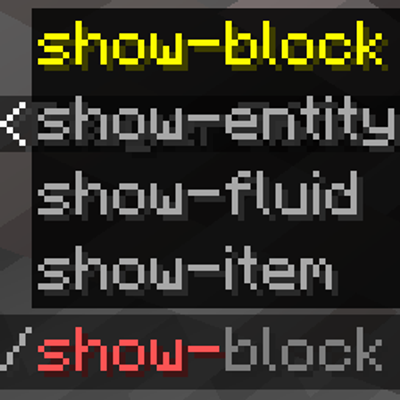
CurseForge · Minecraft mod
Show Everything (Forge port)
Showcase your items, blocks, and even entities in chat.
Choose a version Pick your version below, then grab the matching file.
Quick answer
Which Show Everything (Forge port) release should I use?
Latest stable file showeverything-1.0.5-neoforge-1.21.1.jar
Game version 1.21.1
Loader NeoForge
Show Everything (Forge port) showeverything-1.0.5-neoforge-1.21.1.jar targets 1.21.1 with NeoForge. The project page does not say whether this file belongs on the client, dedicated server, or both. No extra mods listed for this file.
Where it goes
Is Show Everything (Forge port) required on the client, server, or both?
The project page does not say whether this file belongs on the client, dedicated server, or both.
Client Source doesn’t say
Dedicated server Source doesn’t say
Loader for this release NeoForge
Required install it here Optional supported, not mandatory Not supported do not install here Source doesn’t say do not assume
The source does not explicitly classify this release as client-only or server-only.
What else does Show Everything (Forge port) showeverything-1.0.5-neoforge-1.21.1.jar need?
showeverything-1.0.5-neoforge-1.21.1.jar. Change the file and its required mods may change too.
This file does not list any required mods. Do not add a library just because a different file uses it.
This file does not list any required or optional mods.
Before you install it
Add Show Everything (Forge port) without breaking your instance.
Built for Show Everything (Forge port) showeverything-1.0.5-neoforge-1.21.1.jar. Pick another file and the loader, install side or required mods may change.
- 01
Stick to this file
Use showeverything-1.0.5-neoforge-1.21.1.jar. It targets 1.21.1 with NeoForge; another release may have different loader, side or dependency requirements.
- 02
Bring the mods it needs
This file does not list any required mods. Do not add a library just because a different file uses it.
- 03
Put it on the correct side
The project page does not say whether this file belongs on the client, dedicated server, or both.
- 04
Pick the file you checked
Use the “Get this file” button beside showeverything-1.0.5-neoforge-1.21.1.jar. It opens that exact file at the source.
About this project
What does Show Everything (Forge port) add?
Show Everything (Forge Port)
Forge port of MinersLab/show-everything.
Show items, blocks, fluids, and entities in chat with hover details. The command logic runs on the server, and the mod declares remote clients as optional, so vanilla/Forge clients without this mod can still join.
Clients that also install this mod get enhanced /show-item rendering for very large item NBT. Clients without the mod receive a safe shortened hover instead, so oversized NBT cannot kick players through Minecraft's chat packet string limit.
Commands
All commands are available to normal players.
| Command | Description |
|---|---|
/show-item |
Shows the item in your main hand, or offhand if the main hand is empty. |
/show-block |
Shows the block you are looking at within 15 blocks. Falls back to your current position. |
/show-block <x> <y> <z> |
Shows the block at a specific position. |
/show-fluid |
Shows the fluid you are looking at within 15 blocks. Falls back to your current position. |
/show-fluid <x> <y> <z> |
Shows the fluid/block at a specific position. |
/show-entity |
Shows the entity you are looking at within 15 blocks. Falls back to yourself. |
/show-entity <selector> |
Shows a selected entity. |
Aliases without hyphens are also registered, such as /showitem and /showblock.
Client keybind (since v1.0.5)
With the client mod installed, an optional keybind (customizable in Controls, default H) shows the item under the cursor in chat. It works in any screen where an item tooltip is displayed — container screens, other mods' GUIs, and item-list overlays such as JEI/REI/EMI — and requires the server to run the mod. The chat output is identical to /show-item.
Project description from CurseForge.
Pick your setup
Show Everything (Forge port) by Minecraft version and loader
Choose the version and loader you play, then open the matching release.
Minecraft version
1.20.1
1 loader buildMinecraft version
1.19.2
1 loader buildMinecraft version
1.18.2
1 loader buildMinecraft version
1.16.5
1 loader buildMinecraft version
1.12.2
1 loader buildMinecraft version
1.7.10
1 loader buildCheck the dependencies, then try the file in a copied instance before changing a world you care about.
Recent files
Show Everything (Forge port) versions and loaders
showeverything-1.0.5-neoforge-1.21.1.jar
27 Jul 2026
Client Source doesn’t say Server Source doesn’t say Dependencies No extras listed Listed on Release listing
Check the 1.21.1 · NeoForge setup 1.21.1NeoForge release
showeverything-1.0.5-forge-1.20.1.jar
27 Jul 2026
Client Source doesn’t say Server Source doesn’t say Dependencies No extras listed Listed on Release listing
Check the 1.20.1 · Forge setup 1.20.1Forge release
showeverything-1.0.5-forge-1.19.2.jar
27 Jul 2026
Client Source doesn’t say Server Source doesn’t say Dependencies No extras listed Listed on Release listing
Check the 1.19.2 · Forge setup Forge1.19.2 release
showeverything-1.0.5-forge-1.18.2.jar
27 Jul 2026
Client Source doesn’t say Server Source doesn’t say Dependencies No extras listed Listed on Release listing
Check the 1.18.2 · Forge setup Forge1.18.2 release
showeverything-1.0.5-forge-1.16.5.jar
27 Jul 2026
Client Source doesn’t say Server Source doesn’t say Dependencies No extras listed Listed on Release listing
Check the 1.16.5 · Forge setup 1.16.5Forge release
showeverything-1.0.5-forge-1.12.2.jar
27 Jul 2026
Client Source doesn’t say Server Source doesn’t say Dependencies No extras listed Listed on Release listing
Check the 1.12.2 · Forge setup Forge1.12.2 release
showeverything-1.0.5-forge-1.7.10.jar
27 Jul 2026
Client Source doesn’t say Server Source doesn’t say Dependencies No extras listed Listed on Release listing
Check the 1.7.10 · Forge setup Forge1.7.10 release
showeverything-1.0.4-neoforge-1.21.1.jar
15 Jul 2026
Client Source doesn’t say Server Source doesn’t say Dependencies No extras listed Listed on Release listing
Check the 1.21.1 · NeoForge setup 1.21.1NeoForge release
showeverything-1.0.3-forge-1.20.1.jar
15 Jul 2026
Client Source doesn’t say Server Source doesn’t say Dependencies No extras listed Listed on Release listing
Check the 1.20.1 · Forge setup 1.20.1Forge release
showeverything-1.0.3-forge-1.19.2.jar
15 Jul 2026
Client Source doesn’t say Server Source doesn’t say Dependencies No extras listed Listed on Release listing
Check the 1.19.2 · Forge setup Forge1.19.2 release
showeverything-1.0.3-forge-1.18.2.jar
15 Jul 2026
Client Source doesn’t say Server Source doesn’t say Dependencies No extras listed Listed on Release listing
Check the 1.18.2 · Forge setup Forge1.18.2 release
showeverything-1.0.3-forge-1.16.5.jar
15 Jul 2026
Client Source doesn’t say Server Source doesn’t say Dependencies No extras listed Listed on Release listing
Check the 1.16.5 · Forge setup 1.16.5Forge release
Looking for an older file? The official CurseForge project page is in Resources.
 mod
CurseForge · Minecraft
CustomFishing
CustomFishing is a CraftTweaker addon that allows users to add fishing conditions using scripts. For example, you can set a 50% chance of catching an apple when fishing in lava.
 mod
Modrinth · Minecraft
Plasmo Voice Messages
Adds voice messages to the Minecraft chat with Plasmo Voice integration. Includes a custom chat widget, recording UI, global/local/private message types, permissions,chunked audio transfer. Requires both client mod and server plugin.
 mod
Modrinth · Minecraft
clock-in
a mod that adds a clock widget that lets you view the time easily in the hud