Minecraft version
Back to mods 
CurseForge · Minecraft mod
WyWF
Minecraft seed finder right in the world creation menu in the seed input field
Choose a version Pick your version below, then grab the matching file.
Quick answer
Which WyWF release should I use?
Latest stable file wywf-1.4.1+1.21.x.jar
Game version 1.21.8, 1.21.5, 1.21.4
Loader Fabric
wywf-1.4.1+1.21.x.jar targets 1.21.8, 1.21.5, 1.21.4 with Fabric. The project page does not say whether this file belongs on the client, dedicated server, or both. No extra mods listed for this file.
Where it goes
Is WyWF required on the client, server, or both?
The project page does not say whether this file belongs on the client, dedicated server, or both.
Client Source doesn’t say
Dedicated server Source doesn’t say
Loader for this release Fabric
Required install it here Optional supported, not mandatory Not supported do not install here Source doesn’t say do not assume
The source does not explicitly classify this release as client-only or server-only.
What else does wywf-1.4.1+1.21.x.jar need?
wywf-1.4.1+1.21.x.jar. Change the file and its required mods may change too.
This file does not list any required mods. Do not add a library just because a different file uses it.
This file does not list any required or optional mods.
Before you install it
Add WyWF without breaking your instance.
Built for wywf-1.4.1+1.21.x.jar. Pick another file and the loader, install side or required mods may change.
- 01
Stick to this file
Use wywf-1.4.1+1.21.x.jar. It targets 1.21.8, 1.21.5, 1.21.4 with Fabric; another release may have different loader, side or dependency requirements.
- 02
Bring the mods it needs
This file does not list any required mods. Do not add a library just because a different file uses it.
- 03
Put it on the correct side
The project page does not say whether this file belongs on the client, dedicated server, or both.
- 04
Pick the file you checked
Use the “Get this file” button beside wywf-1.4.1+1.21.x.jar. It opens that exact file at the source.
About this project
What does WyWF add?

Type what you want your world to be like — get a seed that matches.
What you Want to Find - Minecraft seed finder mod that searches for vanilla seeds matching the biomes, structures and spawn conditions you describe - before the world is created. Describe the world you want, press Create, and the mod searches offline for a matching seed.
Version compatibility
| Minecraft version | 1.4.1 | 1.4.0 | 1.2.x | 1.1.x | 1.0.x |
|---|---|---|---|---|---|
| 1.16.5 | ❌ | ❌ | ❌ | ❌ | ❌ |
| 1.17.1 | ❌ | ❌ | ❌ | ❌ | ❌ |
| 1.18.2 | ❌ | ❌ | ❌ | ❌ | ❌ |
| 1.19.2 | ❌ | ❌ | ❌ | ❌ | ❌ |
| 1.20.1 | ❌ | ❌ | ❌ | ❌ | ❌ |
| 1.20.4 | ❌ | ❌ | ❌ | ❌ | ❌ |
| 1.21.1 | ✅ | ✅ | ❌ | ❌ | ❌ |
| 1.21.5 | ✅ | ✅ | ❌ | ❌ | ❌ |
| 1.21.11 | ✅ | ✅ | ❌ | ❌ | ❌ |
| 26.1 | ✅ | ✅ | ✅ | ✅ | ✅ |
| 26.1.2 | ✅ | ✅ | ✅ | ✅ | ✅ |
| 26.2 | ✅ | ✅ | ✅ | ✅ | ✅ |
| 26.3 | ✅ | ❌ | ❌ | ❌ | ❌ |

Type a description into the Seed field, for example:
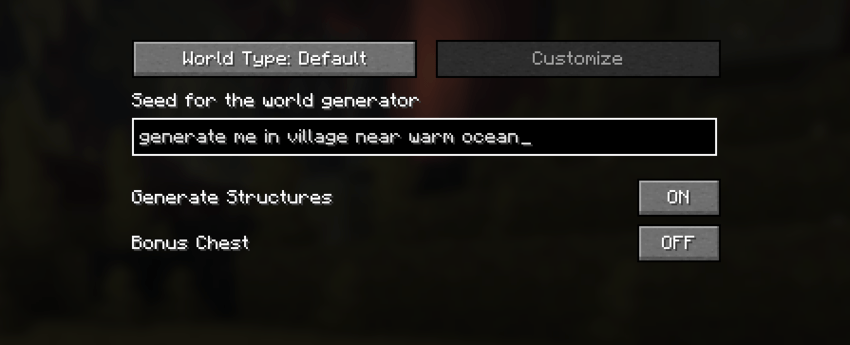
village near warm ocean       mansion dark forest
desert temple in desert       near deep dark
spawn on sand                 some 4 village
never plains village          only desert pyramid
between 500 to 800 village   spawn on any solid
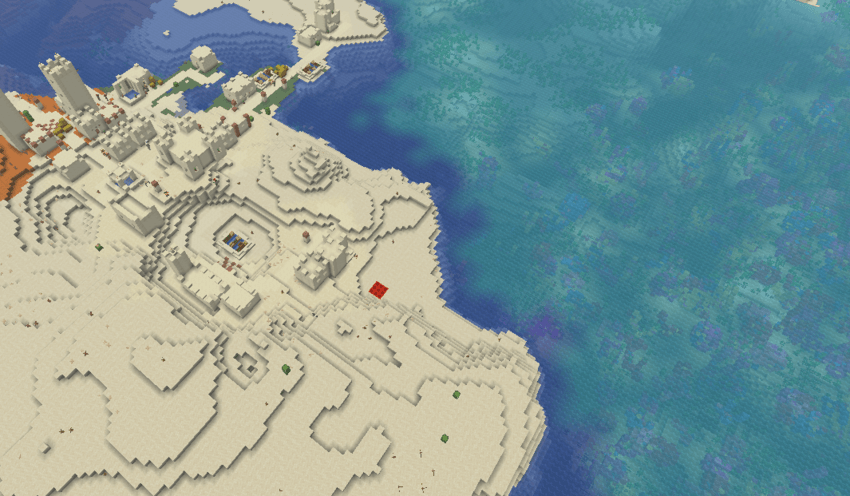
When you press Create New World, the mod parses the text and, if it contains recognized keywords, opens a search screen. It scans seeds around your chosen center (spawn or origin), locates structures from placement math and samples biomes with a fast native library when available (with a pure-Java fallback). When a seed matches, the world is created with it. The red dot indicates the player's approximate spawn point (the player's spawn point is selected after the world has been generated):
Keywords are recognized in Russian and English, with many synonyms.

| Modifier (EN / RU) | Meaning |
|---|---|
| (none) | present within the default radius |
near / рядом, возле… |
within ~200 blocks |
in / в, на… |
within ~64 blocks |
far / далеко, вдали… |
far away (~500–1000 blocks) |
some N / несколько, много… (updated) |
N or more structures nearby (~320-700 blocks, default 2 structures) |
only / только, лишь, одна… (new) |
exactly one structure nearby (~500 blocks) |
between 500 to 800 / между, от… (new) |
structure within a distance range |
under / под, снизу |
the surface biome at that spot |
no, not, without, never / нет, не, без |
must NOT be present (~500-1000 blocks) |

- Biomes: surface biomes (ocean, desert, forest, …) and cave biomes (
deep dark,lush caves,dripstone caves,sulfur caves— withnearorunder). - Structures: village (and
village_plains/desert/… variants), desert pyramid, jungle temple, swamp hut, igloo, mansion, monument, shipwreck, outpost, mineshaft, ocean ruins, buried treasure, trail ruins, ancient city, trial chambers, ruined portal, stronghold, nether fortress/bastion/fossil, and more. Nether checks use a separate nether generator. - Compound terms:
plains village→village_plains,desert temple→desert_pyramid,snowy village→village_snowy, etc. - Spawn block: find seeds by the block you stand on —
spawn on sand,on the stone block,на блоке песок, or any solid block. - Search center: check at spawn (default) or origin
(0, 0).
For slow queries the search stops early (after collecting a few candidates) so you get a result faster. Every candidate is re-checked exhaustively before it is shown.
Normal play logs almost nothing; run with -Dwywf.debug=true for the full per-search log when reporting a bug.

- Objects (
tree,water,lava) are recognized but not searched yet. - The 26.x jars require Minecraft 26.x and Java 25; the 1.21.x jar (version 1.4.1) requires Minecraft 1.21.x and Java 21.
The mod can ONLY find vanilla seeds with vanilla structures and biomes; at this time, the mod cannot find structures and biomes from other mods, and it is not recommended to use WyWF with mods that alter vanilla generation.

Apache License 2.0.
Credits
Fast native biome/structure math is based on cubiomes by Cubitect, via the active fork by xpple. The DLL ships inside the mod — nothing is downloaded at runtime. Build sources, the build script and SHA-256 hashes are published with each release for verification.
Project description from CurseForge.
Pick your setup
WyWF by Minecraft version and loader
Choose the version and loader you play, then open the matching release.
Minecraft version
26.2
1 loader buildMinecraft version
26.1.2
1 loader buildMinecraft version
26.1.1
1 loader buildMinecraft version
26.1
1 loader buildMinecraft version
1.21.11
1 loader buildMinecraft version
1.21.10
1 loader buildMinecraft version
1.21.9
1 loader buildMinecraft version
1.21.8
1 loader buildMinecraft version
1.21.7
1 loader buildMinecraft version
1.21.6
1 loader buildMinecraft version
1.21.5
1 loader buildShowing the newest 12 of 16 game versions. Older files are in the list below.
Check the dependencies, then try the file in a copied instance before changing a world you care about.
Recent files
WyWF versions and loaders
wywf-1.4.1+1.21.x.jar
15 Sept 2026
Client Source doesn’t say Server Source doesn’t say Dependencies No extras listed Listed on Release listing
Check the 1.21.11 · Fabric setup Fabric1.21.81.21.51.21.4 release
wywf-1.4.1+26.3.jar
15 Sept 2026
Client Source doesn’t say Server Source doesn’t say Dependencies No extras listed Listed on Release listing
Check the 26.3 · Fabric setup Fabric26.3 release
wywf-1.4.1+26.x.jar
15 Sept 2026
Client Source doesn’t say Server Source doesn’t say Dependencies No extras listed Listed on Release listing
Check the 26.2 · Fabric setup Fabric26.126.1.126.1.2 release
wywf-1.4.0+26.x.jar
27 Aug 2026
Client Source doesn’t say Server Source doesn’t say Dependencies No extras listed Listed on Release listing
Check the 26.2 · Fabric setup Fabric26.126.1.126.1.2 release
wywf-1.4.0+1.21.x.jar
27 Aug 2026
Client Source doesn’t say Server Source doesn’t say Dependencies No extras listed Listed on Release listing
Check the 1.21.11 · Fabric setup Fabric1.21.81.21.51.21.4 release
wywf-1.3.0+1.21.x.jar
25 Jul 2026
Client Source doesn’t say Server Source doesn’t say Dependencies No extras listed Listed on Release listing
Check the 1.21.11 · Fabric setup Fabric1.21.81.21.51.21.4 release
wywf-1.3.0+26.x.jar
25 Jul 2026
Client Source doesn’t say Server Source doesn’t say Dependencies No extras listed Listed on Release listing
Check the 26.2 · Fabric setup Fabric26.126.1.126.1.2 release
wywf-1.2.0+26.1.jar
19 Jul 2026
Client Source doesn’t say Server Source doesn’t say Dependencies No extras listed Listed on Release listing
Check the 26.2 · Fabric setup Fabric26.126.1.126.1.2 release
wywf-1.1.1+26.1.jar
16 Jul 2026
Client Source doesn’t say Server Source doesn’t say Dependencies No extras listed Listed on Release listing
Check the 26.2 · Fabric setup Fabric26.126.1.126.1.2 release
wywf-1.1.0+26.1.jar
13 Jul 2026
Client Source doesn’t say Server Source doesn’t say Dependencies No extras listed Listed on Release listing
Check the 26.2 · Fabric setup Fabric26.126.1.126.1.2 release
wywf-1.0.0+26.1.jar
12 Jul 2026
Client Source doesn’t say Server Source doesn’t say Dependencies 1 required · 1 unchecked Listed on Release listing
Check the 26.2 · Fabric setup Fabric26.126.1.126.1.2 release
Looking for an older file? The official CurseForge project page is in Resources.
 mod
CurseForge + Modrinth · Minecraft
Variants&Ventures
Adds multiple new mob variants seamlessly integrated into your Minecraft world.
 mod
CurseForge · Minecraft
Experience Skills
Earn separate experience for each skill just by playing — walking, mining, fighting, swimming, fishing, etc. — and level them up for attribute bonuses that grow with every level.
 mod
CurseForge · Minecraft
Slow Baby Zombies
Slows down baby zombies, instead of outright removing them