Minecraft version
Back to mods 
CurseForge · Minecraft mod
Opal Light
A universal colored light API with automatic Iris Shaders and VulkanMod compatibility.
Choose a version Pick your version below, then grab the matching file.
Quick answer
Which Opal Light release should I use?
Latest stable file OpalLight-1.1.1
Game version 1.21.1
Loader NeoForge
Opal Light OpalLight-1.1.1 targets 1.21.1 with NeoForge. The project page does not say whether this file belongs on the client, dedicated server, or both. No extra mods listed for this file.
Where it goes
Is Opal Light required on the client, server, or both?
The project page does not say whether this file belongs on the client, dedicated server, or both.
Client Source doesn’t say
Dedicated server Source doesn’t say
Loader for this release NeoForge
Required install it here Optional supported, not mandatory Not supported do not install here Source doesn’t say do not assume
The source does not explicitly classify this release as client-only or server-only.
What else does Opal Light OpalLight-1.1.1 need?
OpalLight-1.1.1. Change the file and its required mods may change too.
This file does not list any required mods. Do not add a library just because a different file uses it.
This file does not list any required or optional mods.
Before you install it
Add Opal Light without breaking your instance.
Built for Opal Light OpalLight-1.1.1. Pick another file and the loader, install side or required mods may change.
- 01
Stick to this file
Use OpalLight-1.1.1. It targets 1.21.1 with NeoForge; another release may have different loader, side or dependency requirements.
- 02
Bring the mods it needs
This file does not list any required mods. Do not add a library just because a different file uses it.
- 03
Put it on the correct side
The project page does not say whether this file belongs on the client, dedicated server, or both.
- 04
Pick the file you checked
Use the “Get this file” button beside OpalLight-1.1.1. It opens that exact file at the source.
About this project
What does Opal Light add?
OpalLight —— Colored Light API
Overview
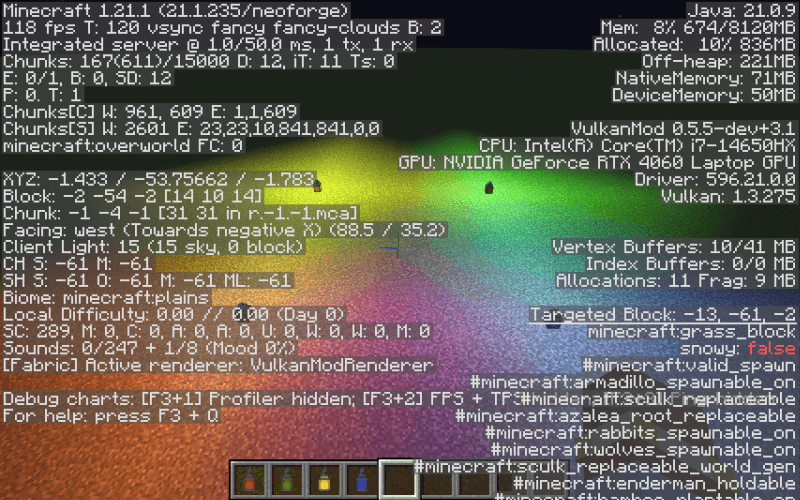
OpalLight provides a universal colored light API for Minecraft. Unlike common full-screen shader approaches, OpalLight uses per-block, voxel-level RGB light propagation——colors travel through blocks via BFS, attenuate with distance, mix across RGB channels, and take the strongest value within each channel. This means colored lighting renders correctly around corners and through complex geometry, rather than being a screen-space post-effect.
The key advantage: automatically compatible with the vast majority of Iris Shaders with zero user configuration. Also fully supports the VulkanMod renderer.
Core Features
Powerful Colored Light API
- Data-driven + event-driven: Register colored light sources via JSON data files, or programmatically through the
ModificationEvent. - StatePropertiesPredicate support: Different block states of the same block can emit different colors.
- Zero-invasion integration: Any block from any mod can emit colored light——just register data or listen to the event.
True Color Propagation
- Voxel-level BFS light propagation, with linear attenuation over Manhattan distance.
- Per-channel multi-source merging: different channels mix naturally while equal channels use the strongest value, so removing a source remains exact.
- Correct lighting regardless of terrain complexity——corners, crevices, and caves all light accurately.
Broad Compatibility
- Iris Shaders: Automatically compatible with the vast majority of shader packs. No manual compatibility selection needed.
- VulkanMod: Native support for the Vulkan renderer.
- Custom shaders use Core Profile GLSL 150, standards-compliant to avoid rendering conflicts.
Example: Colored Lanterns
Seven colored lanterns are included as API usage demonstrations:
| Lantern | Recipe |
|---|---|
| Red / Orange / Yellow / Green / Cyan / Blue / Purple Lantern | Vanilla lantern + matching dye (shapeless) |
Each lantern is registered through OpalLight's API, showing how blocks are associated with RGB colors.
Showcase
Vanilla
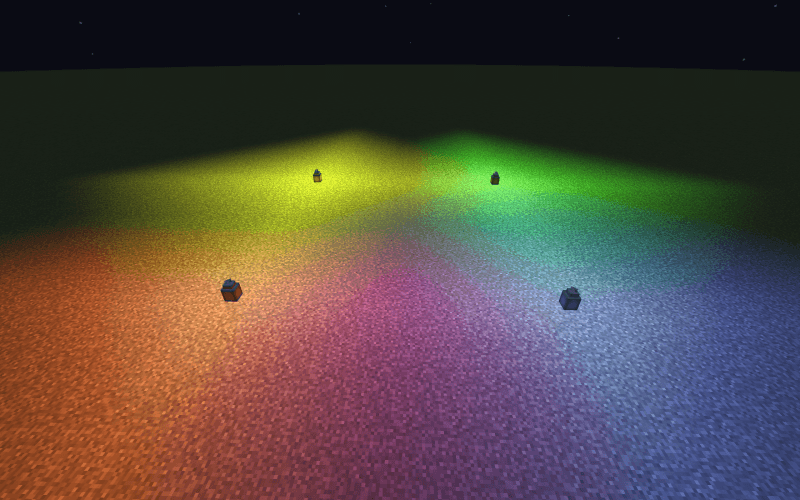
Complementary
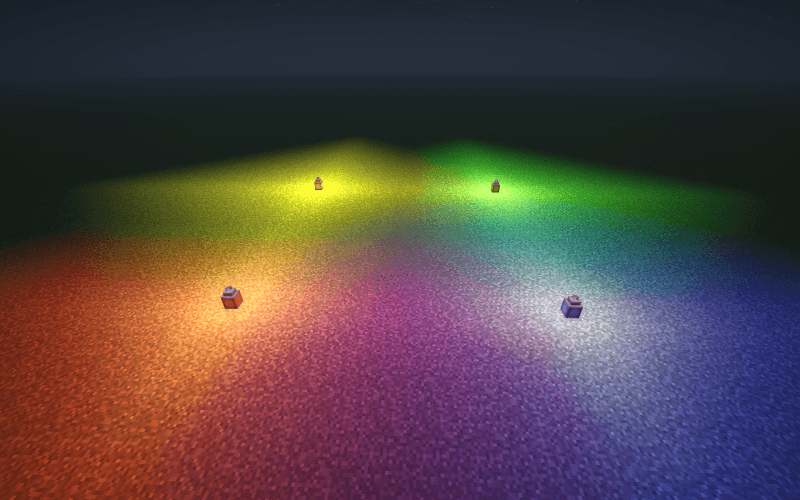
BSL

Photon
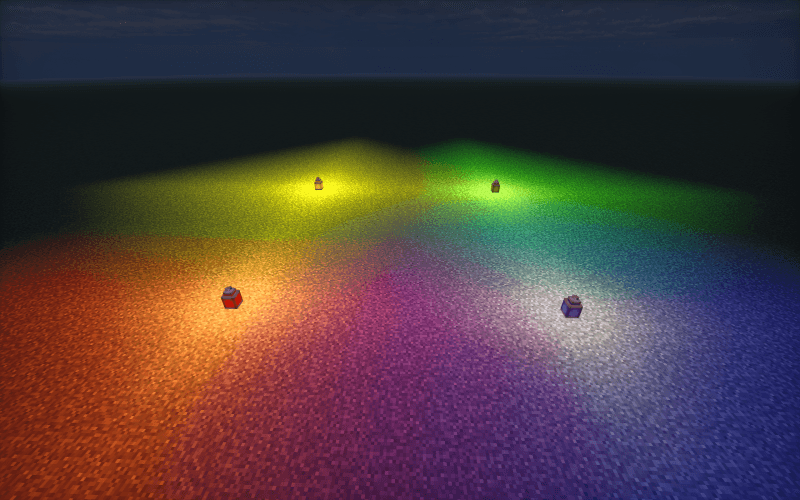
Mellow
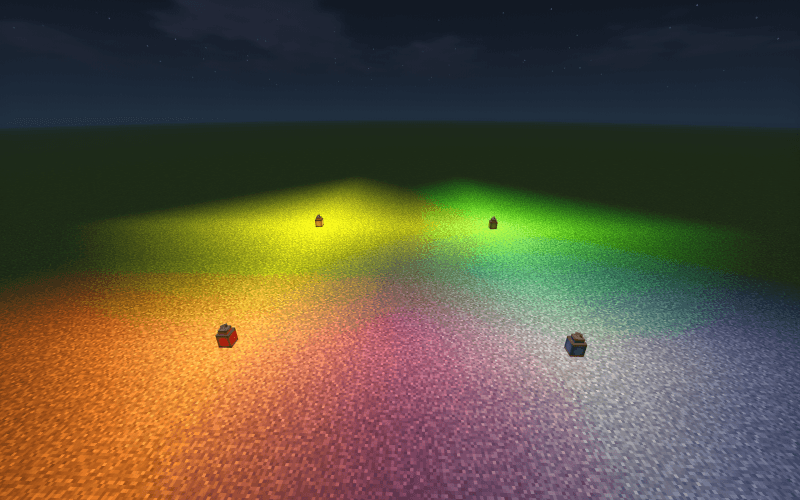
VulkanMod
For Developers
// Listen to ModificationEvent to register colored light for any block
@SubscribeEvent
public static void onLightModification(LightDataLoader.ModificationEvent event) {
    event.getDataByBlock().put(
        MyBlocks.GLOWING_CRYSTAL,
        List.of(new LightDataLoader.OpalData(new OpalColor(0.2f, 0.8f, 1.0f), Optional.empty()))
    );
}
Or drop a JSON file under assets/<modid>/opal_data/ for zero-code integration.
Compatibility
| Project | Status |
|---|---|
| Iris Shaders | Auto-compatible with most shader packs |
| VulkanMod | Fully supported |
| NeoForge 1.21.1 | Native platform |
| Other mods' light-emitting blocks | Compatible via API registration |
Project description from CurseForge.
Pick your setup
Opal Light by Minecraft version and loader
Choose the version and loader you play, then open the matching release.
Check the dependencies, then try the file in a copied instance before changing a world you care about.
Recent files
Opal Light versions and loaders
OpalLight-1.1.1
opallight-1.1.1.jar
18 Jul 2026
Client Source doesn’t say Server Source doesn’t say Dependencies No extras listed Listed on Release listing
Check the 1.21.1 · NeoForge setup 1.21.1NeoForge release
OpalLight-1.1.0
opallight-1.1.0.jar
15 Jul 2026
Client Source doesn’t say Server Source doesn’t say Dependencies No extras listed Listed on Release listing
Check the 1.21.1 · NeoForge setup 1.21.1NeoForge release
OpalLight-1.0.0
opallight-1.0.0.jar
13 Jul 2026
Client Source doesn’t say Server Source doesn’t say Dependencies No extras listed Listed on Release listing
Check the 1.21.1 · NeoForge setup 1.21.1NeoForge beta
Looking for an older file? The official CurseForge project page is in Resources.
 mod
mod CurseForge · Minecraft
touhou little maid: maid manager
An add-on for the Touhou Little Maid mod that introduces a handheld "Maid Management Tablet" and a "Work Block," allowing maids to be centrally managed, remotely summoned, dispatched in batches, and safely stored.
 mod
mod CurseForge · Minecraft
AnvilLib
AnvilLib is a NeoForge mod library developed by Anvil-Dev, providing Minecraft mod developers with a series of practical tools and frameworks.
 mod
mod CurseForge · Minecraft
Some-Useless-Things
A mod that provides universal tools, super alloy furnaces, and various QOL modifications.