Minecraft version
Back to mods 
CurseForge · Minecraft mod
MobHealth ReForged
Simple NeoForge plugin to let you know the damage you just caused to a mob, and how much health it has left.
Choose a version Pick your version below, then grab the matching file.
Quick answer
Which MobHealth ReForged release should I use?
Latest stable file MobHealth 2.5.3 / MC 26.3
Game version 26.3
Loader NeoForge
MobHealth ReForged MobHealth 2.5.3 / MC 26.3 targets 26.3 with NeoForge. The project page does not say whether this file belongs on the client, dedicated server, or both. No extra mods listed for this file.
Where it goes
Is MobHealth ReForged required on the client, server, or both?
The project page does not say whether this file belongs on the client, dedicated server, or both.
Client Source doesn’t say
Dedicated server Source doesn’t say
Loader for this release NeoForge
Required install it here Optional supported, not mandatory Not supported do not install here Source doesn’t say do not assume
The source does not explicitly classify this release as client-only or server-only.
What else does MobHealth ReForged MobHealth 2.5.3 / MC 26.3 need?
MobHealth 2.5.3 / MC 26.3. Change the file and its required mods may change too.
This file does not list any required mods. Do not add a library just because a different file uses it.
This file does not list any required or optional mods.
Before you install it
Add MobHealth ReForged without breaking your instance.
Built for MobHealth ReForged MobHealth 2.5.3 / MC 26.3. Pick another file and the loader, install side or required mods may change.
- 01
Stick to this file
Use MobHealth 2.5.3 / MC 26.3. It targets 26.3 with NeoForge; another release may have different loader, side or dependency requirements.
- 02
Bring the mods it needs
This file does not list any required mods. Do not add a library just because a different file uses it.
- 03
Put it on the correct side
The project page does not say whether this file belongs on the client, dedicated server, or both.
- 04
Pick the file you checked
Use the “Get this file” button beside MobHealth 2.5.3 / MC 26.3. It opens that exact file at the source.
About this project
What does MobHealth ReForged add?
MobHealth
This simple but invaluable mod lets you know the damage you just caused to a mob (including other players), and how much health it has left.
MobHealth is a modern NeoForge rewrite of the classic MobHealth Bukkit plugin — the same idea it had in 2011, rebuilt for Minecraft 1.21.11 with six display modes you can mix and match.
Hit a zombie, and MobHealth tells you exactly what you did to it:
Zombie [||||||||||] 14/20 (-6)
Or shows you a floating health bar above its head. Or a boss bar. Or a name-tag bar. Your call — every mode is independent, and you can enable as many as you like.
Display modes
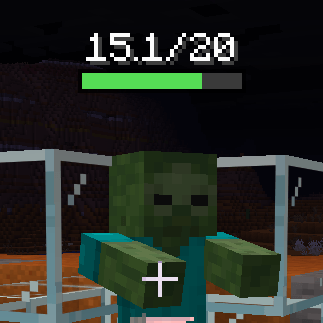 Graphical A floating bar above the mob |
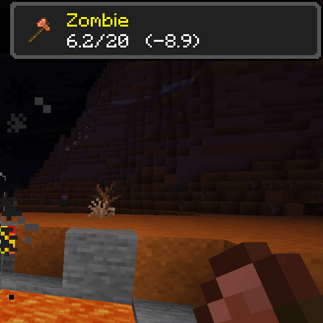 Toast Popup, with the weapon used |
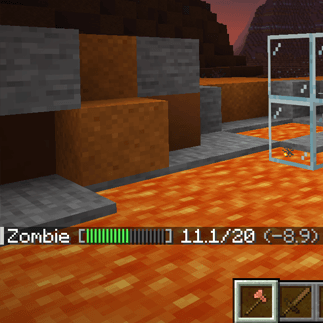 Chat Damage and health, in chat log |
|---|---|---|
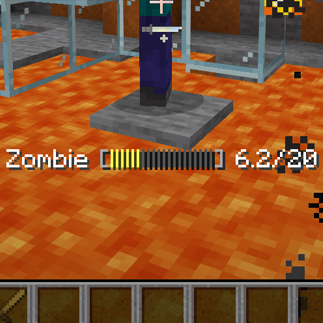 Action bar The readout above your hotbar |
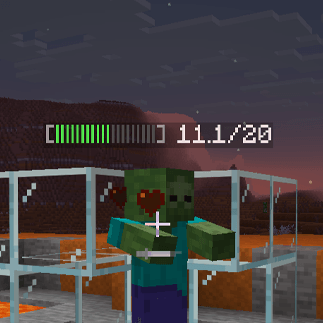 Nameplate Health bar on the mob's name tag |
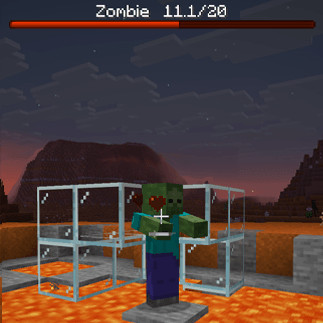 Boss bar Vanilla bar, top of the screen |
| Mode | What it looks like | Needs the mod on the client? |
|---|---|---|
| Chat | A message with damage dealt and health remaining | No |
| Action bar | The same readout on the line above your hotbar | No |
| Nameplate | A coloured health bar on the mob's name tag | No |
| Boss bar | The vanilla boss-bar widget at the top of the screen | No |
| Toast | An achievement-style popup showing the mob, the weapon used, and its health | Yes |
| Graphical | A crisp pixel health bar floating above the mob in the world | Yes |
Bars are coloured by remaining health — green, to yellow, to red.
The first four modes work on completely unmodified vanilla clients. Install MobHealth on your server and every player gets chat, action bar, nameplate and boss-bar health readouts without downloading anything. Players who also install the mod additionally get toasts and graphical bars.
MobHealth runs happily as a server-only, client-only, or both-sides install. Client-only on a vanilla server? You still get graphical bars over everything you can see.
Choose what gets a health bar
- Per-group toggles for hostile, neutral, passive, boss mobs and other players (PvP).
- Per-entity overrides that beat the group setting —
"minecraft:villager=false","somemod:custom_boss=true". Works with modded mobs. - Hide until damaged, so untouched mobs stay clean.
- Choose the audience: only the attacker, or everyone within a configurable radius.
- Per-group display timers — let boss bars linger, let chicken bars vanish.
Make the bars yours
Text bars (chat / action bar / nameplate) let you set the segment count, the filled and empty glyphs, and whether the numbers show as 14/20, 70%, or not at all.
Graphical bars have four styles — solid, rounded, segmented, tapered — plus width, height, scale, vertical offset, draw distance, optional line-of-sight checks, and optional scale-and-fade with distance so they feel anchored in the world rather than pasted on the screen.
Server-enforced graphical settings
Graphical bars are drawn by the client, but a server can enforce any of them. Each option resolves as server override if set, otherwise the client's own choice, so admins can force line-of-sight (no seeing mobs through walls), cap the draw distance, or lock a consistent look — while leaving everything else up to the player. On a vanilla server, nothing is enforced and the client keeps full control.
Commands
| Command | Who | Description |
|---|---|---|
/mobhealth toggle [on|off] |
Everyone | Turn your own displays on or off. Your choice persists across logouts and deaths. |
/mobhealth reload |
Ops (level 2+) | Re-push settings to online players. Config edits auto-apply on save, so this is rarely needed. |
Permissions
MobHealth uses NeoForge's permission system, so it works out of the box with vanilla operator levels — and if you run LuckPerms you can manage the nodes per-group with no extra setup.
| Node | Default | Controls |
|---|---|---|
mobhealth.see |
everyone | Whether a player receives displays at all. Deny it to hide MobHealth from a rank. |
/lp group guest permission set mobhealth.see false
Configuration
Two TOML files are generated on first run, and both are editable in-game via Esc → Mods → MobHealth → Config:
mobhealth-common.toml— server side: what is shown, to whom, and how.mobhealth-client.toml— client side: the appearance of your graphical bars.
Changes apply as soon as you save. The full config reference, plus ready-made recipes (vanilla-friendly server, MMO always-on bars, PvP fairness, classic chat-only, immersive graphical-only), is on the GitHub page linked below.
Requirements
- Minecraft 1.21.11
- NeoForge 21.11.42+
- Java 21
- No other dependencies.
About
MobHealth was originally a Bukkit plugin (2011–2016, ~1 million downloads) by Sablednah. This is a complete rewrite for NeoForge by the same author — none of the original code carries over, but the spirit does. Licensed MIT.
Bug reports, feature requests and source: https://github.com/Sablednah/MobHealth-NeoForge
Project description from CurseForge.
Pick your setup
MobHealth ReForged by Minecraft version and loader
Choose the version and loader you play, then open the matching release.
Minecraft version
26.2
1 loader buildMinecraft version
26.1.2
1 loader buildMinecraft version
1.21.11
1 loader buildCheck the dependencies, then try the file in a copied instance before changing a world you care about.
Recent files
MobHealth ReForged versions and loaders
MobHealth 2.5.3 / MC 26.3
mobhealth-2.5.3+mc26.3.jar
8 Oct 2026
Client Source doesn’t say Server Source doesn’t say Dependencies No extras listed Listed on Release listing
Check the 26.3 · NeoForge setup NeoForge26.3 release
MobHealth 2.5.3 / MC 26.2
mobhealth-2.5.3+mc26.2.jar
8 Oct 2026
Client Source doesn’t say Server Source doesn’t say Dependencies No extras listed Listed on Release listing
Check the 26.2 · NeoForge setup NeoForge26.2 release
MobHealth 2.5.3 / MC 26.1.2
mobhealth-2.5.3+mc26.1.2.jar
8 Oct 2026
Client Source doesn’t say Server Source doesn’t say Dependencies No extras listed Listed on Release listing
Check the 26.1.2 · NeoForge setup NeoForge26.1.2 release
MobHealth 2.5.3 / MC 1.21.11
mobhealth-2.5.3+mc1.21.11.jar
8 Oct 2026
Client Source doesn’t say Server Source doesn’t say Dependencies No extras listed Listed on Release listing
Check the 1.21.11 · NeoForge setup NeoForge1.21.11 release
MobHealth 2.5.2 / MC 26.3
mobhealth-2.5.2+mc26.3.jar
29 Sept 2026
Client Source doesn’t say Server Source doesn’t say Dependencies No extras listed Listed on Release listing
Check the 26.3 · NeoForge setup NeoForge26.3 release
MobHealth 2.5.2 / MC 26.2
mobhealth-2.5.2+mc26.2.jar
14 Sept 2026
Client Source doesn’t say Server Source doesn’t say Dependencies No extras listed Listed on Release listing
Check the 26.2 · NeoForge setup NeoForge26.2 release
MobHealth 2.5.2 / MC 26.1.2
mobhealth-2.5.2+mc26.1.2.jar
14 Sept 2026
Client Source doesn’t say Server Source doesn’t say Dependencies No extras listed Listed on Release listing
Check the 26.1.2 · NeoForge setup NeoForge26.1.2 release
MobHealth 2.5.2 / MC 1.21.11
mobhealth-2.5.2+mc1.21.11.jar
14 Sept 2026
Client Source doesn’t say Server Source doesn’t say Dependencies No extras listed Listed on Release listing
Check the 1.21.11 · NeoForge setup NeoForge1.21.11 release
MobHealth 2.5.1 / MC 26.2
mobhealth-2.5.1+mc26.2.jar
29 Aug 2026
Client Source doesn’t say Server Source doesn’t say Dependencies No extras listed Listed on Release listing
Check the 26.2 · NeoForge setup NeoForge26.2 release
MobHealth 2.5.1 / MC 26.1.2
mobhealth-2.5.1+mc26.1.2.jar
29 Aug 2026
Client Source doesn’t say Server Source doesn’t say Dependencies No extras listed Listed on Release listing
Check the 26.1.2 · NeoForge setup NeoForge26.1.2 release
MobHealth 2.5.1 / MC 1.21.11
mobhealth-2.5.1+mc1.21.11.jar
29 Aug 2026
Client Source doesn’t say Server Source doesn’t say Dependencies No extras listed Listed on Release listing
Check the 1.21.11 · NeoForge setup NeoForge1.21.11 release
MobHealth 2.5.0 / MC 26.2
mobhealth-2.5.0+mc26.2.jar
27 Aug 2026
Client Source doesn’t say Server Source doesn’t say Dependencies No extras listed Listed on Release listing
Check the 26.2 · NeoForge setup NeoForge26.2 release
Looking for an older file? The official CurseForge project page is in Resources.
 mod
mod CurseForge · Minecraft
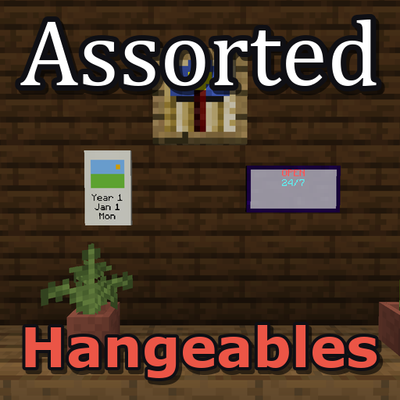
Assorted Hangeables
Adds neon signs, calendars, wall clocks, wallpaper and frames.
 mod
mod CurseForge · Minecraft
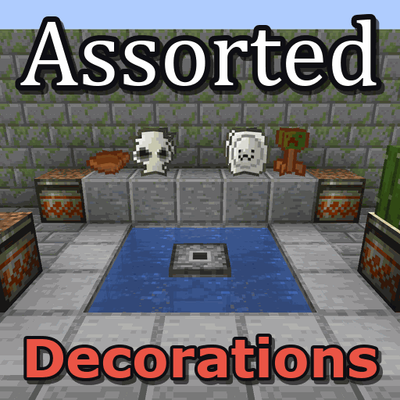
Assorted Decorations
Adds clay and bone decorations, the planter pot and a fountain.
 mod
mod CurseForge + Modrinth · Minecraft
Per Player Quests
Adds per-player and server-unique progression modes to FTB Quests.