Minecraft version
Back to mods 
CurseForge · Minecraft mod
Schematic Printer (Litematic, Schem & NBT)
Print .litematic, .schem, .nbt, and .schematic files with a catalog GUI, ghost preview, and /schematic commands.
Choose a version Pick your version below, then grab the matching file.
Quick answer
Which Schematic Printer (Litematic, Schem & NBT) release matches NeoForge?
Best match for your filters Schematic Printer 2.0.0 (NeoForge 1.21.1)
Game version 1.21.1
Loader NeoForge
Schematic Printer (Litematic, Schem & NBT) Schematic Printer 2.0.0 (NeoForge 1.21.1) targets 1.21.1 with NeoForge. The project page does not say whether this file belongs on the client, dedicated server, or both. No extra mods listed for this file.
Where it goes
Is Schematic Printer (Litematic, Schem & NBT) required on the client, server, or both?
The project page does not say whether this file belongs on the client, dedicated server, or both.
Client Source doesn’t say
Dedicated server Source doesn’t say
Loader for this release NeoForge
Required install it here Optional supported, not mandatory Not supported do not install here Source doesn’t say do not assume
The source does not explicitly classify this release as client-only or server-only.
What else does Schematic Printer (Litematic, Schem & NBT) Schematic Printer 2.0.0 (NeoForge 1.21.1) need?
Schematic Printer 2.0.0 (NeoForge 1.21.1) on NeoForge. Every mod below is checked against that same setup.
This file does not list any required mods. Do not add a library just because a different file uses it.
This file does not list any required or optional mods.
Before you install it
Add Schematic Printer (Litematic, Schem & NBT) without breaking your instance.
Built for Schematic Printer (Litematic, Schem & NBT) Schematic Printer 2.0.0 (NeoForge 1.21.1) on NeoForge. Pick another file and the loader, install side or required mods may change.
- 01
Stick to this file
Use Schematic Printer 2.0.0 (NeoForge 1.21.1). It targets 1.21.1 with NeoForge; another release may have different loader, side or dependency requirements.
- 02
Bring the mods it needs
This file does not list any required mods. Do not add a library just because a different file uses it.
- 03
Put it on the correct side
The project page does not say whether this file belongs on the client, dedicated server, or both.
- 04
Pick the file you checked
Use the “Get this file” button beside Schematic Printer 2.0.0 (NeoForge 1.21.1). It opens that exact file at the source.
About this project
What does Schematic Printer (Litematic, Schem & NBT) add?
Schematic Printer
Schematic Printer loads a file from your schematics folder and places its blocks in the world. It reads Litematica .litematic files, WorldEdit Sponge .schem files (v1, v2, and v3), vanilla structure .nbt files, and classic .schematic files.
You can run a print from the in-game catalog, or with /schematic commands. The catalog and the in-world ghost preview need the mod on your client. On a server that has the mod, vanilla clients can join and use every command.
Features
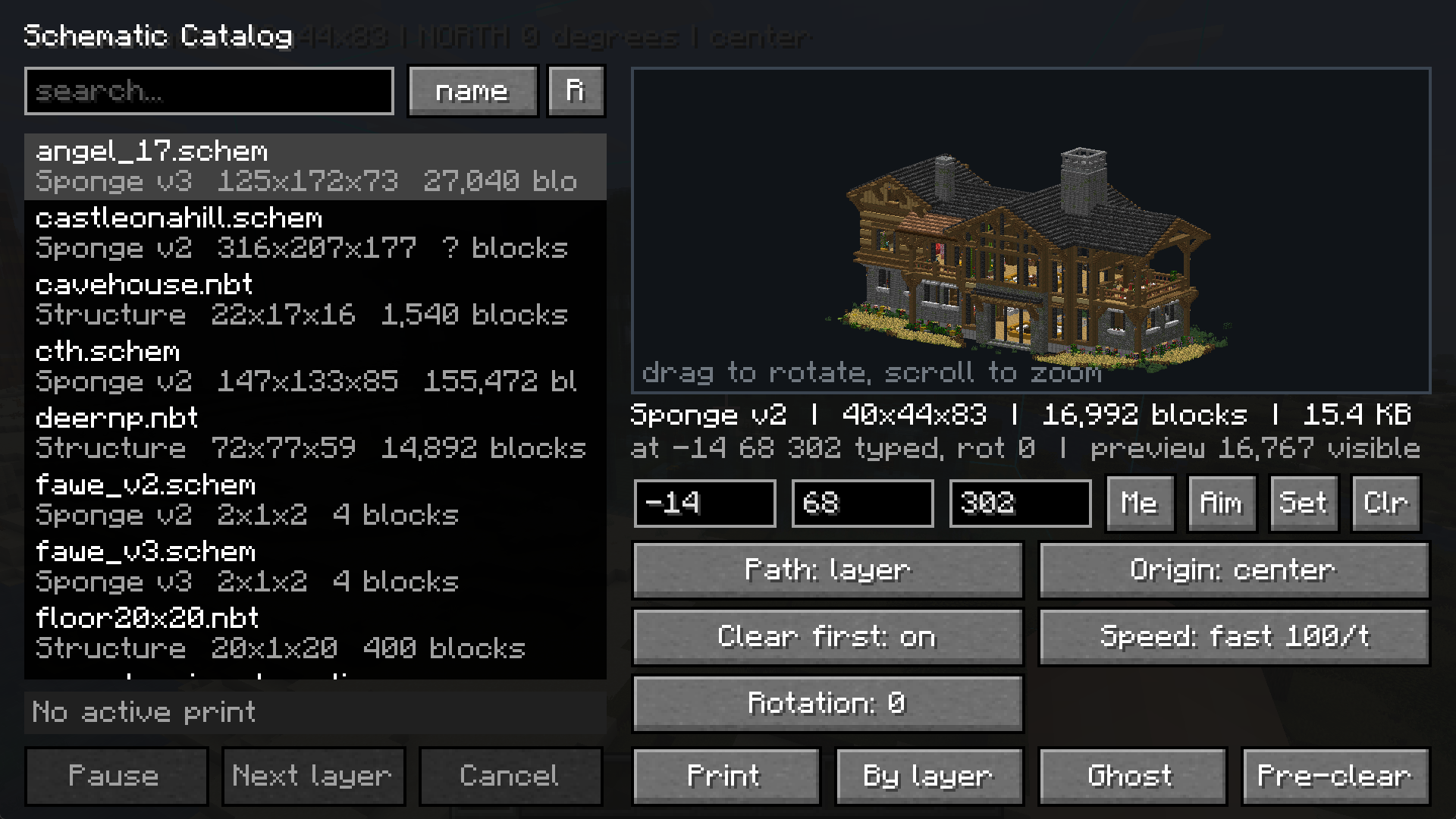
- An in-game catalog. Press K (this key is rebindable) or run
/schematic gui. Search the list, sort by name, size, block count, or format, and reload with R. Each row shows the format, dimensions, and block count. The right side is a 3D preview. Drag to rotate it, and scroll to zoom. Large previews build in the background and show "Building preview N%" while that runs. - Print controls in the same screen: X, Y, and Z fields, Me (where you stand), Aim (the block face you look at, up to 128 blocks), Set (save that location), and Clr. Cycle Path, Origin (corner or center), Clear first, Speed, and Rotation (facing, 0, 90, 180, or 270). Print, By layer, Ghost, and Pre-clear start the matching command. Pause, Resume, Next layer, and Cancel control a print that is already running.
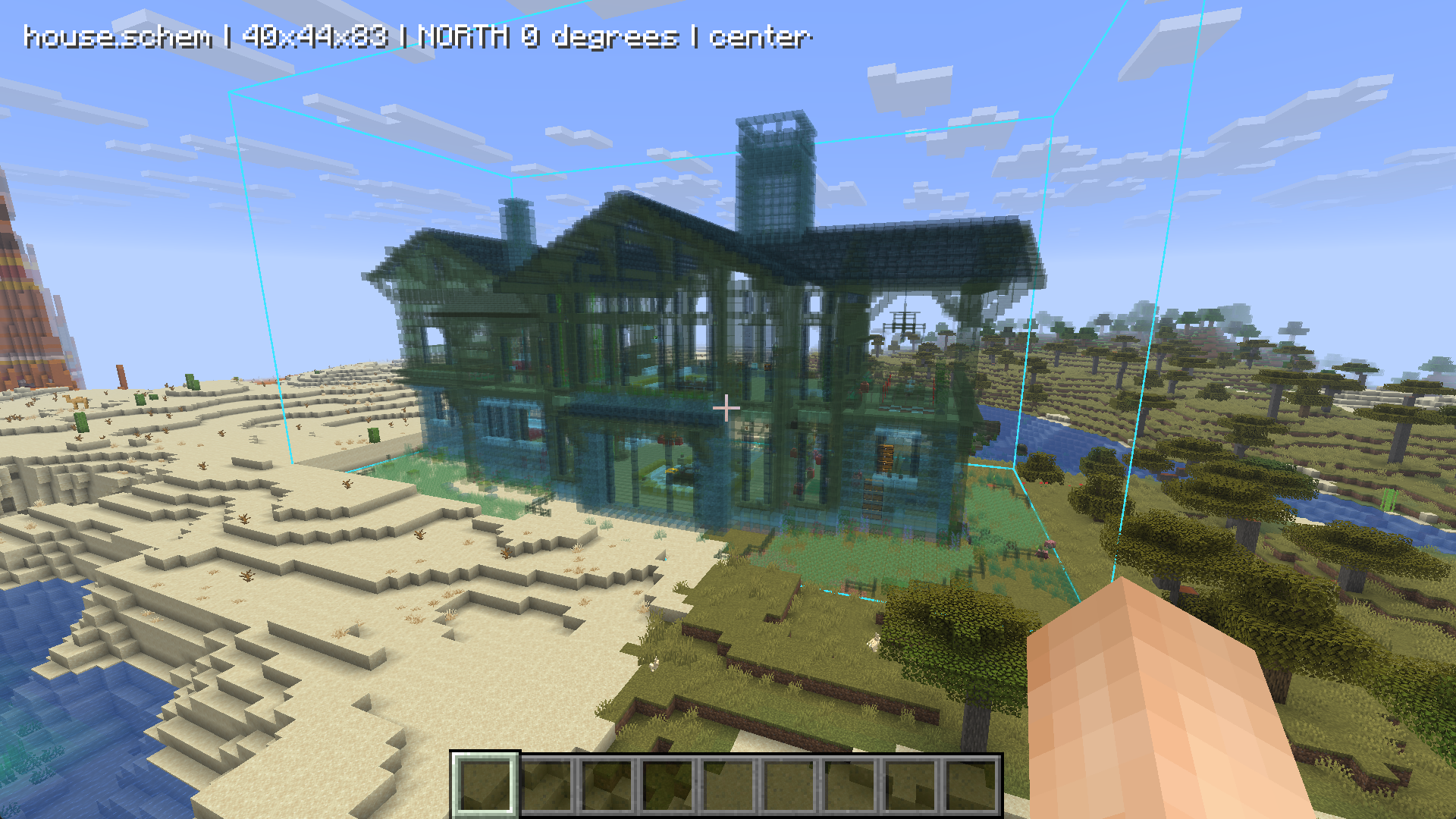
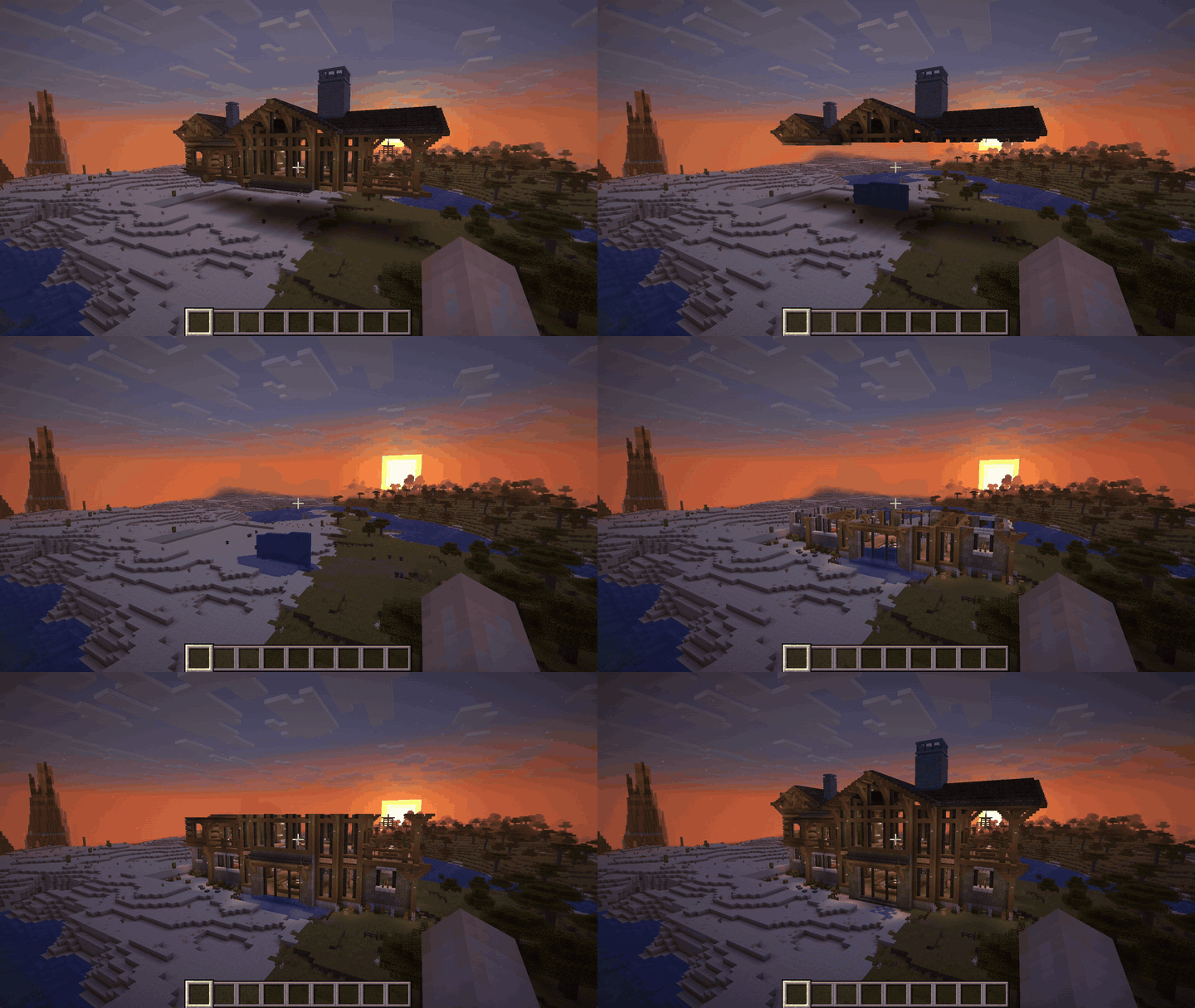
- An in-world ghost preview that places nothing. It draws translucent blocks, a bounds box, an origin marker, a facing guide, and a HUD line with the file name, size, facing, and origin mode. Schematics larger than
maxPreviewBlocks(default 20,000, hard cap 100,000) show the bounds and placement details only.
- Print paths:
layer(the default, bottom-up in row order),bottomup(the same order),topdown,centerout,snake,spiral,radial,growth(footprint first, then up; alsogroundgrowthorfootprint),sheets, andjitter(optional seed)./schematic path fluidslast onplaces water and lava after solid blocks./schematic path skipairis on by default. Turning it off is accepted, but the file readers still drop air when a schematic loads, so air gaps are not placed yet. - Optional survival printing.
/schematic survival onmakes your next print spend real items from your inventory and offhand, then shulker boxes you carry, then containers within range that expose an item inventory. Named, enchanted, or otherwise tagged stacks are never spent. - Large files are read and decoded off the server thread, with a volume cap and a file-size cap. You see a loading message in chat, and progress on the action bar.
/schematic canceland logging out stop a load. - Pre-clear a box, cylinder, hollow cylinder, sphere, pyramid, or the exact volume a schematic will fill.
- Speed profiles (slow, normal, fast, ultra, superultra), mid-print speed changes, pause and resume, and manual layer-by-layer or block-by-block modes.
- The same commands and config keys on Forge 1.20.1 and Fabric 26.3.
Editions
The mod has to be on the server. In singleplayer, the same jar is enough. The client install is optional. You only need it for the catalog and the ghost preview.
| Edition | Minecraft | Loader | Java | Current file | Notes |
|---|---|---|---|---|---|
| Forge 1.20.1 | 1.20.1 | Forge 47 or newer | 17 | 2.0.0 | Commands, catalog, and preview are in this jar. |
| Fabric 26.3 | 26.3, including 26.3 patches | Fabric Loader 0.20.1 or newer, plus Fabric API | 25 | 2.0.1 | Built and tested with Fabric API 0.165.0+26.3. 2.0.1 fixes catalog click and drag-to-rotate on 26.3. |
License: All Rights Reserved. Author: zVibes.
Installation
- Install the matching loader. For Fabric, also install Fabric API for 26.3.
- Put the Schematic Printer jar in the
modsfolder of the server or the game instance. - Start the game or server once. The mod creates
config/schematicprinter.tomland aschematicsfolder in the working directory of the server, or of the game instance in singleplayer. - Copy supported files into that
schematicsfolder. Only files directly in that folder are listed, not files in subfolders. The name you type can include the extension or omit it, unless two files share the same base name. - Run
/schematic list, or open the catalog, to confirm the files were found.
By default, requireCreativeMode is true. Creative-mode players can use the commands, and so can operators at permission level 2, in any game mode. Set requireCreativeMode to false if survival players who are not operators should be able to print.
Quick start
From the catalog
- Put a schematic in the
schematicsfolder. - Press K, or run
/schematic gui. If your client does not have the mod, the command tells you that, and every other/schematiccommand still works. - Click a file. Check the 3D preview, format, and size.
- Set the position with Me, Aim, or the coordinate boxes, then Set if you want to reuse it. Pick a rotation if you do not want to face the build yourself.
- Click Ghost to preview in the world without placing blocks.
- Click Print, or By layer if you want to advance one layer at a time with Next layer.
From commands
- Stand where the schematic should be placed, or save a location with
/schematic setlocation <x> <y> <z>. Coordinates can be absolute or relative, such as~ ~ ~. - Preview first:
/schematic print house.litematic simulate
- If the placement is correct, print it:
/schematic print house.litematic
If you have a saved location, that location is used. Otherwise the schematic is placed at your position. With no explicit rotation, it aligns to the direction you are facing. Rotation 0 is north, 90 is east, 180 is south, and 270 is west. The default origin is the schematic's minimum corner. /schematic origin center uses the center-bottom instead.
Command reference
All commands use the /schematic root. Run /schematic help in game for a compact list.
Find a file and set a location
| Command | Description |
|---|---|
/schematic list |
List supported files in the schematics folder. |
/schematic gui |
Open the catalog. Needs the mod on your client. |
/schematic setlocation <x> <y> <z> |
Save a default location for your future prints. |
/schematic getlocation |
Show your saved print location. |
/schematic clearlocation |
Remove your saved print location. |
/schematic origin center |
Use the schematic's center-bottom as its origin. |
/schematic origin corner |
Use the schematic's minimum corner as its origin. This is the default. |
| Command | Description |
|---|---|
/schematic print <name> |
Print continuously, using your speed for the next task, or the master speed if you have not set one. |
/schematic print <name> simulate |
Show a ghost preview. Places no blocks. |
/schematic print <name> simulate pos <x> <y> <z> |
Preview at an explicit origin. |
/schematic print <name> simulate rotation <degrees> |
Preview with an explicit rotation. |
/schematic print <name> simulate pos <x> <y> <z> rotation <degrees> |
Preview the exact position and rotation. |
/schematic print <name> slow |
Print using the slow speed profile. |
/schematic print <name> pos <x> <y> <z> |
Print at an explicit position. |
/schematic print <name> rotation <degrees> |
Rotate around the Y axis by 0, 90, 180, or 270 degrees. |
/schematic print <name> pos <x> <y> <z> rotation <degrees> |
Combine an explicit position and rotation. |
/schematic printlayer <name> |
Start manual layer-by-layer printing. Advance with /schematic nextlayer. |
/schematic printblock <name> |
Start manual block-by-block printing. Advance with /schematic nextblock. |
printlayer and printblock also accept simulate.
Print paths and options
These settings apply to your next print. They cannot be changed while your own print or clear is running. Each task snapshots its settings when it starts.
| Command | Description |
|---|---|
/schematic path layer |
Print each layer in row order, bottom-up. This is the default. |
/schematic path bottomup |
The same order as layer. bottom-up is an alias. |
/schematic path topdown |
The same row order, from the top down. top-down is an alias. |
/schematic path centerout |
Nearest-first from the build center. center-out is an alias. |
/schematic path snake |
Sweep back and forth across each layer. |
/schematic path spiral |
Print outward in square rings on each layer. |
/schematic path radial |
Print outward from the center of each layer. |
/schematic path growth |
Place each column's lowest block first, then grow up. groundgrowth and footprint are aliases. |
/schematic path sheets |
Complete each horizontal sheet, sweeping along Z and advancing in X. |
/schematic path jitter |
Seeded random order. /schematic path jitter seed <number> sets the seed. |
/schematic path skipair <on|off> |
Skip schematic air. On by default. off does not place air yet. |
/schematic path fluidslast <on|off> |
Place water and lava after all solid blocks. Off by default. |
/schematic cleararea <true|false> |
Enable or disable clearing before future prints. |
/schematic survival <on|off> |
Pay for your next print with items. Off by default. |
/schematic speed <blocks> |
With no active print, set your speed for the next print or clear, capped by the master speed. With an active print, retune that print, capped by maxBlocksPerTick. |
/schematic speed <slow|normal|fast|ultra|superultra> |
Same, using a configured profile. |
/schematic masterspeed <blocksPerTick> |
Change the master speed used as the default and the ceiling for new prints. |
From the server console, /schematic speed still sets the master speed, and is rejected while any print or clear is active.
Control an active print
| Command | Description |
|---|---|
/schematic pause |
Pause the current print. |
/schematic resume |
Resume a paused print, or retry a survival print that is waiting for items. |
/schematic cancel |
Cancel the current print, or a load that is still in progress. |
/schematic nextlayer |
Print the next layer. |
/schematic nextblock |
Place the next block. |
/schematic speed acceleration <true|false> |
Enable or disable acceleration on the active print. |
/schematic materials |
List the items the rest of your active print still needs, against what you have on hand. |
Only one print can be active per player. A running automatic print keeps going if you log out, and finishes on its own. A paused print, a printlayer or printblock print, or a load still in progress is canceled when you disconnect.
Clear an area
A print must not already be active. Dimensions are limited by the config and the command argument ranges.
| Command | Description |
|---|---|
/schematic cleararea box <width> <height> <length> |
Clear a rectangular box around you. |
/schematic cleararea cylinder <height> <radius> |
Clear a solid cylinder. |
/schematic cleararea hollowcylinder <height> <radius> |
Clear a hollow cylinder. |
/schematic cleararea sphere <radius> |
Clear a sphere. |
/schematic cleararea pyramid <basesize> <height> |
Clear a pyramid. |
/schematic cleararea schematic <name> pos <x> <y> <z> rotation <degrees> |
Clear the full transformed volume of a schematic, including positions that are air in the file, and save that position as your print location. |
/schematic cleararea cancel |
Cancel an active clear. |
Config and help
| Command | Description |
|---|---|
/schematic config or /schematic config list |
Operators only (permission level 2). List every config key, its value, default, and range. |
/schematic config get <key> |
Show one key. The key can be the full path, such as general.maxBlocksPerTick, or just the name. |
/schematic config set <key> <value> |
Check the range, apply the value immediately, and save it to schematicprinter.toml. |
/schematic help |
Show a compact command list. |
Creative players who are not operators cannot use /schematic config.
Configuration
Both editions store the common settings at:
config/schematicprinter.toml
The keys and defaults are the same on Forge 1.20.1 and Fabric 26.3.
| Section | Setting | Default | Purpose |
|---|---|---|---|
| top level | masterBlocksPerTick |
1500 | Default speed for new print and clear tasks, and the ceiling for a player's next-task speed. Range 1 to 3000. |
general |
maxBlocksPerTick |
1500 | Maximum speed allowed by /schematic speed on an active print. Range 1 to 10000. |
general |
requireCreativeMode |
true | Restrict use to creative players and operators at permission level 2. |
general |
max_schematic_size_blocks |
5000000 | Maximum schematic volume, including air. Range 1000 to 50000000. maxSchematicSizeBlocks is a legacy alias for the same cap. |
general |
max_schematic_file_mb |
64 | Largest schematic file, compressed, in MB, that the server will load. Uncompressed NBT may be up to 32 times this. Range 1 to 1024. |
general |
restrictedBlocks |
bedrock, end and nether portals, command blocks, structure blocks, and jigsaws | Blocks the printer will not place. |
speedControl |
speedProfileSlow |
1 | Slow profile, blocks per tick. |
speedControl |
speedProfileNormal |
20 | Normal profile. |
speedControl |
speedProfileFast |
100 | Fast profile. |
speedControl |
speedProfileUltra |
500 | Ultra profile. |
speedControl |
speedProfileSuperUltra |
1500 | Super ultra profile. |
speedControl |
enableAdaptiveSpeed |
false | Adjust the speed of a running print based on measured throughput. |
speedControl |
enableAcceleration |
false | Start slowly and accelerate toward the target speed. |
speedControl |
accelerationRate |
5 | Blocks per tick added at each acceleration step. |
survival |
requireMaterials |
false | If true, prints by non-creative players consume real items. Pair with requireCreativeMode set to false on a survival server. |
survival |
containerRadius |
8 | Radius in blocks around the player to pull items from containers. 0 disables containers. Range 0 to 32. |
placement |
enablePreviewMode |
true | Allow ghost previews. |
placement |
maxPreviewBlocks |
20000 | Maximum ghost blocks sent to a client preview before falling back to bounds only. Range 0 to 100000. The catalog 3D preview uses the same cap. |
placement |
clearAreaDefault |
false | Clear the area by default for new prints. |
advanced |
debugMode |
false | Log each finished print and clearing layer to the server log. |
These keys are in the file but are not read yet: defaultLayerMode (prints start in auto mode; use /schematic printlayer for layer-by-layer), enableSimulationMode (simulate follows enablePreviewMode), enablePrecisePlacement (pos and rotation always work), autoBackupArea (no backup is made), and showProgressBar (progress is reported in chat after each layer, and on the action bar while a file loads).
Edit the file while the game is stopped, or use /schematic config as an operator. Make a backup before you raise speed or size limits on a server.
Survival printing
Survival spending is off by default. With nothing changed, prints behave as they did when the printer was creative-only.
/schematic survival on makes your next print pay for each block with items. It spends from your inventory and offhand first, then from shulker boxes you are carrying, then from nearby containers within containerRadius (chests, barrels, placed shulkers, hoppers, and any other storage that exposes an item inventory). Named, enchanted, or otherwise tagged stacks are never spent. The second half of a door or bed is not charged. A double slab costs two slabs.
If you run out, the print pauses and lists the top missing items. It retries every 2 seconds and continues once the items are there. /schematic resume retries immediately. /schematic materials lists what the rest of the print still needs.
A server can require this for every survival print with survival.requireMaterials. Survival players who are not operators also need general.requireCreativeMode set to false, or they cannot run /schematic at all.
Troubleshooting
- No schematics found: confirm the file is directly in the instance or server
schematicsfolder, and that it uses a supported extension. - File not found: use the name shown by
/schematic list. Include the extension if two files share the same base name. - Command rejected: check creative mode and operator permissions, then review
requireCreativeMode. - Catalog will not open: the client needs the mod. You can still print with commands.
- Ghost preview does not appear: the viewing client needs the mod. The server still prints for vanilla clients. If the schematic is larger than
maxPreviewBlocks, you will see bounds only. - Print is too slow, or the server struggles: lower the active speed with
/schematic speed, or reducemasterBlocksPerTick, the speed profiles, andmaxBlocksPerTick. - A print will not start: only one print can be active per player. Cancel or finish it first. A second print is also refused while a file is still loading for you.
- Logging out during a print: a running automatic print keeps going and finishes. A paused print, or one started with
printlayerorprintblock, is canceled. A load still in progress is stopped. - Blocks are missing: check
restrictedBlocks. Bedrock, portals, command blocks, structure blocks, and jigsaws are blocked by default. Unknown block ids in a file are skipped instead of aborting the print. - Survival print pauses: add the listed items to your inventory, a shulker you carry, or a container within range, then wait or run
/schematic resume.
Known limits
/schematic path skipair offdoes not place air yet, because the file readers drop air when they load a schematic.- Chest contents, sign text, and other block-entity data are applied for vanilla structure
.nbtfiles. They are not applied for.schematic,.litematic, or.schemfiles. - Very large prints can still hitch when they load new chunks.
- Only files directly in the
schematicsfolder are listed. Subfolders are ignored.
Project description from CurseForge.
Pick your setup
Schematic Printer (Litematic, Schem & NBT) by Minecraft version and loader
Choose the version and loader you play, then open the matching release.
Minecraft version
1.21.1
2 loader buildsMinecraft version
1.20.1
1 loader buildCheck the dependencies, then try the file in a copied instance before changing a world you care about.
Recent files
Schematic Printer (Litematic, Schem & NBT) versions and loaders
Schematic Printer 2.0.0 (NeoForge 1.21.1)
schematicprinter-neoforge-1.21.1-2.0.0-neoforge-1.21.1.jar
20 Nov 2026
Client Source doesn’t say Server Source doesn’t say Dependencies No extras listed Listed on Release listing
Check the 1.21.1 · NeoForge setup 1.21.1NeoForge release
Looking for an older file? The official CurseForge project page is in Resources.
 mod
CurseForge · Minecraft
Phoenix Excavate
A simple and easy to use VeinMiner mod with powerful config and ingame settings.
 mod
CurseForge + Modrinth · Minecraft
ShapeGen
Additional shapes for any block, including modded ones
 mod
CurseForge · Minecraft
Solaris (Map)
A map mod focused on ease of use, api strength, and beautiful aspects of your world.