Minecraft version
Back to mods 
CurseForge · Minecraft mod
WoodDye ReForged
No mod does wood more good! Stain your wood with dyes, bleach it with bone meal, and fireproof it with magma cream.
Choose a version Pick your version below, then grab the matching file.
Quick answer
Which WoodDye ReForged release should I use?
Latest stable file WoodDye ReForged 3.0.1 / MC 26.3
Game version 26.3
Loader NeoForge
WoodDye ReForged 3.0.1 / MC 26.3 targets 26.3 with NeoForge. The project page does not say whether this file belongs on the client, dedicated server, or both. No extra mods listed for this file.
Where it goes
Is WoodDye ReForged required on the client, server, or both?
The project page does not say whether this file belongs on the client, dedicated server, or both.
Client Source doesn’t say
Dedicated server Source doesn’t say
Loader for this release NeoForge
Required install it here Optional supported, not mandatory Not supported do not install here Source doesn’t say do not assume
The source does not explicitly classify this release as client-only or server-only.
What else does WoodDye ReForged 3.0.1 / MC 26.3 need?
WoodDye ReForged 3.0.1 / MC 26.3. Change the file and its required mods may change too.
This file does not list any required mods. Do not add a library just because a different file uses it.
This file does not list any required or optional mods.
Before you install it
Add WoodDye ReForged without breaking your instance.
Built for WoodDye ReForged 3.0.1 / MC 26.3. Pick another file and the loader, install side or required mods may change.
- 01
Stick to this file
Use WoodDye ReForged 3.0.1 / MC 26.3. It targets 26.3 with NeoForge; another release may have different loader, side or dependency requirements.
- 02
Bring the mods it needs
This file does not list any required mods. Do not add a library just because a different file uses it.
- 03
Put it on the correct side
The project page does not say whether this file belongs on the client, dedicated server, or both.
- 04
Pick the file you checked
Use the “Get this file” button beside WoodDye ReForged 3.0.1 / MC 26.3. It opens that exact file at the source.
About this project
What does WoodDye ReForged add?
 WoodDye
WoodDye ReForged
No mod does wood more good!
Ever built half a house in oak and wished it were spruce? Ever watched a lightning strike take the whole thing with it?
WoodDye ReForged lets you stain any wood any shade — right there in the wall, no rebuilding — and make it immune to fire forever. Any wood: vanilla's, and every mod's.
🎨 Dye wood where it stands
Hold a dye. Right-click a plank. Done.
- Black or brown dye — one step darker
- White or light gray dye, or bone meal — one step lighter
No breaking blocks. No re-placing. No hauling stacks back to a crafting table. Walk along a wall and recolour it as you go.
Everything wooden works — planks, slabs, stairs, logs, stripped logs, wood, stripped wood, fences, fence gates, doors, trapdoors, pressure plates, buttons, signs and shelves.
Blocks you'd normally use — doors, gates, buttons, signs, shelves — dye on sneak + right-click, so an ordinary click still just opens the door. Your builds keep working while you redecorate.
🌳 Every wood — even ones it has never seen
WoodDye doesn't keep a list of woods. It finds them through the standard block tags, so Biomes O' Plenty, Alex's Caves, Cataclysm and any other mod that tags its wood properly are picked up with no setup — switch on moddedWoods and they join the chain.
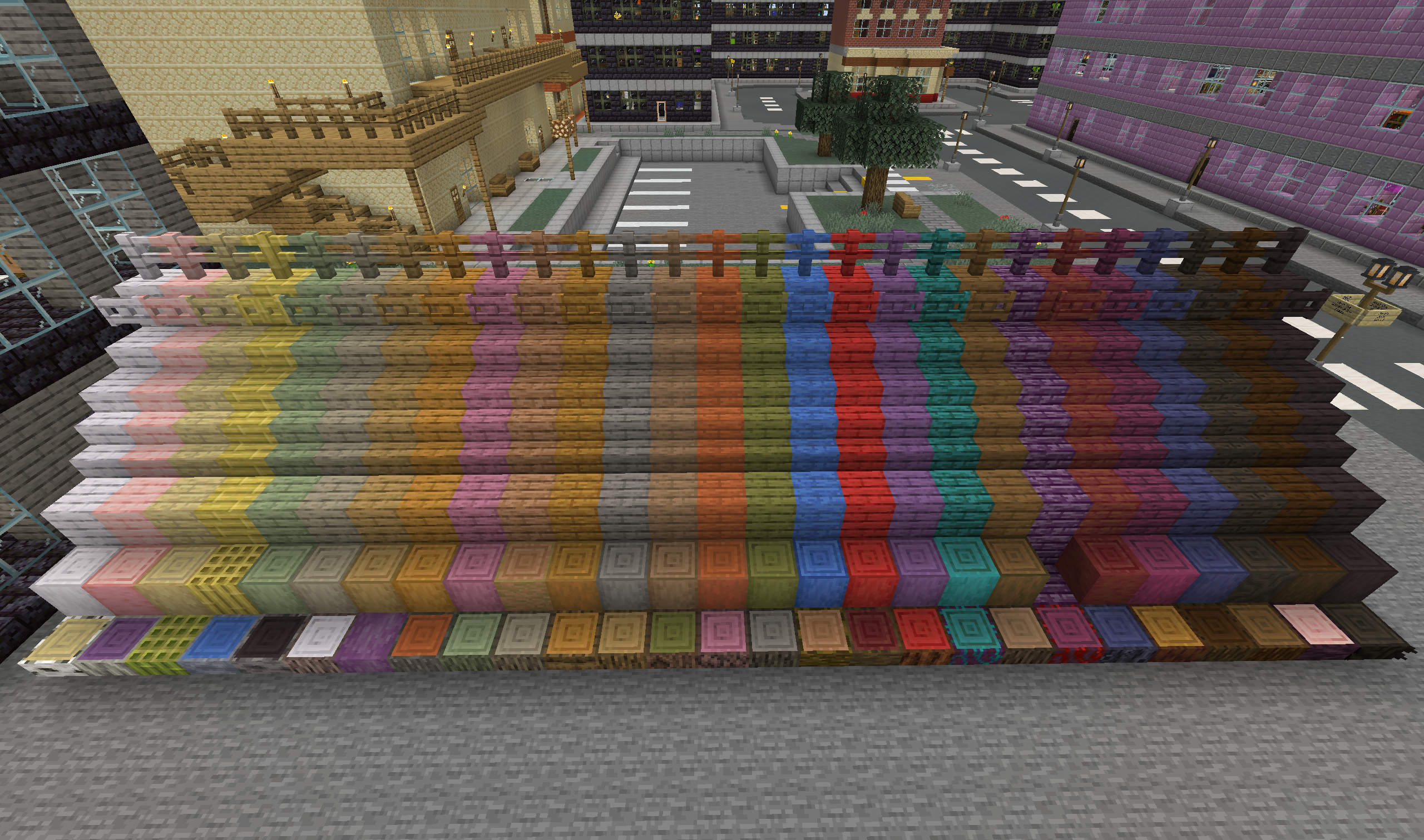
And the order isn't written down by anyone either: WoodDye measures it. Each wood's texture is averaged to a single colour, and the woods are sorted on it — vanilla's at build time, a mod's straight from its own jar when the server starts. A wood nobody has heard of lands exactly where its colour says it should.
- Light to dark (default) — the classic shading chain
- Rainbow — around the colour wheel, for packs full of blue, red and teal woods
Run /wooddye showcase to build every wood in the game in a flight of steps and see the order for yourself.
🔥 Fireproof anything
Right-click a wooden block with Magma Cream and it becomes fireproof — permanently. It will not burn, will not catch, and lava won't light it. Build in a nether hub. Build next to your lava feature.
New in 3.0: fireproofing is a property of the block where it stands, not a separate block — so it works on every wood, a mod's included, and it stays with the block:
- 🔨 Break it and it drops as "Oak Planks (Fireproof)"; place that and it's fireproof again
- 🪚 Craft fireproof wood and the result is fireproof — any ordinary crafting-table recipe, vanilla's or a mod's
- 🧱 Pistons push and pull it, sticky ones included
- ⚙️ Create contraptions carry it — mechanical pistons, bearings, chassis
- 🪓 An axe strips it and it stays fireproof
Hold Magma Cream or a Wet Sponge and every fireproof block nearby shows a small flame, just for you. With Jade, looking at one says Fireproof.
Got a stack to treat rather than a wall? Ring eight of any wood around one magma cream on the bench and all eight come out fireproof.
Changed your mind? A Wet Sponge soaks the magma cream back out — one block in world, or eight on the bench. The sponge isn't used up: it comes back ready for the next batch. (Prefer it stricter? One config flip hands back a dry sponge you must re-soak.)
🪵 It knows how logs work
A log's bark and its end-grain rings are different colours — so they sort differently. The default Intelligent mode reads the face you clicked: hit the side and it follows the bark order; hit the end and it follows the rings.
📖 JEI knows it all
With JEI installed, every fireproof wood has its own entry, and a "WoodDye: in world" tab shows every right-click: which block, what to hold, what it becomes, and whether to sneak.
✨ Details that matter
- 🚪 Doors recolour as a whole — both halves, in one click
- 📝 Signs keep their text
- 📚 Shelves only dye while empty, so nothing you're storing can be lost
- 💨 Every treatment gives a particle, a sound, and a configurable action-bar message
- ⬆️ Upgrading from 2.x? Old fireproof blocks convert to fireproofed wood the first time their chunk loads, and old fireproof items convert in your inventory — nothing to do
⚙️ Made for servers
- Live config — edit and save, no restart. Or use
/wooddye reload - Choose which woods take part: modded woods, nether woods, or leave out a mod or a single wood
- Disagree with a measured colour? Override it in config
- Permission node
wooddye.candyegates who may dye, for LuckPerms and friends - Turn fireproofing off and it's off everywhere — restoring always still works
- Make treatments consume their dye or magma cream, if you want it rarer
Minecraft 1.20.1 (Forge) · 1.21.1 · 1.21.11 · 26.1 · 26.2 · 26.3 (NeoForge) · no dependencies · MIT licensed
Optional: Create, Jade, JEI.
A modern rewrite of the classic WoodDye Bukkit plugin, rebuilt from the ground up.
Source, issues and full documentation on GitHub.
Project description from CurseForge.
Pick your setup
WoodDye ReForged by Minecraft version and loader
Choose the version and loader you play, then open the matching release.
Minecraft version
26.2
1 loader buildMinecraft version
26.1.2
1 loader buildMinecraft version
1.21.11
1 loader buildMinecraft version
1.21.1
1 loader buildMinecraft version
1.20.1
1 loader buildCheck the dependencies, then try the file in a copied instance before changing a world you care about.
Recent files
WoodDye ReForged versions and loaders
WoodDye ReForged 3.0.1 / MC 26.3
wooddye-3.0.1+mc26.3.jar
4 Oct 2026
Client Source doesn’t say Server Source doesn’t say Dependencies No extras listed Listed on Release listing
Check the 26.3 · NeoForge setup NeoForge26.3 release
WoodDye ReForged 3.0.1 / MC 26.2
wooddye-3.0.1+mc26.2.jar
4 Oct 2026
Client Source doesn’t say Server Source doesn’t say Dependencies No extras listed Listed on Release listing
Check the 26.2 · NeoForge setup NeoForge26.2 release
WoodDye ReForged 3.0.1 / MC 26.1.2
wooddye-3.0.1+mc26.1.2.jar
4 Oct 2026
Client Source doesn’t say Server Source doesn’t say Dependencies No extras listed Listed on Release listing
Check the 26.1.2 · NeoForge setup NeoForge26.1.2 release
WoodDye ReForged 3.0.1 / MC 1.21.11
wooddye-3.0.1+mc1.21.11.jar
4 Oct 2026
Client Source doesn’t say Server Source doesn’t say Dependencies No extras listed Listed on Release listing
Check the 1.21.11 · NeoForge setup NeoForge1.21.11 release
WoodDye ReForged 3.0.1 / MC 1.21.1
wooddye-3.0.1+mc1.21.1.jar
4 Oct 2026
Client Source doesn’t say Server Source doesn’t say Dependencies No extras listed Listed on Release listing
Check the 1.21.1 · NeoForge setup 1.21.1NeoForge release
WoodDye ReForged 3.0.1 / MC 1.20.1
wooddye-3.0.1+mc1.20.1.jar
4 Oct 2026
Client Source doesn’t say Server Source doesn’t say Dependencies No extras listed Listed on Release listing
Check the 1.20.1 · Forge setup 1.20.1Forge release
WoodDye ReForged 3.0.0 / MC 1.21.11
wooddye-3.0.0+mc1.21.11.jar
3 Oct 2026
Client Source doesn’t say Server Source doesn’t say Dependencies No extras listed Listed on Release listing
Check the 1.21.11 · NeoForge setup NeoForge1.21.11 release
WoodDye ReForged 3.0.0 / MC 1.21.1
wooddye-3.0.0+mc1.21.1.jar
3 Oct 2026
Client Source doesn’t say Server Source doesn’t say Dependencies No extras listed Listed on Release listing
Check the 1.21.1 · NeoForge setup 1.21.1NeoForge release
WoodDye ReForged 3.0.0 / MC 1.20.1
wooddye-3.0.0+mc1.20.1.jar
3 Oct 2026
Client Source doesn’t say Server Source doesn’t say Dependencies No extras listed Listed on Release listing
Check the 1.20.1 · Forge setup 1.20.1Forge release
wooddye-2.0.0.jar
16 Jul 2026
Client Source doesn’t say Server Source doesn’t say Dependencies No extras listed Listed on Release listing
Check the 1.21.11 · NeoForge setup NeoForge1.21.11 release
Looking for an older file? The official CurseForge project page is in Resources.
 mod
mod CurseForge + Modrinth · Minecraft
Particle Rain
replaces the default weather with particle effects
 mod
mod CurseForge · Minecraft
TPS Checker
A lightweight Forge mod that adds a /tps command to check server performance, with a config option to allow all players or restrict it to admins.
 mod
mod CurseForge · Minecraft
Tensura EP Scaling
Allows Items to evolve based on EP